Chapter 4 Operation
- 36 -
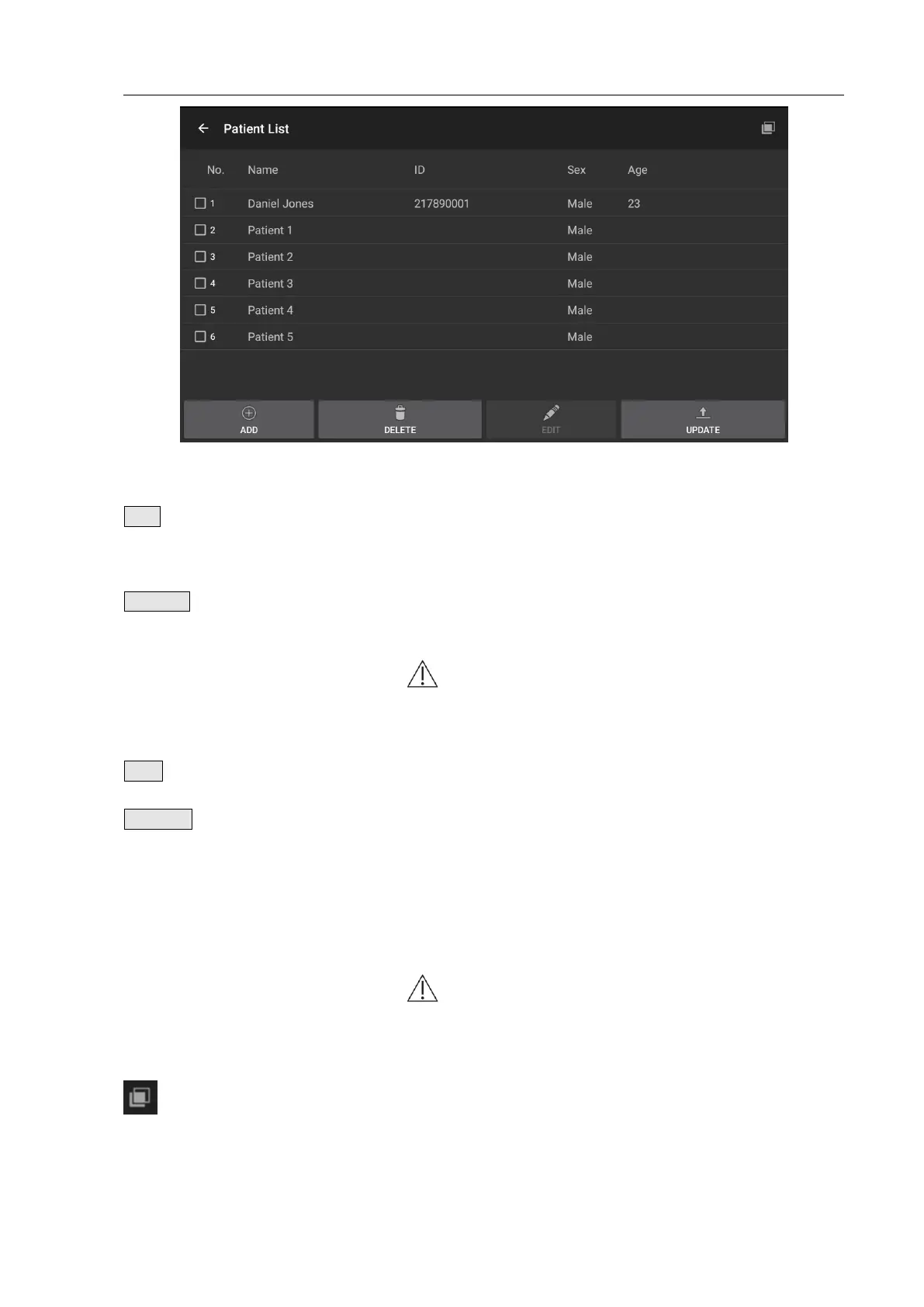
Fig. 4.33 Patient List
Click the key to pop up a dialogue box and prompt to enter
the patient’s ID, name, age and sex, to add a new patient to
the patient list.
Select the patient to be deleted and click the key to delete
the patient in the patient list.
Note: Please be careful with deletion to prevent
misoperation. The patient list can’t be restored once
deleted.
Click this key to edit patient’s information.
Click the key to update the selected and ticked patient to the
Main Unit. The patient list is written to the Main Unit only
when update is successful with a prompt of “OK” on the
screen; if update failed with a prompt of “ERROR”, you need
to try again. A maximum of 20 patient’s cases can be
updated.
Note: When updating the case list, it will clear the
measurement data saved in the Main Unit, and be
careful with the operation.
Select All key/
DeSelect All key
Click the key to select or not select the 20 patients in front of
the list.


 To Next Page