MediaTek Proprietary and Confidential. © 2022 MediaTek Inc. All rights reserved. Unauthorized reproduction or disclosure of this document, in whole or in part, is strictly prohibited.
Genio 1200 Evaluation Kit User Guide
2.10 How to Switch Boot from eMMC to UFS
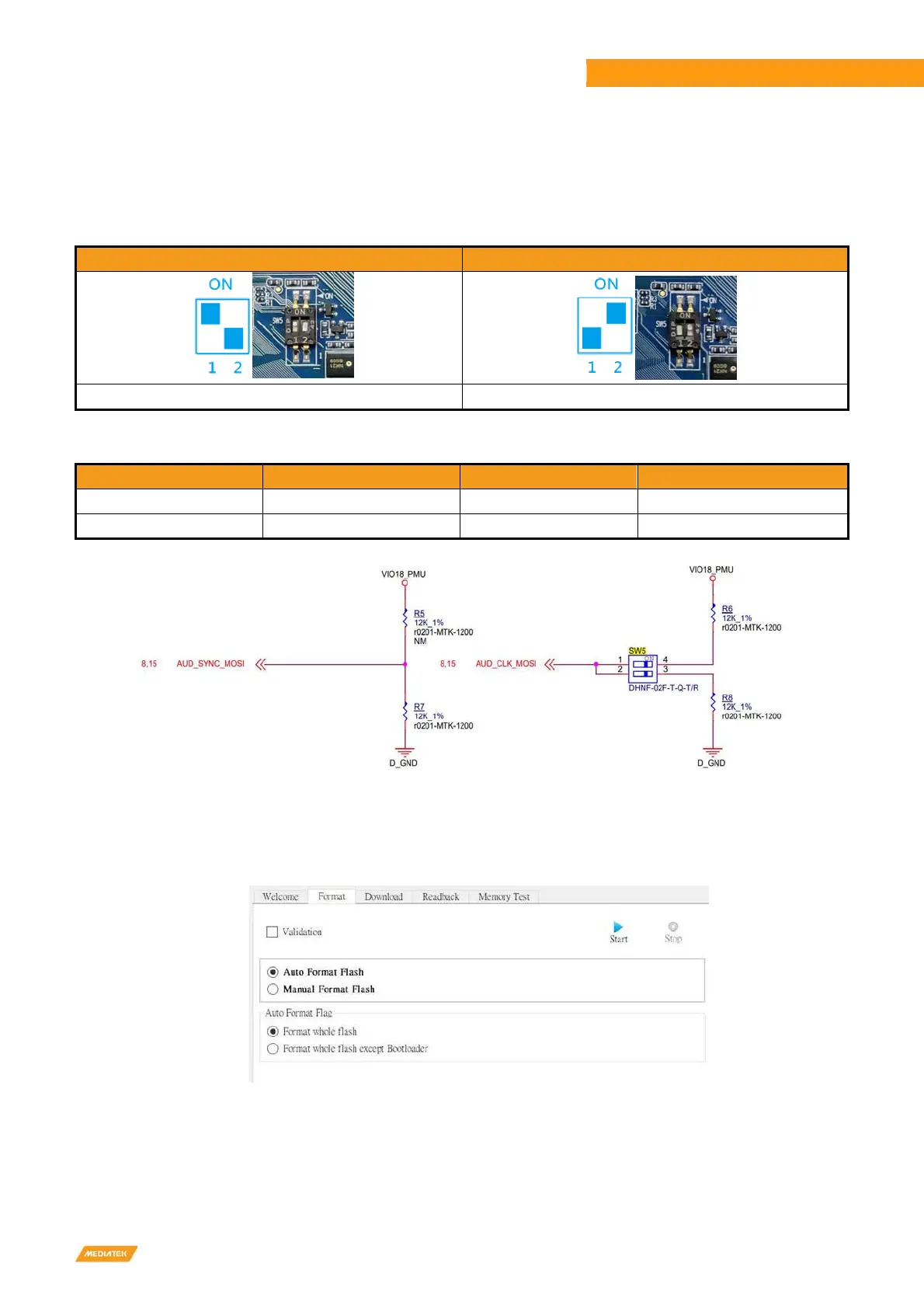
You can choose to boot from eMMC or boot from UFS by switching the state of SW5.
Table 2-3 Boot Initiation (SW5)
Boot from eMMC Boot from UFS
1: ON, 2: OFF (Default) 1: OFF, 2: ON
Table 2-4 SW5 Pin Status
AUD_SYNC_MOSI AUD_CLK_MOSE Storage Booting SW5
L H (by external PU) Only eMMC boot 1: ON, 2: OFF (Default)
L L Only UFS boot 1: OFF, 2: ON
Figure 2-9 Boot on Strapping Path
1
. Power off the EVK, then switch DIP (SW5) to eMMC boot: Run "SP Flash Tool", on <Format> tab, press <Start> button
to format eMMC. Then plug the USB Type-C cable to EVK. It will format eMMC partition automatically.
Figure 2-10 Flash Tool Format Screen



 To Next Page