2 6
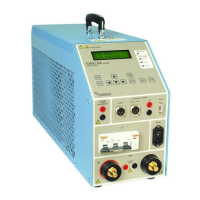
T O R K E L 8 2 0 / 8 4 0 / 8 6 0
P r o g r a m m a E l e c t r i c A B
Z P - B S 0 6 E R 1 0 1
10
Auto-limits
Activating auto-
limits
Press <ESC> repeatedly until you see the “MAIN
MENU”.
Select ”Auto-limits” using the vertical arrow keys
and press <ENTER>.
Warning Vmin
No 1.85V/cell
Use the vertical arrow keys (
or
) to activate
the auto-limits function (”Yes”) so that it will issue
voltage warnings.
Set the voltage value/cell value.
Press <ENTER>.
Stop Vmin
No
1.80 V/cell
Use the vertical arrow keys (
or
) to activate
the auto-limits function so that it will provide
voltage stops.
Set the voltage value/cell value.
Press <ENTER>.
Using the same procedure as that set forth above, you
can set TORKEL to:
Issue a warning when, say, 50 % of the test
period (time) has elapsed.
Stop discharging when, say, 100% of the test
period (time) has elapsed.
Issue a warning when, say, 50% of the rated
capacity is discharged.
Stop discharging when, say, 100% of rated
capacity is discharged
When you start the test, TORKEL will ask you to enter
the number of cells, the length of the test period
(time) and the rated capacity.
1]
2]
3]
4]
5]
6]
7]
8]
•
•
•
•
Invoking the auto-
limits function
The auto-limits function automatically calculates and
sets the limit values. Here, you must specify the volt-
age per cell at which you want a warning to be issued
and the voltage per cell at which you want TORKEL to
stop discharging the battery.
When you start the test, TORKEL asks you to enter
number of cells and then sets the limits automatically.
This function can also be used to simplify the task of
setting capacity and time limits.


 To Next Page