18
MELBOURNE INSTRUMENTS – NINA V 1.3.0
19
MELBOURNE INSTRUMENTS – NINA V 1.3.0
Store to A/B
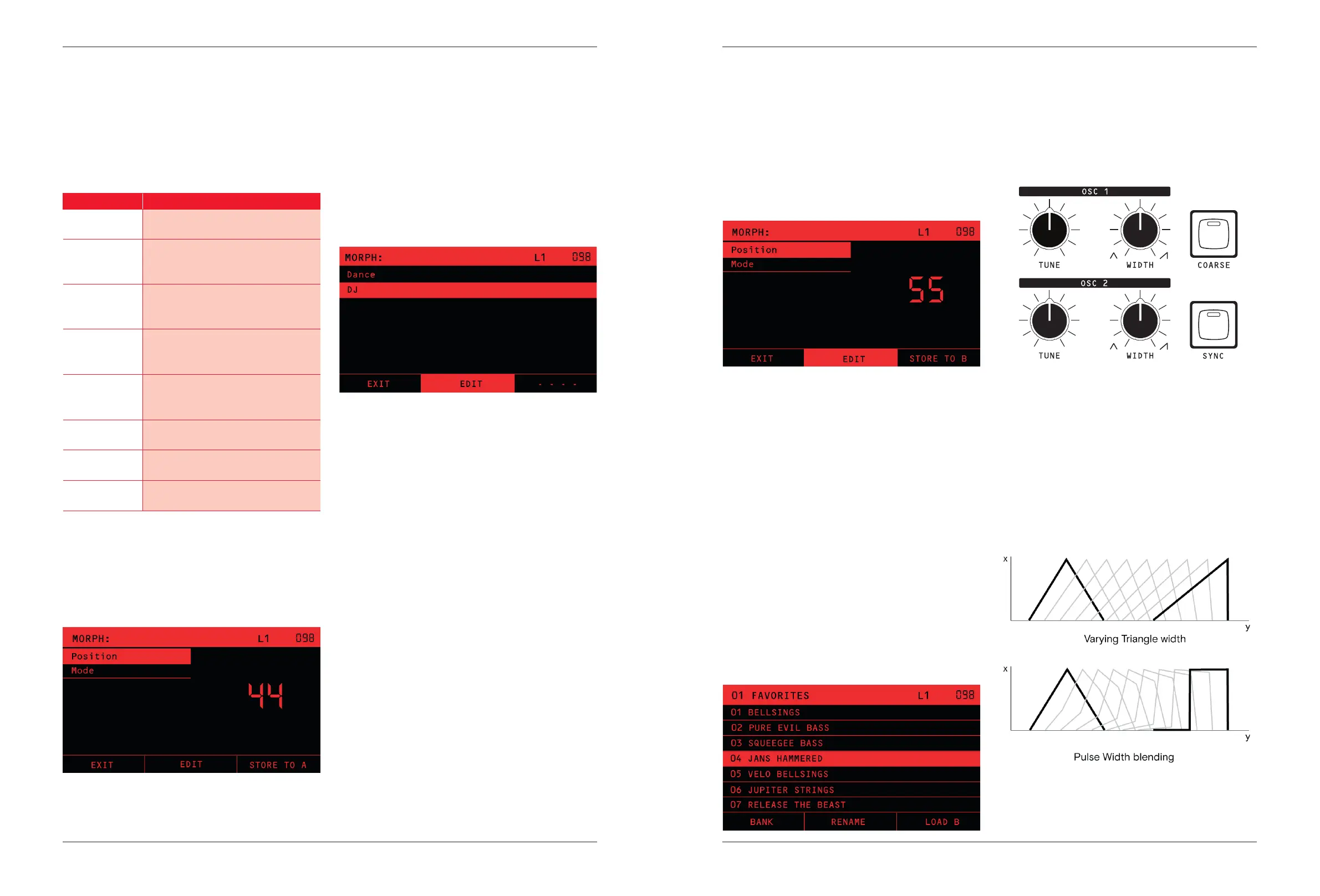
At any point you can save the morphed sound to the A
or B Patch by pressing the STORE TO A or STORE TO B
soft-key (determined by A/B key).
TIP: Always take notice of the state of the A/B Key
before you start to Morph, because that is where you
will be able to save it.
Below: STORE TO B soft-key shown because A/B is on.
Load a Preset into B
A great way to explore new sounds is to load two
completely dierent sounding Presets into the A and B
sounds, and morph between them.
You can load a Preset into the B sound using the A/B
Key in combination with LOAD. To be specic: you can
load the “A” sound from another Preset into the current
Patch B sound.
A normal Preset LOAD, as described in the section on
Loading Presets on page 14, is one where the A/B Key is
on A (LED o). In a normal load, the full Preset with both
A and B sounds will be loaded.
However, if the A/B Key is on B (LED on) when you load,
then the Preset you selected will just load into the B
sound. The A sound and the rest of the current Patch will
remain unchanged.
When the A/B Key is on B, the soft-key for loading
changes to LOAD B.
Patch Design
Analog VCOs
Nina has two Analog VCOs, OSC1 and OSC2.
These are discrete-transistor VCOs which generate a
Sawtooth/Triangle shape and a Pulse Shape.
The control of Nina’s sawtooth to triangle wave shape
has a unique feature —
Most existing synthesizers do a crossfade between
triangle and sawtooth when you adjust the shape control.
Nina’s oscillators do a smooth shape transition between
triangle and saw, which follows the pulse width. This is
creates a unique set of timbres between the two shapes.
The following diagram shows a picture of how the Width
Knob changes the shape of the Saw/Triangle and Pulse
waveforms:
TIP: Modulate the Width with an LFO to create
interesting phaser-like bass sounds.
The morph is not a crossfade between the 2 sounds,
it is a creating entirely new timbres between them. The
morphed sound is made by smoothly interpolating
every parameter between the settings in the 2 patches,
including the entire Modulation Matrix.
Some settings cannot be morphed in the same way,
so work a bit dierently.
Setting Morph Operation
OSC 3 Crossfades between the sound of
OSC3 on A and B
COARSE Tune Steps between the octaves on A
and B in even steps divided over the
Morph Range
SUB Oscillator
Enable
Steps between the A sound and B
sound setting at the 50% Morph
position
SYNC Enable Steps between the A sound and B
sound setting at the 50% Morph
position
NOISE Type Steps between the A sound and B
sound setting at the 50% Morph
position
OVERDRIVE Setting is always the same on A and
B. Does not morph.
EFFECTs Setting is always the same on A and
B. Does not morph.
TEMPO, ARP,
SEQUENCER
Setting is always the same on A and
B. Does not morph.
Operating the Morph control will bring up the Morph
menu on the LCD.
Below: STORE TO A soft-key shown because A/B is
o. The Mode setting allows you to select Dance or DJ
mode.
Dance Mode
In Dance mode, the knobs will all move to show their
positions in the Morph, and you can edit that morphed
sound as you go.
As you morph between the two, you can also move any
of the front panel knobs to lock in that parameter. For
example, if you are morphed ¼ of the way from A to B,
and you adjust the Resonance Knob, then when you
move the morph knob again, the Resonance Knob will
not move anymore.
DJ Mode
In DJ mode, the Morph knob will morph between the
sounds, and you will hear the morphed sound, but the
knobs will not move. The controls will either be editing
the A or B sound, depending on the A/B Key.
TIP: DJ Mode works well if you are automating the
Morph control from a DAW and want to use the patch
editing knobs at the same time.
In Dance mode, you edit the Morphed sound if you
adjust with the knobs, but in DJ mode you edit the
original A and B sounds when you adjust the knobs.


 To Next Page