34
MELBOURNE INSTRUMENTS – NINA V 1.3.0
35
MELBOURNE INSTRUMENTS – NINA V 1.3.0
The total number of voices across the layers must be 12
or less. If you cannot increase the number of voices on
a layer, then you may need to go to another layer and
reduce the number of voices allocated to that layer. A
layer assigned 0 voices is turned o.
TIP: The ONE LAYER default layer setup has 12 voices
assigned to Layer 1. To enable more layers, you must
rst reduce this so you can allocate voices to other
layers.
Output Routing
This sets which of Nina’s four analog outputs to send the
layer to. Note that the voices are always stereo.
Assignment Routing
1
Route the Left signal from all the voices
to Analog output 1.
2
Route the Right signal from all the voices
to Analog output 2.
3
Route the Left signal from all the voices
to Analog output 3.
4
Route the Right signal from all the voices
to Analog output 4.
1-2
Route the stereo signal from all the
voices to Analog outputs 1 & 2
3-4
Route the stereo signal from all the
voices to Analog outputs 3 & 4
1-2-3-4
Route the stereo signal from all the
voices to Analog outputs 1 & 2 and 3 & 4
Low Note / High Note
These two settings are used to create keyboard splits.
Notes in the range of Low Note to High Note (inclusive)
will play on the layer, and all other notes ignored.
TIP: If you play a key on an attached keyboard while or
after you press EDIT, then the note number will be set
to that key.
MIDI Channel
This setting chooses which MIDI channel the layer will
respond to, from 1 to 16. The extra setting of 0 (omni) will
make the layer respond to MIDI on all channels.
MPE
Nina supports MIDI Polyphonic Expression (MPE) to
allow the performer to vary the pitch and timbre of notes
individually while playing. Nina supports 3 dimensions
of control, as dened by the MPE specication. These
dimensions are (1) per-note Pitch Bend, (2) per-note
Channel Aftertouch, and (3) per-note control using MIDI
CC #74. An external MPE controller is required to use
MPE on Nina.
MPE works across the normal 16 MIDI channels. You can
choose how many MIDI channels you want to use for
MPE, and the other channels will operate as standard
normal MIDI.
MPE denes two zones, Upper and Lower. The Lower
zone has a channel on channel 1, and the Upper Zone
has the Master Channel on 16.
MPE on Nina works in conjunction with Multi-timbral
operation. Each layer can either be an MPE instrument
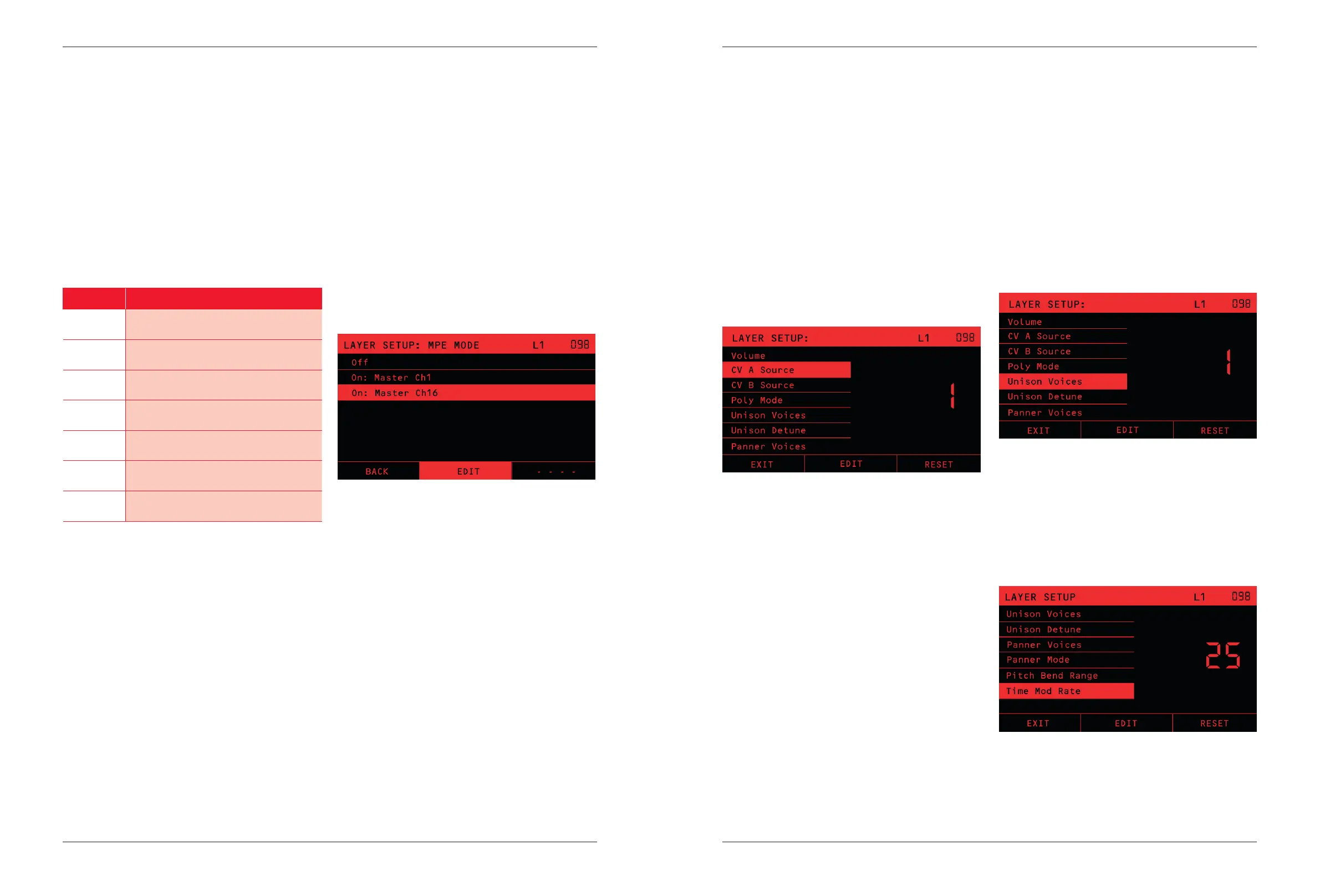
or a normal instrument. To turn on MPE mode, from the
LAYER menu set MPE mode to “Master Ch 1” or “Master
Ch 16”. Then set the MPE Num Channels to the number
of MIDI channels you want to assign to the MPE layer.
NOTE! Nina and the attached MPE controller must
have the same settings of master channel and number
of channels.
For typical operation, you should set the Layer Voices to the
same as the MPE Num Channels. If you have a sound with
Unison Voices greater than 1, then you should assign more
voices, to allow Unison to play notes without voice stealing.
In MPE mode, the modulation matrix source labelled EXP
is taken from MIDI CC #74, instead of the MIDI Expression
Control.
NOTE: Nina’s ‘MPE System’ Settings which relate to
the way dierent MPE controllers work are set in the
System->Global Settings menu. The MPE polyphonic
pitch bench range, and the ‘MPE UZ PB Range’ sets
the upper zone.
MPE CC polarity is selectable between Bipolar or
Unipolar. This setting depends on the attached MPE
controller. For typical operation, the Linnstrument, Erae
Touch and Seaboard should be set to Bipolar and the
Osmose to Unipolar.
Volume
This setting sets the overall volume of the layer between
0 (silence) and 100 (full volume). Use this to adjust the
mix of sounds that are going to the same analog outputs.
CV A and CV B Source
Chooses which of the 4 analog inputs are used for the
CVA and CVB Mod Matrix sources. For details on how to
adjust the control voltage gains and osets, see Global
Settings on page 37.
Patch/Preset Global Settings
The following settings in the layer menu are actually part of
the Preset on that layer, and are saved and loaded with the
Preset, even though they are accessed from the LAYER key.
Poly Mode
Mono mode is monophonic, only 1 voice is used. The EG1
and EG2 envelopes play the full ADSR with every new
note played.
Legato sets Monophonic legato mode, where the
envelope does not retrigger when you play legato style.
If you release one note before pressing down the next,
the envelope generator will restart from Attack. If you
start playing a new note before you release the last
one, then the envelope generator will not restart, it will
just continue with the same envelope shape, and the
oscillator will change pitch to the new note.
Poly mode is polyphonic. Notes are played up to the
maximum number of voices.
NOTE: Voice stealing: If the maximum number of
voices is allocated and a new note is played, then the
oldest played note that is in its Release phase is taken.
If no notes are in the release phase, then the oldest
played note is taken.
Unison Voices and Unison Detune
Unison Voices sets how many voices are played for each
note. Because Nina is an analog instrument, each voice
naturally has a slightly dierent character. Using unison
to overlay multiple voices playing the same note gives
a power and texture to the sound. Unison Detune adds
to this dierence in character by detuning the voices as
they play together.
TIP: When you have a lot of voices playing in Unison,
applying a small amount detune (eg 4) usually gives a
nicer sound than having detune at 0.
Panner Voices and Panner Mode
These two settings congure the Panner. For a detailed
description of how the Panner operates, see The Panner
on page 25.
Pitch Bend Range
This sets how far an external Pitch Bend MIDI controller
aects the pitch, in semitones.
Time Mod Rate
This sets the speed of the Time modulation source.
See the section on Modulation Sources on page 25
for details.


 To Next Page