38
MELBOURNE INSTRUMENTS – NINA V 1.3.0
39
MELBOURNE INSTRUMENTS – NINA V 1.3.0
Loading and Saving Layer Setups
Up to 127 LAYER Setups can be stored on Nina. When
the Layer menu is active and the LAYER Key LED if on,
press LOAD or SAVE to load or save layer setups.
Load Layer Setups
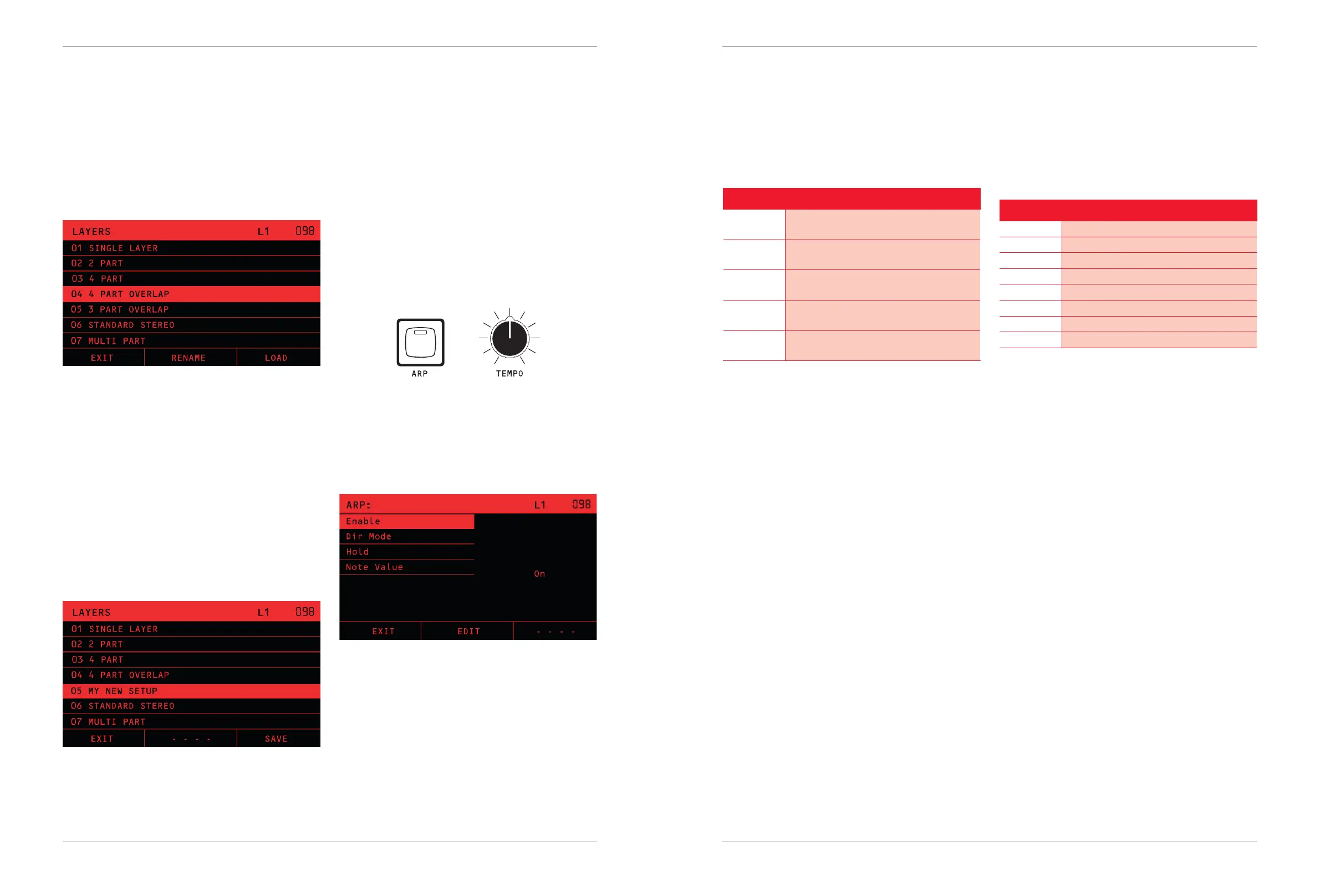
If you press LOAD, the display shows a list of all saved
layer setups:
NOTE that there is a default layer setup called “ONE
LAYER”. This setup is for single timbre operation, with
12 voices assigned to layer 1 and layers 2, 3 and 4 all
turned o (0 voices assigned).
Save Layer Setups
To save the current/new LAYER Setup, choose a position
on the list where you want to save and press the SAVE
soft-key. The display will go to the rename page, which
will allow you to set the name that you wish to save. The
renaming works in the same way as for saving Presets,
see Saving Presets on page 15. Press the ENTER
soft-key to save the layer setup or the BACK soft-key if
you change your mind.
Arpeggiator
Nina has a simple Arpeggiator. If you play multiple notes,
the Arpeggiator will play those notes in an repeating
sequence, according to its settings and the rate control
TEMPO Knob.
The settings for the Arpeggiator are saved with the
Presets. When you load or save a Preset, the Arpeggiator
settings will be loaded or saved with it.
NOTE that for Multi-Timbral setups, the Arpeggiator is
tied to the Preset on Layer 1 only. See the section on
Layer Setups & Multi-timbral on page 31.
Basic Operation
+
The ARP Key is used to turn the Arpeggiator on and o,
and to access the Arpeggiator settings.
A short press of the Arp Key will turn the Arpeggiator ON
or OFF, and display the settings. A long press (more than
½ second) of the ARP Key will bring up the Arpeggiator
settings without changing whether it is on or o.
\\
The arpeggiator receives notes from a keyboard, and
plays them out in a repeating sequence. The MIDI
channel assigned in Layer 1 in the LAYERS Menu is the
channel used. All notes received on this MIDI channel
will be Arpeggiated and sent to the same channel. If
the channel is 0 (omni), then the notes received on
any channel will be arpeggiated, and sent to the same
channel that they came in on. For details of the MIDI
channel assignments in a Multi-Timbral setup see the
section Arpeggiator with Multi-Timbral on page 30.
The Arpeggiator settings are described below:
Dir Mode
Sets the direction of notes played out. For example, if the
Temp is 60 BPM, and the setting is “1/4”, the Arpeggiator
will play one note per second. The “T” settings have
triplet timing.
Assignment Routing
Up
Notes are played from the lowest to the
highest, then restarting from the lowest.
Down
Notes are played from the highest to the
lowest, then restarting from the highest.
Up-down
Notes are played from the lowest to the
highest, then back down to the lowest.
Random
Notes are played in a random order. They
are shued each time they repeat.
Assigned
Notes are played in the order they were
played on the keyboard.
Hold
With Hold on, the arpeggiator will continue to play after
you release the notes, until you turn the arpeggiator o.
With hold o, the arpeggiator will play out while you hold
notes down, and will stop when you release the notes.
Note Value
Multiplies the TEMPO BPM to play the Arpeggiator. The
meaning of Beats per Minute follows the MIDI convention
that a Beat is a quarter-note.
For example, if the Tempo is 60 BPM, and the setting is
1/4, the Arpeggiator will play one note per second.
The T settings have triplet timing.
Setting Multiplier
1/4 1 note per Beat
1/8 2 notes per Beat
1/16 4 notes per Beat
1/32 8 notes per Beat
1/4T 1.5 notes per Beat (Triplet)
1/8T 3 notes per Beat (Triplet)
1/16T 6 notes per Beat (Triplet)
1/32T 12 notes per Beat (Triplet)
External Sync
You can lock the arpeggiator and sequencer to an
external MIDI clock source, such as a DAW, to keep it in
time with other instruments. External sync operation is
set in the System Menu, see page 39.


 To Next Page