42
MELBOURNE INSTRUMENTS – NINA V 1.3.0
43
MELBOURNE INSTRUMENTS – NINA V 1.3.0
Chorus
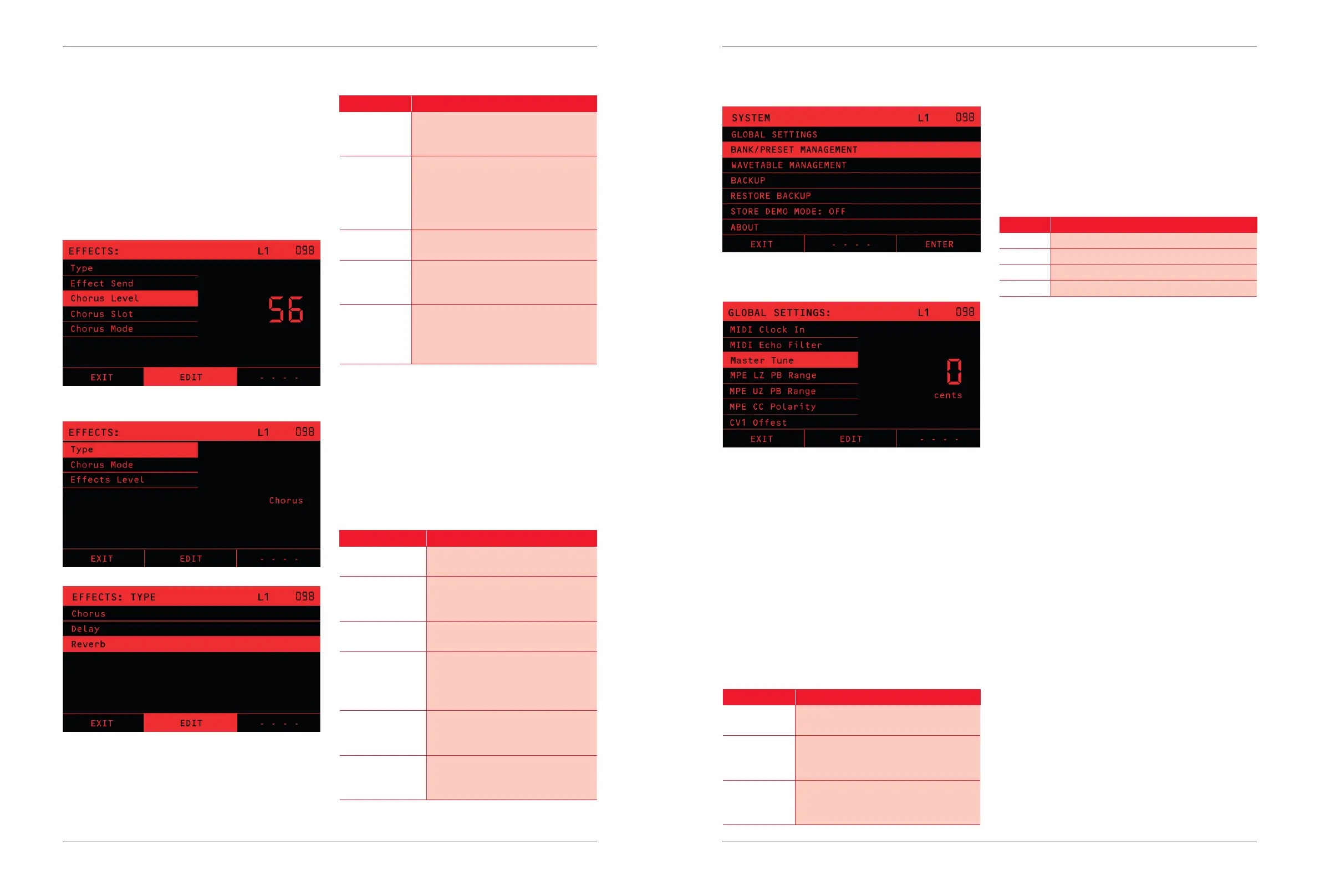
The Chorus eect is a simple classic synthesizer chorus.
The Chorus Mode has simple selection of type. Type I
adds a gentle shimmer to the sound, type II has a
deeper, wider eect and both can be turned on together.
Note that the Chorus eect is much more pronounced
when the voices have stereo spread. For example, if you
are playing just single note lead, then the combination of
a number of Unison voices and Stereo spread using the
Panner will make the Chorus do a lot more to the sound.
Eects Menu, showing Eects level, slot, type and mode.
Delay
The delay is a digital delay with adjustable time
and feedback level with a low-pass lter. It can be
synchronized to the Arpeggiator / Sequencer. The
settings are as follows:
Setting
Description
Delay Time Sets the delay from 60ms at minimum
(0) to 1.8 seconds at 100. Used when
Sync is O.
Delay Time
Sync
Sets the delay as a multiple of the
Sequencer/Arpeggiator clock. Used
when Sync is On. The multiple settings
are the same choices as for the LFO
Sync. See page 26.
Sync Choose which of the two above Delay
times are used.
Delay
Feedback
Sets the level of the feedback. 0 is
no feedback, so there will just be one
repeat. 100 is feedback at 100% level,
Delay Tone Sets the frequency of the low pass
lter on the feedback loop. The lter
is 6dB per octave, so each repeat will
sound progressively darker.
Reverb
The Reverb eect has a number of Presets, and then a
number of parameters that can be adjusted to change
the eect. Note that the Presets congure the eect
into distinct modes of operation and are not just a way
of recalling the other settings. Room reverb emulates
a reverberant room, Hall 1 and 2 a small and large hall,
and plate 1 and 2 emulate a small and large metal plate
reverb.
Setting
Description
Reverb Preset Choose between a room, plate 1,
plate 2, hall 1 and hall 2 eect.
Reverb Decay Sets how fast the reverb decays
to silence. Low values are fast and
high slower.
Reverb Predelay Sets the initial delay before the
sound starts to reverb.
Reverb Early Mix Sets the level of the early
reections, which gives the
impression of how large the room
or chamber is.
Reverb Tone Sets how bright or dark the reverb
sounds, by adjusting a low pass
lter.
Reverb Shimmer Shimmer is created by mixing in the
reverb pitch shifted up one octave.
Shimmer sets the level of this mix.
System Functions
Global Settings
Midi Clock In
If set to On, the sequencer and arpeggiator will use MIDI
clock coming in. If set to O, the internal clock, as set by
the TEMPO Knob will be used.
Midi Echo Filter
The MIDI Echo lter xes a problem with DAWs and
external devices which send back all MIDI Conguration
Controller (CC) messages when they receive them. If this
happens, the knobs will send MIDI CC messages as you
turn them, but then be told by the external device to put
them back to where they were, creating a feedback loop
ghting for position. The settings are:
Setting
Description
No lter MIDI Echo Filter is O. Use this only if
external devices or DAWs do not echo.
Echo Filter MIDI CCs that are detected as an echo
are removed. Other received CCs will
be followed.
Filter All All incoming MIDI CCs are ignored.
Use this if you do not want any external
control or automation.
Master Tuning
Master tuning can be used to tune the entire instrument
up or down from -200 to 200 cents.
CV Oset Gain and Mode
These settings are to precisely calibrate or tune the
response to an external Control Voltage input. The CV’s
follow the 1 Volt-per-octave convention. The CV Modes are:
Setting
Description
-10:10 Range is -10V to +10V. 0V is nominally C4
0:10 Range is 0V to +10V. 5V is nominally C4
-5:5 Range is -10V to +10V. 0V is nominally C4
0:5 Range is -0V to +5V. 2.5V is nominally C4
Backup
The Backup & Restore menu items will be available when
a FAT32 formatted USB Flash drive is plugged into one
of the USB-A ports on the back.
Backup will save the complete set of user data to two
zip les on the drive. Press the ENTER soft-key on
the BACKUP list item to perform the backup. The two
les will be called “patches_backup_NNNN.zip” and
“calibration_SSSS.zip”, where NNNN and SSSS are 2
automatically generated numbers.
The patches_backup_NNNN.zip le contains all of the
Layer setups and Presets that are on the unit. It will not
include the default preset called BASIC or BACKUP,
only presets that either in the supplied factory set
and all user created Presets. The number NNNN is an
automatically increasing number that goes up by one
each time a backup is done.
The calibration_SSSS.zip stores all of the factory analog
calibration settings. SSSS is the unique internal serial
number of the NINA unit. You should normally never need
to use this le, and is there for customer support and
servicing use only.
Restore
The RESTORE Menu item will be available if a USB ash
drive is inserted and there is a le called “patches_
backup.zip” on it. Note that this le name does not have
a number sux. If you wish to restore from a previously
made backup, rst rename the le from “patches_
backup_NNNN.zip” to “patches_backup.zip”.
When you start the restore operation, Nina will rst do a
backup and write it to the ash drive. This is for safety,
because the restore is a complete overwrite. The restore


 To Next Page