30
MELBOURNE INSTRUMENTS – NINA V 1.3.0
31
MELBOURNE INSTRUMENTS – NINA V 1.3.0
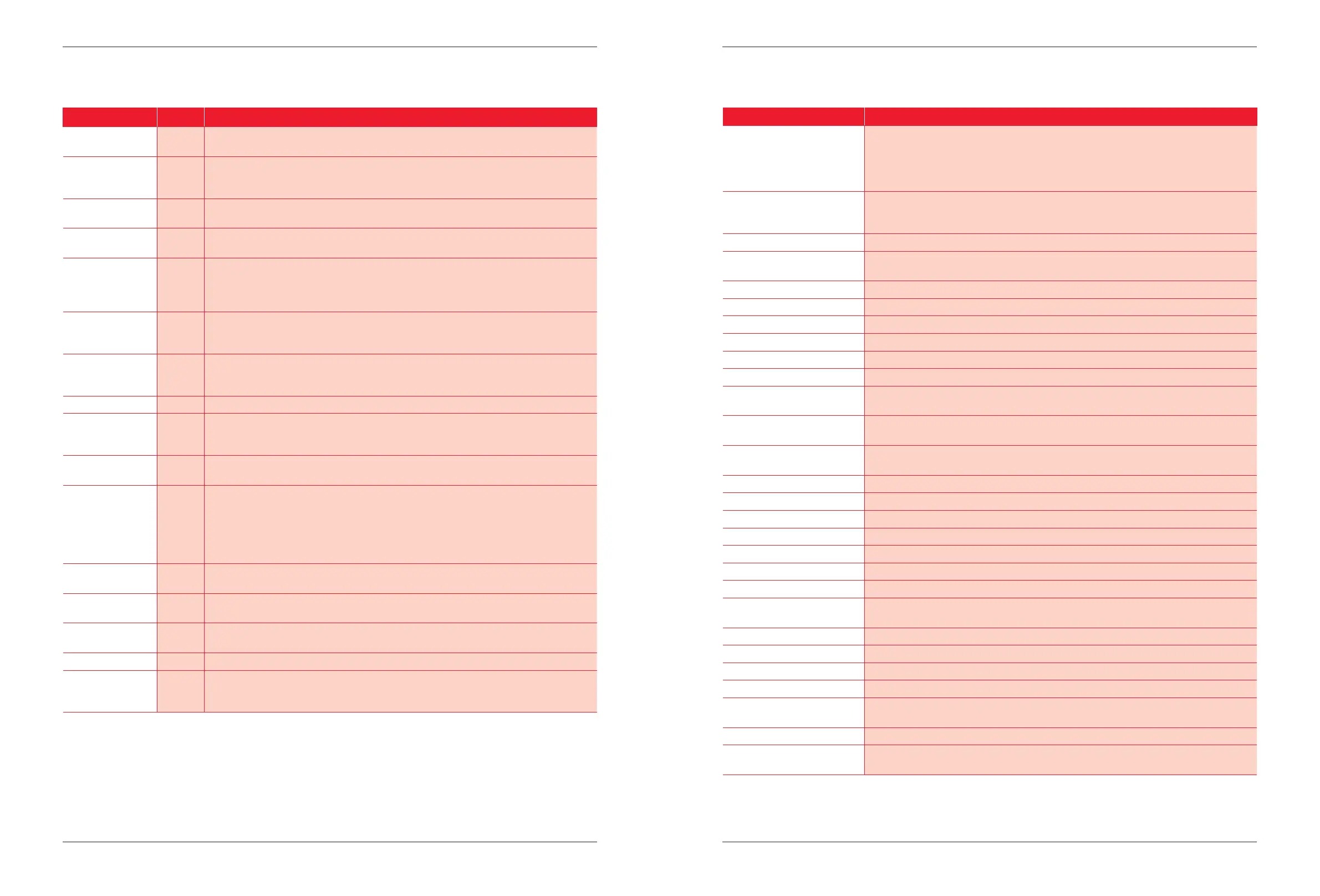
Name Function
OSC 1 TUNE Pitch of VCO 1. The response of VCO 1 to the amount received is shaped so that small values
give a small detune while larger values move pitch a lot more. A value of 100 will match exactly
127 semitones. This means is designed so that if you assign the KBD (MIDI note number) to
pitch with a value of 100, then each note on the keyboard will play its correct frequency. A
small value such as 10 will apply a small detune, such as for vibrato from an LFO.
OSC 1 WIDTH A value of 100 will match exactly 127 semitones. This means if you assign the KBD (MIDI note
number) to pitch with a value of 100, then each note on the keyboard will play its correct
frequency. A small value such as 10 will apply a small detune, such as for vibrato from an LFO.
OSC 1 BLEND The pulse width and Sawtooth/Triangle shape amount of VCO1.
OSC 1 MIX The Level of the OSC 1 outputs into the Mix. Note that a negative value at the Mix level amount
destination mean that the OSC outputs will be inverted and mixed in at that level.
OSC 2 TUNE See OSC 1 TUNE.
OSC 2 WIDTH See OSC 1 WIDTH.
OSC 2 MIX See OSC 1 MIX.
OSC 3 TUNE See OSC 1 TUNE.
OSC 3 POS OSC 3 Wavetable position.
OSC 3 MIX See OSC 1 MIX.
NOISE Level Noise/Fuzz source in the Mix. Note that a negative value at the Mix level amount
destination mean that the OSC outputs will be inverted and mixed in at that level.
LFO1/2 Rate The LFO 1 or LFO 2 Rate (according to the LFO1/2 Key). LFO 1 can modulate LFO 2 and
vice versa. LFO 1 and 2 cannot modulate themselves.
LFO1/2 Level The LFO 1 or LFO 2 Level (according to the LFO1/2 Key). LFO 1 can modulate LFO 2 and
vice versa. LFO 1 and 2 cannot modulate themselves.
RESONANCE The VCF Resonance.
CUTOFF The VCF Cuto Frequency.
DRIVE VCF overdrive level.
EG1 ATTACK Envelope Generator 1 Attack Time.
EG1 DECAY Envelope Generator 1 Decay Time.
EG1 SUSTAIN Envelope Generator 1 Sustain Level.
EG1 RELEASE Envelope Generator 1 Release Time.
EG1 LVL Envelope Generator 1 Level. This scales the entire ADSR envelope of EG1, so maintains the
shape while changing the amplitude of the envelope.
EG2 ATTACK Envelope Generator 2 Attack Time.
EG2 DECAY Envelope Generator 2 Decay Time.
EG2 SUSTAIN Envelope Generator 2 Sustain Level.
EG2 RELEASE Envelope Generator 2 Release Time.
EG2 LVL Envelope Generator 2 Level. This scales the entire ADSR envelope of EG2, so maintains the
shape while changing the amplitude of the envelope.
SPIN Spin rate. See the section on Spin on page 24.
PAN The Pan Position of the voice. The Pan response to the value is dened in the section Stereo
Innite Panning on page 23.
Modulation Destinations
MOD Key # Name Description
1 EG1 The ADSR Envelope from Envelope Generator 1. This envelope is very commonly assigned
to the Filter Cuto frequency, but it does not have to be.
2 EG2 The ADSR Envelope from Envelope Generator 2. This envelope is always assigned to the
output stereo VCA from each voice at 100%. This is not shown in the list on the LCD, because
it is a xed connection, always on. You can also assign it to any other destination.
3 LFO LFO 1 output modulation source. This can be assigned to any destination, including the rate
and level of LFO 2.
4 WAVE The OSC3 Wavetable waveform. An example use is assigning this source to modulate OSC1
(VCO 1) Tune can create FM sounds.
5 KBD The MIDI Note Number. This is normally assigned 100% to the Tune destination of OSC1, 2 and
3, so that the keys play notes at the correct frequency. An example use is assigning this source
to the PAN destination to create a sound that pans left to right as you play from the left to right
hand side of an attached keyboard.
6 VEL The MIDI Note Velocity. An example use is to assign to the EG2 sustain to make notes play
louder or softer according to how hard or softly you play. This modulation source works
dierently.
7 AFTR The MIDI Channel or Polyphonic Aftertouch. This is the pressure on the keyboard after notes
are pressed down. An example use it to assign to Filter Cuto to open the lter by pressing on
the keyboard.
8 MOD The MIDI Mod Wheel. An common use is to assign this to the LFO1 or LFO2 Level.
9 EXP The MIDI Expression Control. This is MIDI controller number 11. The MIDI specication denes
this as “Expression is a form of volume accent above the programmed or main volume”,
however it is a normal MIDI controller and can be assigned to any destination.
10 PAN The Panner. See section Stereo Innite Panning on page 19 for details. Note that this is not the
MIDI Pan control.
11 TIME Is a constantly increasing level from 0 to 100 which acts like an envelope with only an Attack
phase. Time starts with a value of 0 when a note is played and the attack phase starts, and
ramps upwards with an inverse exponential (RC type) shape. The speed or rate of attack (1
Time Constant or 63% of amplitude) is around 60ms at the fastest rate of 0, up to around 4
minutes at the slowest rate of 100. The time amount is best set by ear, and the Time Rate is
accessed in the Layer menu, see Time Mod Rate on page 33.
12 MIDI MIDI controller CC Number 2. This is dened as the “Breath controller” in the MIDI
Specication. It is commonly assigned to a ribbon controller on MIDI keyboards.
13 CVA Control Voltage A. The mapping of this to an analog input is described in section CV A and
CV B Source on page 32.
14 CVB Control Voltage B. The mapping of this to an analog input is described in section CV A and
CV B Source on page 32.
15 LFO2 LFO 2. See the section on LFOs above for details.
16 SET Is a constant value. This value is added onto the destination at all times. For example if you
want to make the LFO values go between 0 and 100, instead of -100 to 100, make the LFO
amplitude 50, and add a SET of 50 to the same destination as the LFO.
Modulation Sources


 To Next Page