20
MELBOURNE INSTRUMENTS – NINA V 1.3.0
21
MELBOURNE INSTRUMENTS – NINA V 1.3.0
Noise and Other Sources
In addition to the three Oscillators, sounds sources
labelled as NOISE can be mixed into each voice.
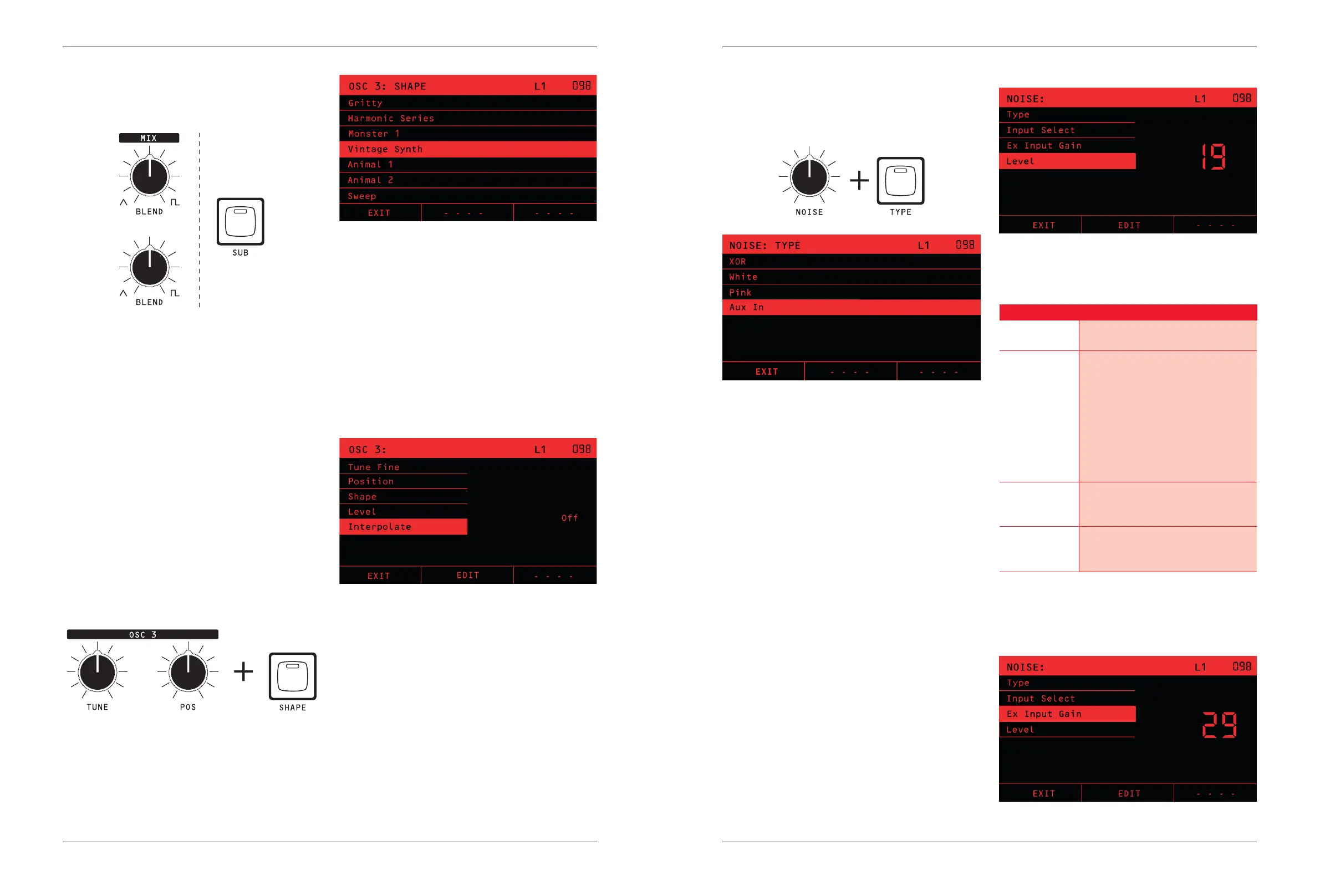
The TYPE Key displays a list of the sound sources that
can be used:
XOR
This source is an analog signal which is a ring modulation
of the Pulse outputs of VCO1 and VCO2. This ring
modulation is created by a discrete transistor XOR gate.
This kind of sound has a very particular and unusual
timbre.
White
This source is digitally generated white noise. This is full
audio bandwidth bright noise.
Pink
This source is digitally generated pink noise. Pink noise
has less high frequency energy, so sounds darker and
less harsh than white noise.
AUX In
Selecting this source allows the Analog Inputs (line level
or MIC) to be inserted into the front end of the voice.
This lets you mix in external sources to each voice and
pass through the overdrive, VCF, VCA and eects.
Operating the NOISE Knob brings up the Noise settings
menu, which has some further options.
Input Select
This option chooses which analog inputs are routed into
the Aux In:
Setting
Description
1, 2, 3 or 4 This selects Analog Input 1 , 2, 3 or 4
as a mono source
Stereo 1-2 This selects Analog Inputs 1 & 2 as a
stereo pair (Left & Right respectively)
into pairs of voices.
In order to get the voices to work as
a stereo pair, set Unison Voices (see
page 33) to a multiple of 2. To get a
stereo spread, set Panner Number to
2, and mode to Spread or Ping-Pong
(see page 33).
Stereo 3-4 Works the same way as Stereo 1-2,
but uses inputs 3 & 4 as Left & Right
respectively.
Stereo Out 1-2 This routes Nina’s Channel 1 & 2
outputs back to the voices in a stereo
pair to create a feedback loop.
Ex Input Gain
Adjusts the gain on the analog inputs.
The Blend control is a crossfade between the
Saw/Triangle output and Pulse output of each VCO.
The SUB key makes OSC 1’s pulse output drop 1 octave
and become a square wave.
The SYNC Key makes OSC 2 hard sync to OSC 1. This
means the every time OSC 1 restarts its waveform it
forces OSC 2 to restart.
The TUNE Knob is used for either ne or coarse tune
adjustment, as determined by the state of the COARSE
Key. If the Coarse Key LED is o, the TUNE Knob is a ne
tune control in cents (1/100 of a semitone), with a range
of +/-7 semitones (700 cents) ie a perfect fth.
If the COARSE Key LED is on, the TUNE Knob is an
octave transpose 5 position switch with a range of +/- 2
octaves.
Digital Oscillator
OSC 3 is a Digital Wavetable Oscillator.
Nina’s included factory wavetables cover a range
of styles, from retro 80s style to modern high
resolution interpolated waveforms. Wavetables can
be imported and exported, and formats from popular
software synthesizers are supported. See Wavetable
Management for more details.
The TUNE Knob performs the same coarse and ne tune
functions as it does with OSC 1 and OSC 2.
The POS Knob sets the wavetable position. You
can manually adjust the position and the position is
often assigned as a modulation destination to let the
wavetable sound evolve as it plays.
The wavetable Interpolate option determines how the
wavetable sounds. If Interpolation is on, the wavetable
Position (POS) will smoothly transition the sound
between the wavetables. If it is o, then it will step from
one to the next. How ‘steppy’ the sound is will depend on
many steps the chosen wavetable contains.


 To Next Page