PERFECT page 22
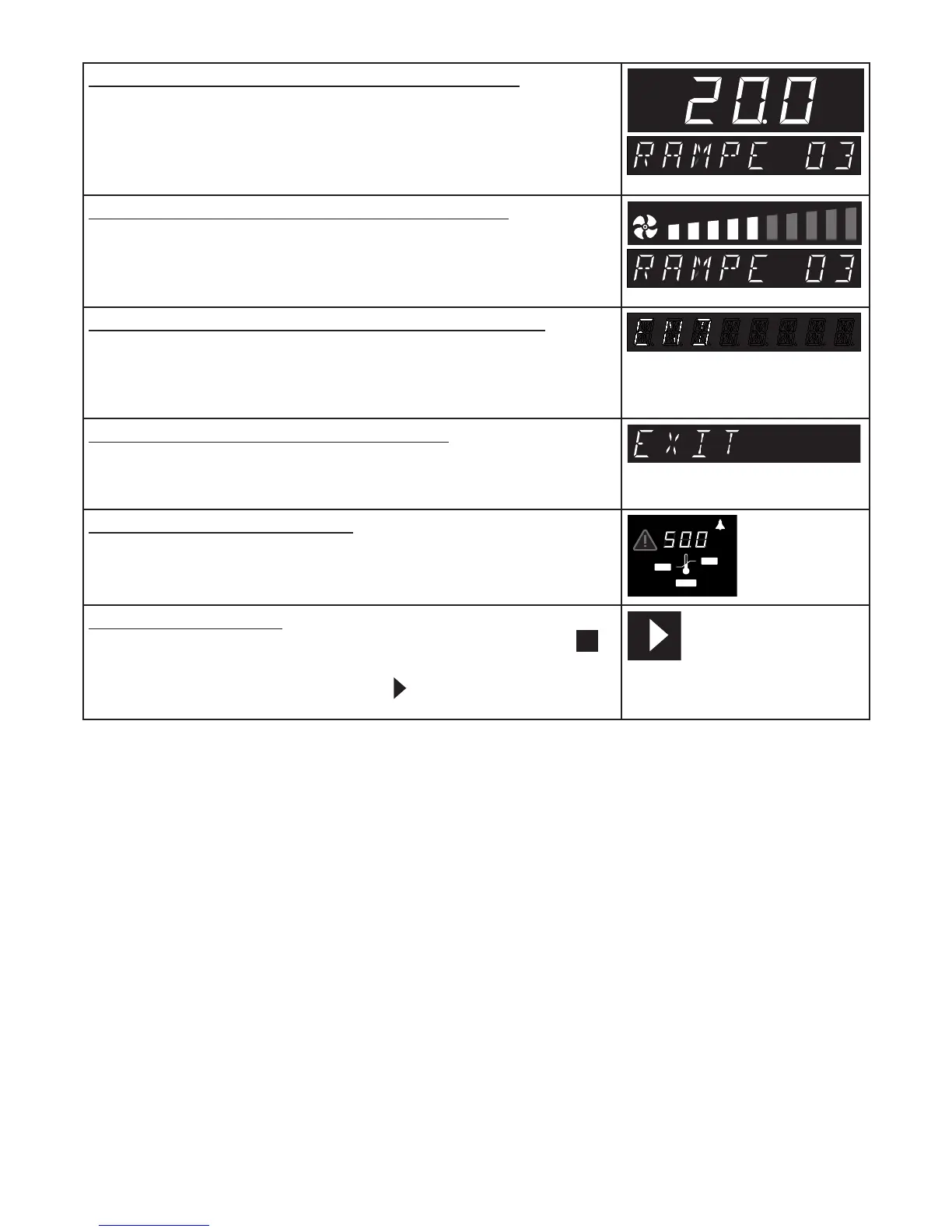
14. Select temperature of third ramp segment
Turn the push/turn control clockwise until the temperature display is
flashing.
Hold down the SET key and set the required temperature setpoint of
20°C using the push/turn control.
˚C
15. Select fan speed for third ramp segment
Turn the push/turn control clockwise until the fan symbol is flashing.
Hold down the SET key and set the fan speed to 50% using the push/
turn control.
16. Set closure command for third ramp segment
Turn the push/turn control clockwise until a segment closure command
(e.g end ) appears.
Press the SET key briefly to enter.
17. Exit programme writing mode EDIT
Turn the push/turn control clockwise until EXIT appears on the display.
Press the SET key briefly to enter.
18. Set temperature monitor
Turn the push/turn control clockwise and set the temperature monitor.
(see Section: “Temperature monitor”)
MIN
MAX
AUTO
°C
19. Start programme
Turn the push/turn control anticlockwise until the stop symbol is
flashing.
Hold down the SET key and select Start with the push/turn control.



 To Next Page