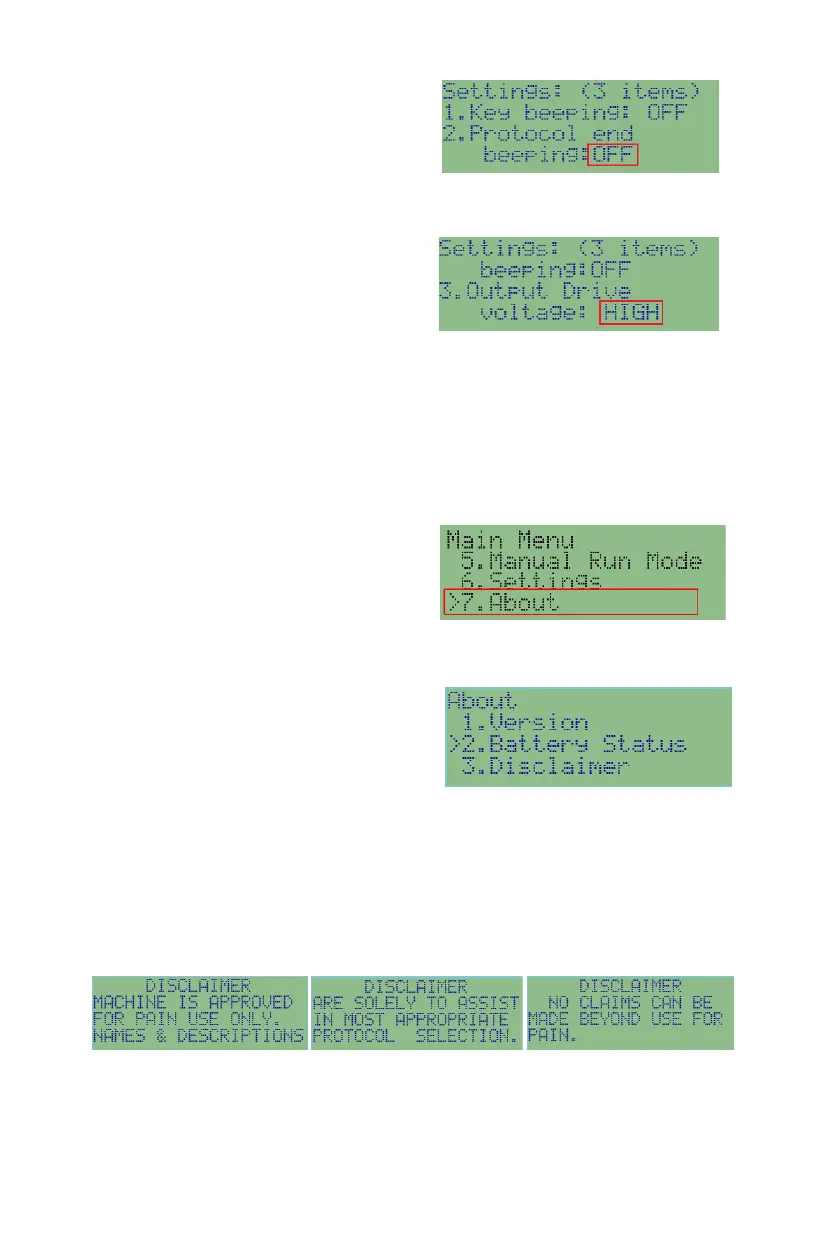
To turn ON/OFF protocol end beeping:
press SET key multiple times until the
edit cursor has moved to the ON/OFF
setting of protocol end beeping, use UP/DOWN to change the value. Press Enter
again when the new value is set.
To change output drive voltage: press
SET key multiple times until the edit
cursor has moved to the setting of the
output drive voltage, use UP/DOWN to
change the value between HIGH, MEDIUM and LOW. Press SET key again
when the new value is set. The new settings will take effect after you press
t h e BACK key to the Main Menu.
About
To go to About: press Back key to go to
Main Menu and use UP/DOWN
to select About, and press RIGHT
arrow to enter into About screen;
Version: shows the hardware and firmware information.
Battery Status: shows the battery
voltage and estimated time that the
batteries could run for protocols. The
battery run time varies on the output
current levels of the protocols.
Disclaimer: shows the disclaimer to users who use this product. Use
UP/DOWN key to scroll between screens. Use BACK key to exit. You can also
use STOP key or START to skip the screens when the disclaimer is shown upon
power up. The three screens are captured below.


 To Next Page