Manual Run Mode
Manual Run Mode is the mode to run a frequency pair with any parameters
programmed directly from keypad. The new value will be applied on the
microcurrent output in 3 seconds after SET.
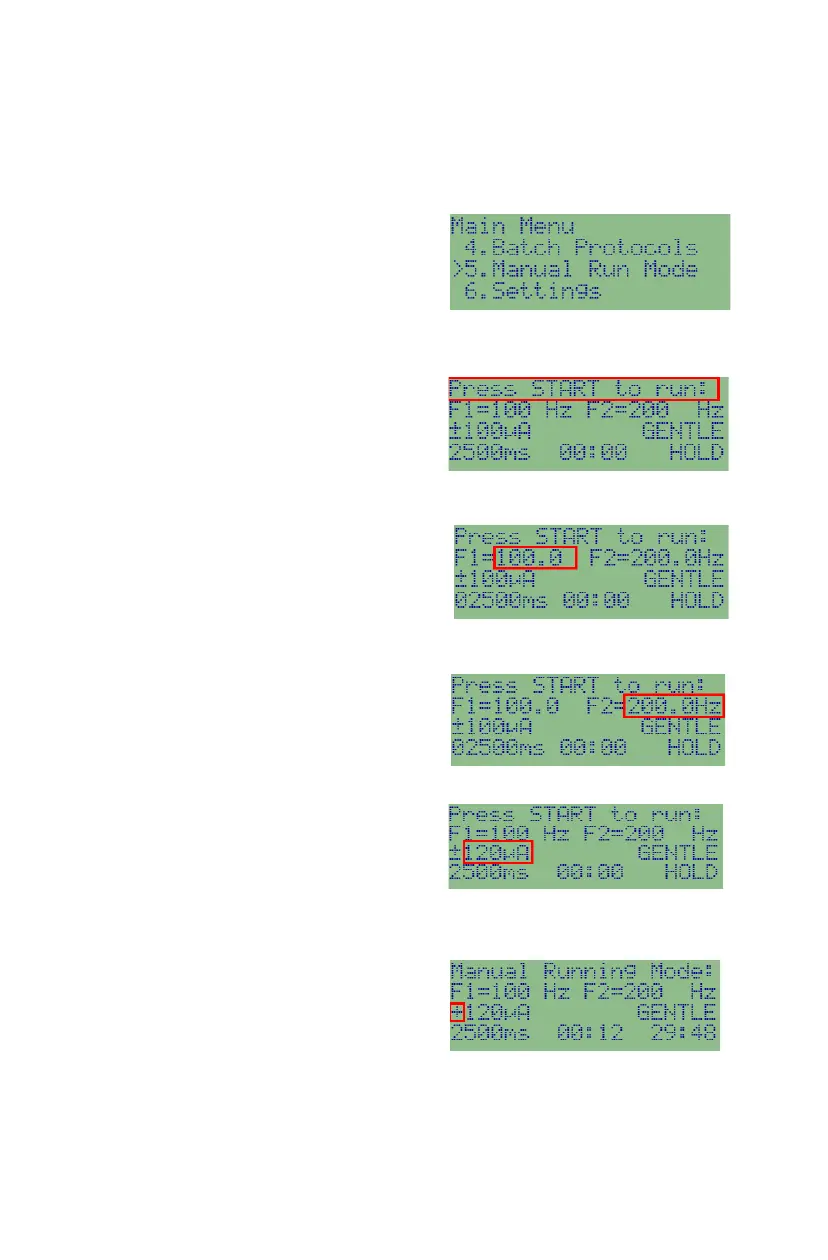
To go into Manual Run Mode: press
Back key to Main Menu and use
UP/DOWN to select Manual Run Mode
and press RIGHT arrow to enter into
manual run mode; Or press Key 5 to select manual run mode from Main Menu.
To prepare running parameters: You
will be first in Manual Run Prepare
screen. You can run immediately by
pressing START, or change those values
first, and then press START to run.
To change CH1 frequency: Press CH1,
the edit cursor will jump to CH1 frequency
value. Then enter the digits of the new
frequency value. For example, to enter
frequency 970Hz, press CH1, 9, 7, 0, 0 and SET.
To change CH2 frequency: Press CH2,
the edit cursor will jump to CH2 frequency
value. Then enter the digits of the new
frequency value. For example, to enter 52.9Hz, press CH2, 5, 2, 9 and SET.
To change output current intensity +/-:
Press + key to increase current intensity
value or press - key to decrease current
intensity value. Or press SET key until the edit cursor has moved to the output
current position, then use number keys or arrow keys to change the value.
To change polarity: Press Polarity key to
rotate the output polarity between ±
(alternating), + (polarized positive) and –
(polarized negative).


 To Next Page