85-03-01060-M FV44i Décor Gen 3 Page 43
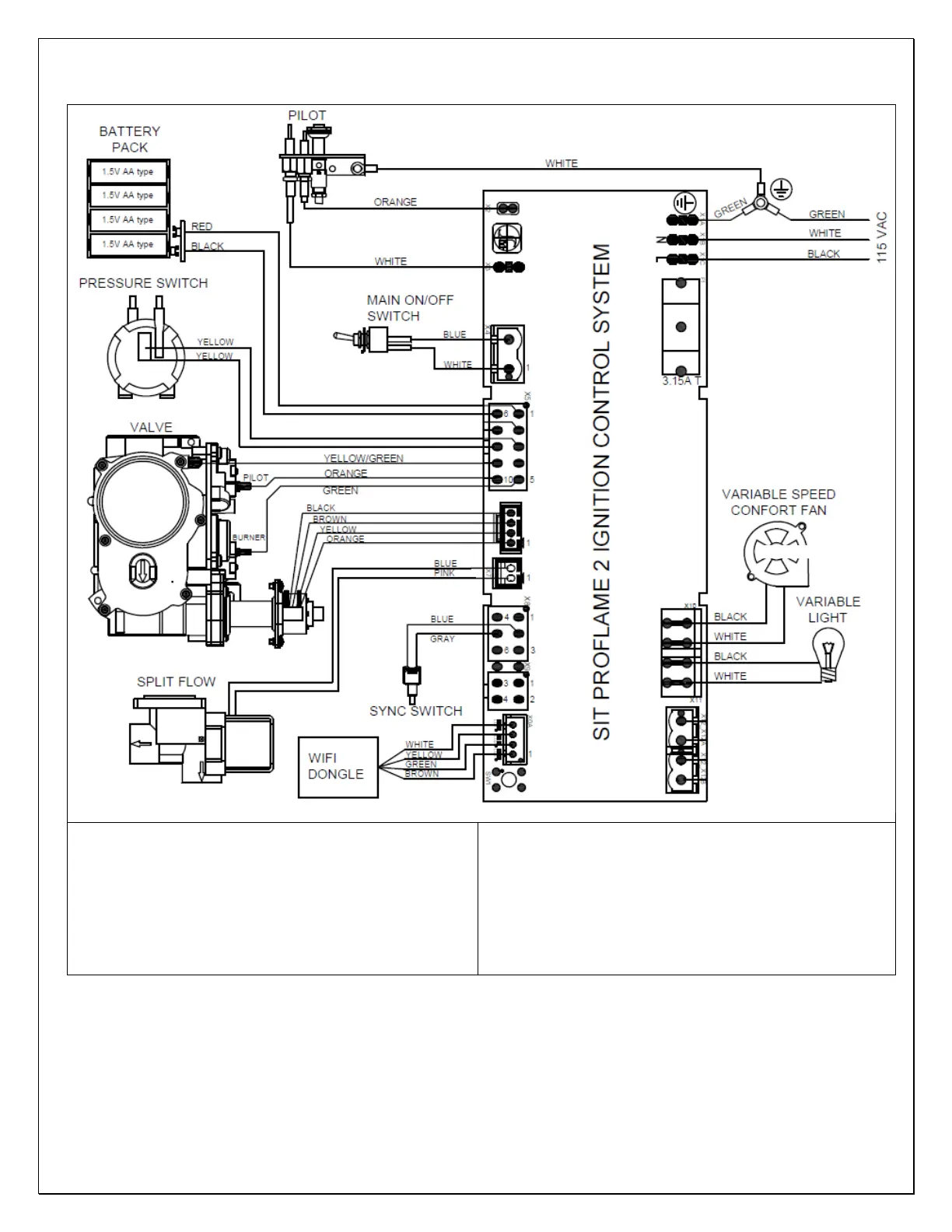
3.3.3 PF2 Ignition System Diagram
Note: Connect wires in junction box located on the right
side of this appliance to house power using supplied wire
nuts.
Replacement wires must have the same type and size of
insulation as the original.
This appliance must be electrically connected and grounded
in accordance with local codes or, in the absence of local
codes, with the current NFPA 70- National Electric Code or
CSA C22.1- Canadian Electrical Code.
Label all wires prior to disconnection when servicing control.
Wiring Errors can cause improper and dangerous operation.
Verify proper operation after servicing.
3.3.4 Wi-Fi Dongle and Application
This appliance has the capability to be controlled via an application through Wi-Fi. The Wi-Fi dongle is included with the fireplace
but is not connected to the control module. If Wi-Fi control of the fireplace is desired the installer shall connect the dongle to the
control module. The Wi-Fi dongle shall be attached to the RH access panel assembly with Velcro. The Wi-Fi dongle is equipped with
a reset button for if there are connectivity issues between the fireplace and phone application. To reset the Wi-Fi connection press
and hold the button to reset the connection. The application is called “Proflame Connect” and is available in your phone’s app
store. Please see the “Proflame WIFI Dongle; Use and Installation Instructions” PDF for installation and use instructions.


 To Next Page