27
ADVANCED SETTINGS
PASSWORD
37
SET PASSWORD
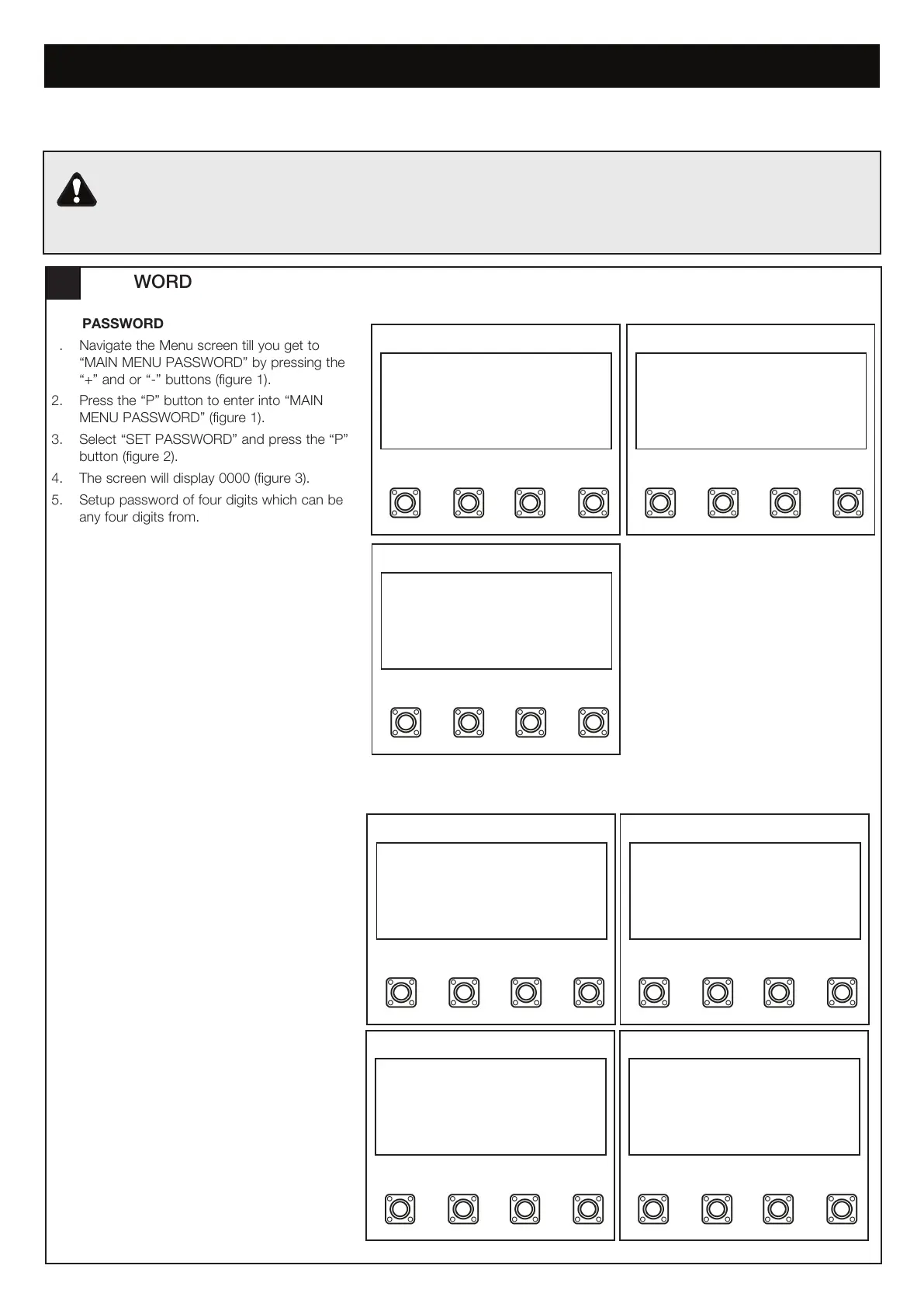
1. Navigate the Menu screen till you get to
“MAIN MENU PASSWORD” by pressing the
“+” and or “-” buttons (figure 1).
2. Press the “P” button to enter into “MAIN
MENU PASSWORD” (figure 1).
3. Select “SET PASSWORD” and press the “P”
button (figure 2).
4. The screen will display 0000 (figure 3).
5. Setup password of four digits which can be
any four digits from.00
SP
+-
MAIN MENU
PASSWORD
SP
SET PASSWORD
ENTER PASSWORD
CHANGE PASSWORD
SP
+-
0000
SP
+-
MAIN MENU
PASSWORD
SP
+-
SET PASSWORD
ENTER PASSWORD
CHANGE PASSWORD
SP
+-
ENTER OLD PW
0000
SP
+-
ENTER NEW PW
0000
figure 1 figure 2
figure 3
SP
+-
MAIN MENU
PASSWORD
SP
+-
SET PASSWORD
ENTER PASSWORD
CHANGE PASSWORD
SP
+-
0000
SP
+-
MAIN MENU
PASSWORD
SP
SET PASSWORD
ENTER PASSWORD
CHANGE PASSWORD
SP
+-
ENTER OLD PW
0000
SP
ENTER NEW PW
0000
figure 1 figure 2
figure 3
CHANGE PASSWORD
1. Navigate the Menu screen till you get to
“MAIN MENU PASSWORD” by pressing the
“+” and or “-” buttons (figure 1).
2. Press the “P” button to enter this setting
(figure 1).
3. Select “CHANGE PASSWORD” and press
the “P” button (figure 2).
4. Enter the old four digit password and then
press the “P” button (figure 3).
5. Now you must setup the new four digit
password. Press the “P” button when you
would like to save the new password
(figure 4).
figure 4
If the Default speed and force values are changed in the Advanced Settings, the force reversal behaviour of the
gate opener may be affected. Additional safety devices must be used for installations where the force measured
on the leading edge of the gate in both the open and close direction is over 400N. Installers must ensure that the
gates are installed in a compliant manner as per AS/NZS 60335.2.103.


 To Next Page