Revision 21_Sep_2015 36
User Guide Version 2.60 I-button WHO 5th
APPENDIX 5: Cleaning the Capillary / Slide
Compartments
When to clean: DAILY (step 1), WEEKLY (step 2)
Or if SELF-TEST or any other failure occurs
Or if System becomes contaminated with semen
Cleaning kit components:
Long cleaning brush
Blue Dot capillaries (single use)
Sponge-tipped drying capillaries
Cleaning fluid (single drop dispenser)
CLEANING: STEP 1 (DAILY)
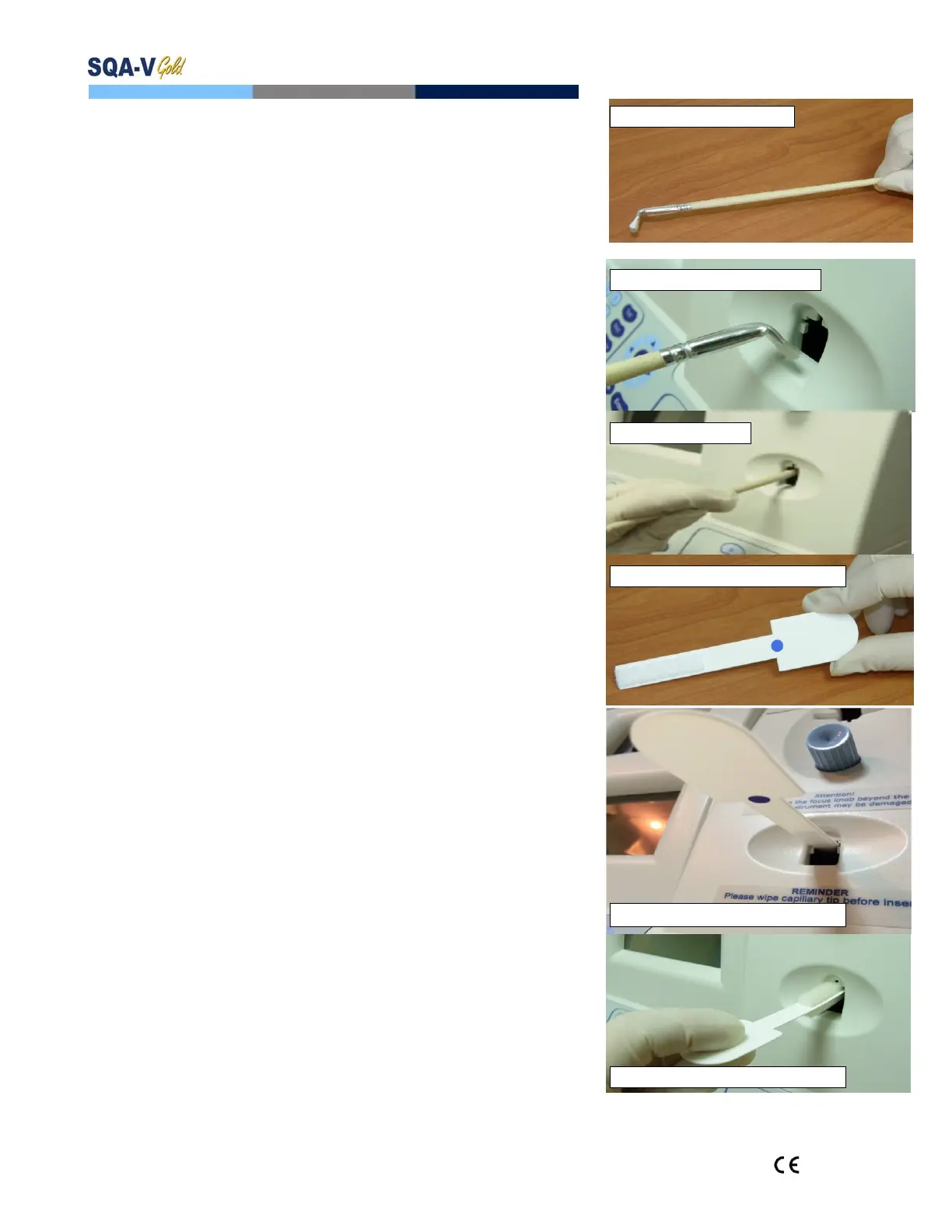
Insert the long brush (bristle side down) into the
upper portion of the lower chamber of the SQA in
the same manner as a testing capillary (Fig 1 and 2).
Pull the brush out, applying downward pressure to
sweep or „dust off‟ the optics (you will feel a „shelf‟ in
the back/top section of the chamber) – (Fig 2 and 3)
Monitor the system’s “REF. 2” parameter. It
should be between 2800 and 3200 mV if possible.
CLEANING: STEP 2 (WEEKLY)
1. Use a BLUE DOT fibrous material capillary (fig 4)
Moisten with only ONE drop of cleaning fluid.
Shake off excess fluid.
Insert into the measurement compartment with blue
dot and fibrous material facing DOWN ONLY (fig 5)
Move the cleaning capillary in and out three times.
2. Use a sponge-tipped drying capillary into the testing
chamber and leave it for 10 – 15 seconds (fig 6).
NOTE: Do not move this drying capillary in and out.
Fig. 1: Long cleaning brush
Fig. 2: Cleaning lower chamber
Fig. 3: “Dusting off”
Fig. 4: BLUE DOT cleaning capillary
Fig. 5: Insertion-BLUE DOT DOWN
Fig. 6: Insertion of drying capillary


 To Next Page