Home
MES
Medical Equipment
SQA-V Gold
Page 67 (SECTION 9: Utilities)
MES SQA-V Gold - SECTION 9: Utilities
71 pages
Manual
Save Page as PDF
To Next Page
To Next Page
To Previous Page
To Previous Page
Loading...
User Guide V
er
sion
3.
60 I-button
Release: 12_
APR
_2016
14
SECTION 9: Ut
ilities
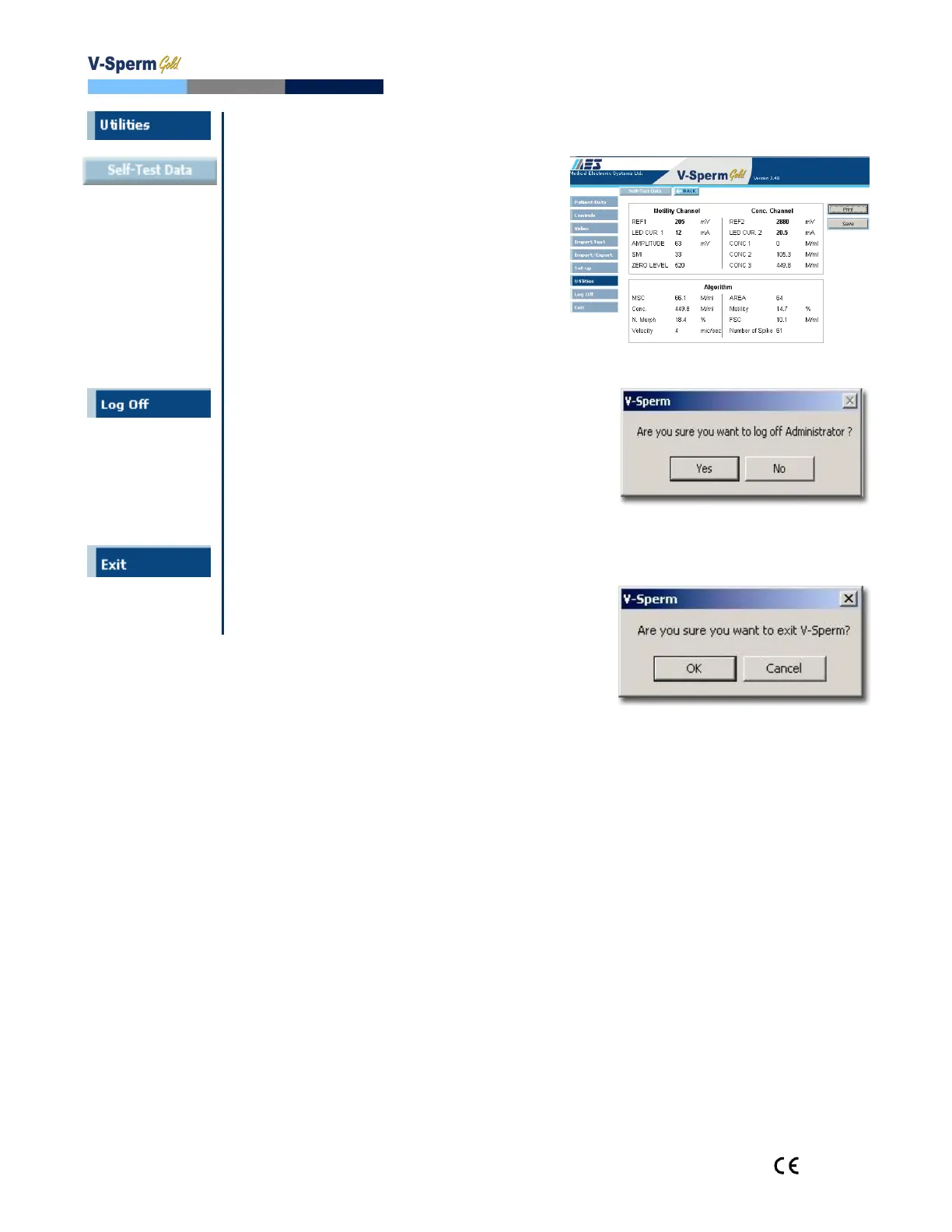
To view and print the SQA-V SELF TEST
DATA for technical support purposes:
Click on the
UTILITIES
navigation button
Select:
SELF TEST DATA
Select:
PRINT or SAVE
SECTION
10
:
Log
-Off
LOG
-OFF
V-Sperm by clicking the
navigation button and confirming with a
click.
A new user can immediately log-on
from the screen. The V-Sperm
program does not need to be shut-
down when a user logs-off.
SECTION 11: Exit
To Exit
–
Click on the OK button.
66
68
Table of Contents
Main Page
Table of Contents
2
Default Chapter
4
Front Panel
4
Keypad Navigation
7
Rear Panel
7
Measurement Capillary
8
Slide Adaptor
8
Reportable Range
9
Semen Parameters
9
SECTION 3: Technology
10
Motility Measurement
10
SECTION 4: Getting Started / Set-Up
11
Power-On
11
Auto-Calibration and Self-Test
11
Set-Up System Defaults: Time, Date, Printing, WHO, Chamber Standard
12
SECTION 5: Testing Semen Samples
13
Patient Information
13
Sample Information
14
Sample Type: Fresh, Washed, Frozen, Postvasectomy
14
Sample Volume: Low Volume, Diluted, Normal Volume
14
Testing
16
Test Results: Normal, Low Quality
17
Printing, Saving and Transferring Results to V-Sperm Gold
18
Postvasectomy Test
19
SECTION 6: Controls and QC
21
Set-Up: Assayed Control
21
Set-Up: Non Assayed Control
22
Running CONTROLS on the Automated System
22
Electronic Self-Test and Auto-Calibration
23
Transferring the SQA-V Archive to V-Sperm
25
Importing Patient and Control Archives to V-Sperm
25
Importing Single Test Results On-Line
25
SECTION 8: Service Menu
26
Service Data
26
Service Personnel
26
Printing SQA-V Default Settings
26
Add I-Button Tests
26
SECTION 9: Operating the Visualization System (Video Display) Introduction
27
Operating Instructions
27
Counting Cells Using the Visualization Screen
27
Standard Slide Preparation
27
Testing Capillary Preparation
27
Stabilization Failed
29
Self-Test Failed
29
Electronic Noise
30
Concentration out of Range
30
APPENDIX 1: Filling the SQA-V Capillary with a Normal Volume Sample
31
APPENDIX 2: Filling the SQA-V Capillary with a Low Volume Sample
33
APPENDIX 3: Using Standard Slides in the Visualization System
34
APPENDIX 4: Counting Cells Using the SQA-V Visualization System
35
APPENDIX 5: Cleaning the Capillary/Slide Compartment
36
APPENDIX 6: Reference Values of Semen Variables
37
APPENDIX 7: Measuring Wbc's in Semen Using Qwikcheck Test Strips
38
APPENDIX 8: Dilution Media: QwikcheckDilution
39
APPENDIX 9: Treating Viscous Samples: Qwikcheck™ Liquefaction
40
APPENDIX 10: Assayed Control - Qwikcheck-Beads
41
APPENDIX 11: Concentration Standard: Counting Chambers
42
APPENDIX 12: Postvasectomy Protocol
43
APPENDIX 13: Globozoospermic Samples
44
APPENDIX 14: Service Report
45
APPENDIX 15: SQA-V Test Report Printouts
47
APPENDIX 16: Printer Ribbon/Paper Installation
48
APPENDIX 17: Warranty
48
APPENDIX 18: Product Performance Data
50
Table of Contents
55
Default Chapter
56
System Requirements
56
SECTION 2: Log-On
57
SECTION 3: Navigating through V-Sperm
57
SECTION 4: Patient Data
57
Locating, Selecting and Authorizing Records
57
Patient List
57
Attach Video/Picture to a Test Record
58
Enter Patient Name
58
Graph Semen Parameters
58
Enter Data (Manual Test/Patient Input)
59
Test Report
59
Authorize (Test Results)
60
Authorizing Test Results
60
Search by Patient
60
View/Attach Images
60
Deleting Records
61
SECTION 5: Controls
61
SECTION 6: Video
62
SECTION 7: Importing/Exporting Data from the SQA-V
63
SECTION 8: Set-Up
63
V-Sperm Set-Up
63
Authorized Users
63
Normal Ranges
64
Report
64
Test Parameters
64
Auto Export
65
Language
65
Port
65
Testing Facility
65
SQA-V Set-Up
66
System and Controls Defaults
66
SECTION 9: Utilities
67
Archive Management
67
Self Test Data
67
SECTION 10: Log-Off
67
SECTION 11: Exit
67
SECTION 12: Install Software and Hardware
68
SECTION 13: Uninstall Software
70
SECTION 14: USB to RS232 Converter Installation
71
General Description
71
Other manuals for MES SQA-V Gold
Service Manual
44 pages


 To Next Page