Revision 21_Sep_2015 48
User Guide Version 2.60 I-button WHO 5th
APPENDIX 16: Printer Ribbon/Paper Installation
APPENDIX 17: Warranty
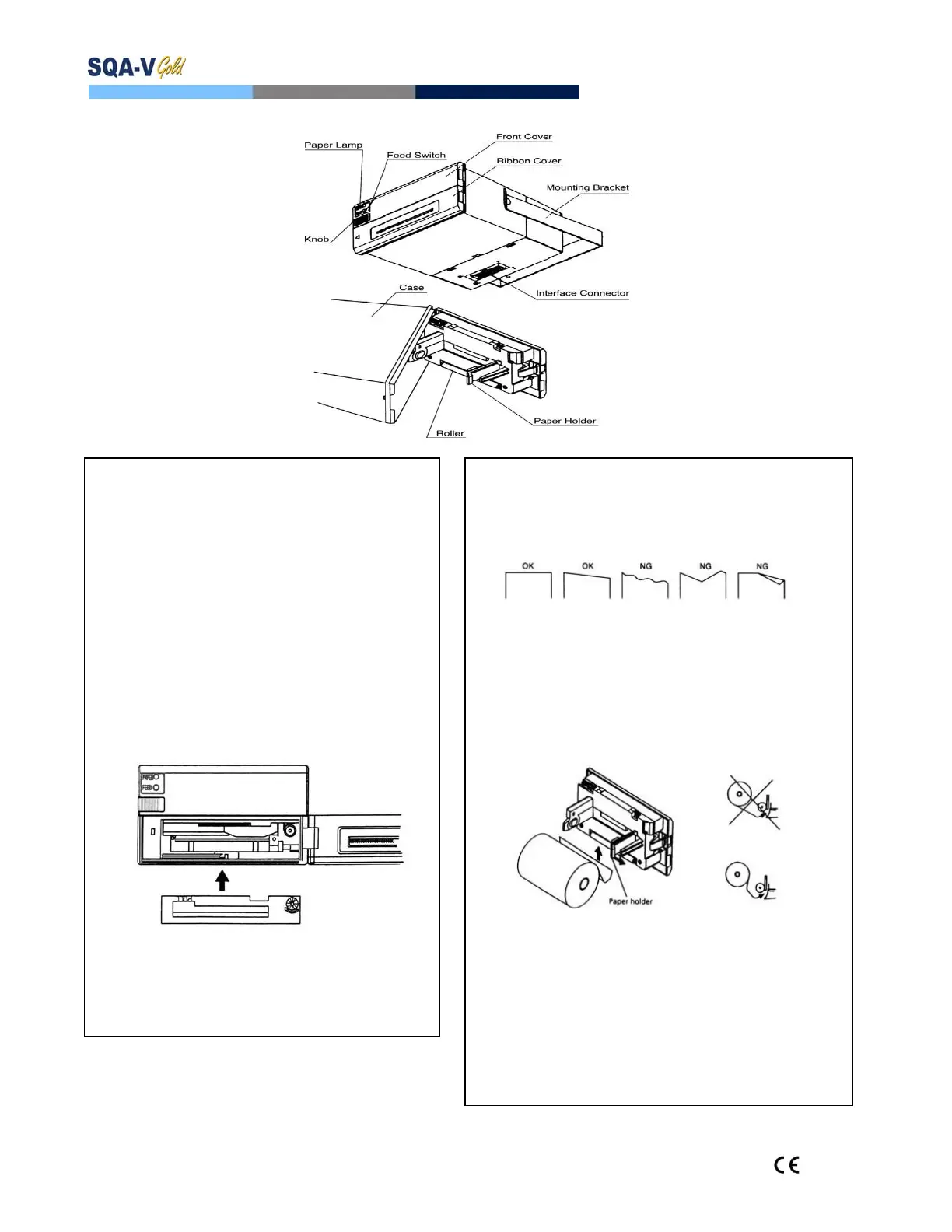
Installing the Printer Ribbon:
1. TurnoffthepowerandopentheRibbonCover–
removeoldribboncassette
2. Cutawayanypaperthatisobstructingtheribbon
installationarea
3. Confirmthatthenewribboncassetteisplacedinthe
correctway(seebelow)
4. Insertthenewribbonbetweentheprintingheadand
theplaten–pressthecassettedownfromtheknob
side
5. Removetheribbonslackbyturningtheribbonin
thecorrectdirectiontotightenit
PLEASE NOTE:
UseonlyM.E.S.suppliedribbons
Donotprintifthereisnoribbonintheholder
Ribbonswilldryoutifsittingforalongtimeinthe
printer
Installing Printer Paper:
1. Openthefrontcovertoexposethepaperholderandroller
2. Cuttheedgeofthepaperasshownbelow
3. Insertthepaperintotheprintermechanismasshown
below.ThepaperwillautomaticallyadvanceORpressthe
FEEDSWITCHtoadvancethepaper(advanceonelineata
timebypressingonce;pressandholdtofeedcontinuously)
4. Loadthepaperrollintothebrackets–makesurethepaper
rollisfeedingpaperinthecorrectdirection–seeexample
below.
PLEASE NOTE:
Loadthepaperinthedirectionshownabove
UseonlyM.E.S.suppliedpaper–standardrollsaretoo
largeforthisprinterandwilldamageit
Donotprintwhenthereisnopaperorduringloading
Donotpullonthepaperinthereversedirection
Paperwilljamiffeddiagonallyorincorrectly,inthiscase
turn the printer OFF and gently pull the paper in the
rightdirection


 To Next Page