MI 3205 TeraOhm XA 5kV Main menu
26
4.3.5 Clearing complete memory content
When selecting the Clear all memory function in Memory menu all the memory content
will be deleted.
Keys in Clear all memory confirmation screen:
Toggles between YES or NO.
SELECT
Clears all memory content (if YES is selected).
ESC
Returns to the Main menu without changes.
4.4 Settings menu
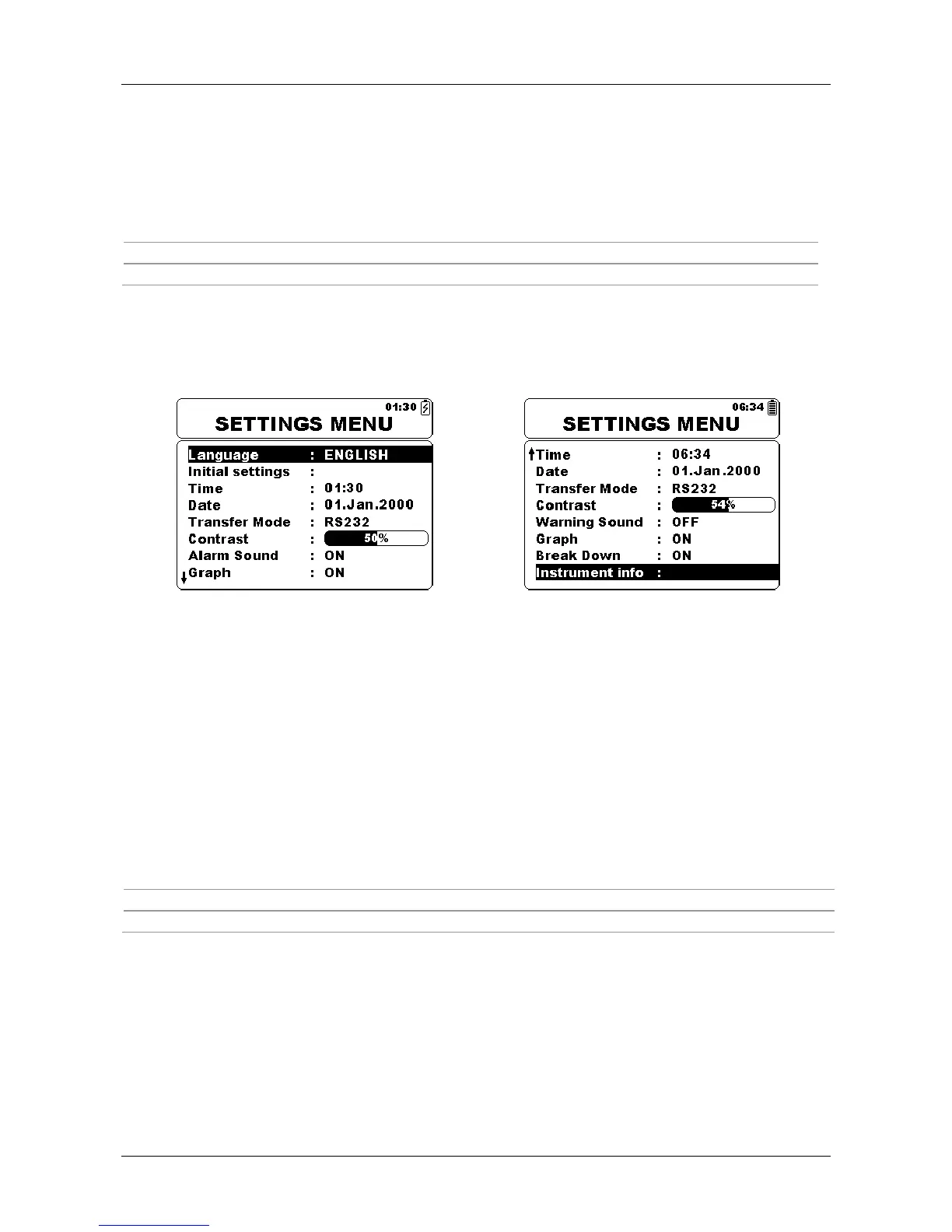
In the Settings menu different parameters and settings of the instrument can be viewed or
set.
Figure 4.10: Settings menu
Keys:
Select the setting to adjust or view:
<Language> instrument language;
<Initial Settings> factory settings;
<Time> time settings;
<Date> date settings;
<Transfer Mode> communication mode selection;
<Contrast> LCD contrast settings;
<Warning Sound> enables or disables high voltage warning sound;
<Graph> switches graph on or off;
<Break Down> enables or disables breakdown detection;
<Instrument Info> basic instrument information.
SELECT
Confirms selection.
ESC
Returns to the Main menu.




 To Next Page