AirConditioningandAudioSystems
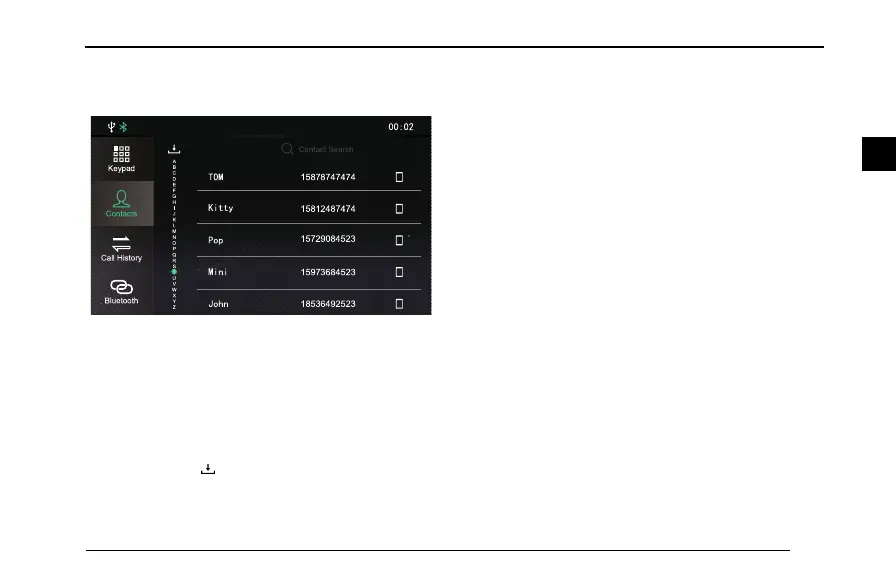
MakingaCallintheContacts
T ouch[Contacts]toentertheContactsinterface.
11 ;; 11 33
A
B
C
D
E
F
G
H
I
J
K
L
M
N
O
P
Q
R
S
T
U
V
W
X
Y
Z
158787 474 74
158124 874 74
159736 845 23
185364 925 23
U
U PP NN
LL jj uu uu zz
Q
Q pp qq
N
N jj oo jj
KK pp ii oo
Bluetooth
Keypad
Contacts
Call History
Contact Search
DownloadtheContacts
Whentheentertainmentsystemandmobilephone
Bluetoothareconnected,thesystemwillautomatically
downloadthecontactsinthemobilephoneintothe
system.
Change[ContactsDownload]to[Manual]inthe
[Bluetooth].T ouchtodownloadthecontactsmanually.
EnterBluetoothphoneinterface,andthentouch
[Contacts].Thecontactsinthemobilephonewillappear.
ThecontactssynchronizedviaBluetoothsupportvoice
callingandquicksearchingfunctionsanddoesnotsupport
deletingcontacts.
Note:Forsomemobilephones,adialogboxasking
whethertodownloadBluetoothcontactswillbe
poppedupbeforethedownloadingofBluetooth
contacts.
Note:Sincethesystemtemporarilyonlysupports
somecommerciallyavailablemobilephonetypes,the
caseofnosynchronizationofBluetoothcontactswill
occur.
Note:Ifyouchangethemobilephonecontactswhen
Bluetoothphoneisinuse,butdonotdisconnectthe
phoneandconductpairingagain,ordonotdownload
theContactsagain,theentertainmentsystemwillnot
synchronouslyupdatetheBluetoothContacts.
QuickSearch
T ouchaletterattheleftsideofthe[Contacts]interface
toquicklylocatethecontactswiththisletterastheinitial
letter.
105
2



 To Next Page