Page 18 - 34007117EN/AB
1
2
%
%
3. Operation
3.1 Start-up
10
11
12
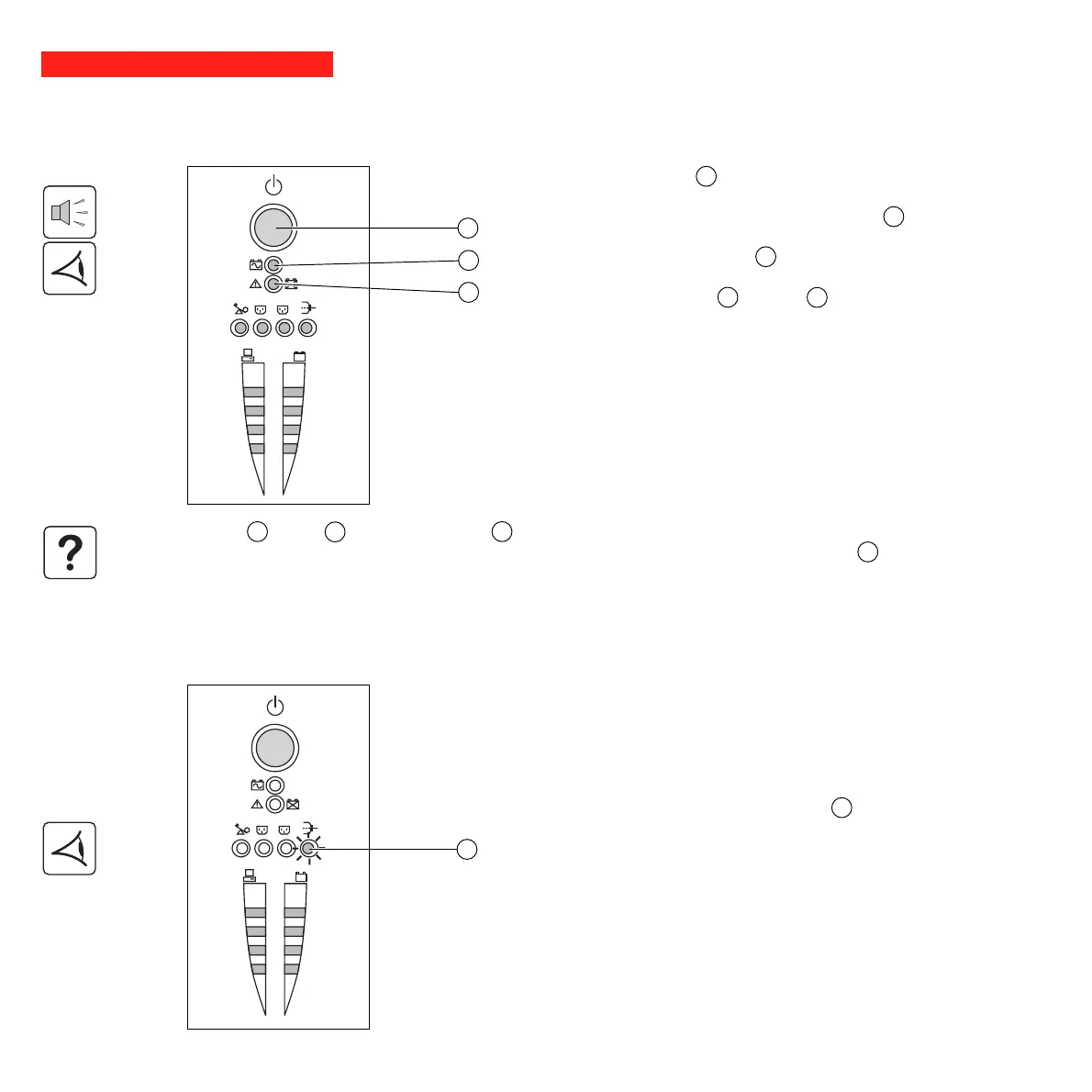
Press the ON / OFF button 10 .
The buzzer beeps and all the LEDs come ON.
The buzzer beeps twice during the self-test, then button 10 remains
ON, indicating that the outlets are supplied with power.
- AC power is present: Only button 10 is ON. The protected
equipment is supplied by the AC-power source.
- AC power is absent: Button 10 and LED 11 are ON. The protected
equipment is supplied by the UPS, operating on battery power.
All the connected equipment is supplied with power.
1
2
%
%
3.2 Shift to booster or fader mode
(during voltage variations in the AC-input power)
16
The booster and fader functions maintain the output voltage supplied by
the UPS within close tolerances around the rated value even if
significant voltage variations occur in the AC-input power. This avoids
calling on battery power.
The values defining the voltage range may be set using the UPS Driver
software.
During operation in booster or fader mode, LED 16 is ON, signalling a
significant voltage variation in the AC-input power.
If button 10 or LED 11 are not ON or if LED 12 is ON, there is a fault (see section 4.1).
Note: The battery is charged as soon as the UPS is connected to the AC-power source, even if button 10 is in the OFF
position.






 To Next Page