34007117EN/AB - Page 23
P U L S A R
Evolution
1 5 0 0
B
A
C
4.2 Replacement of the battery module
4. Maintenance
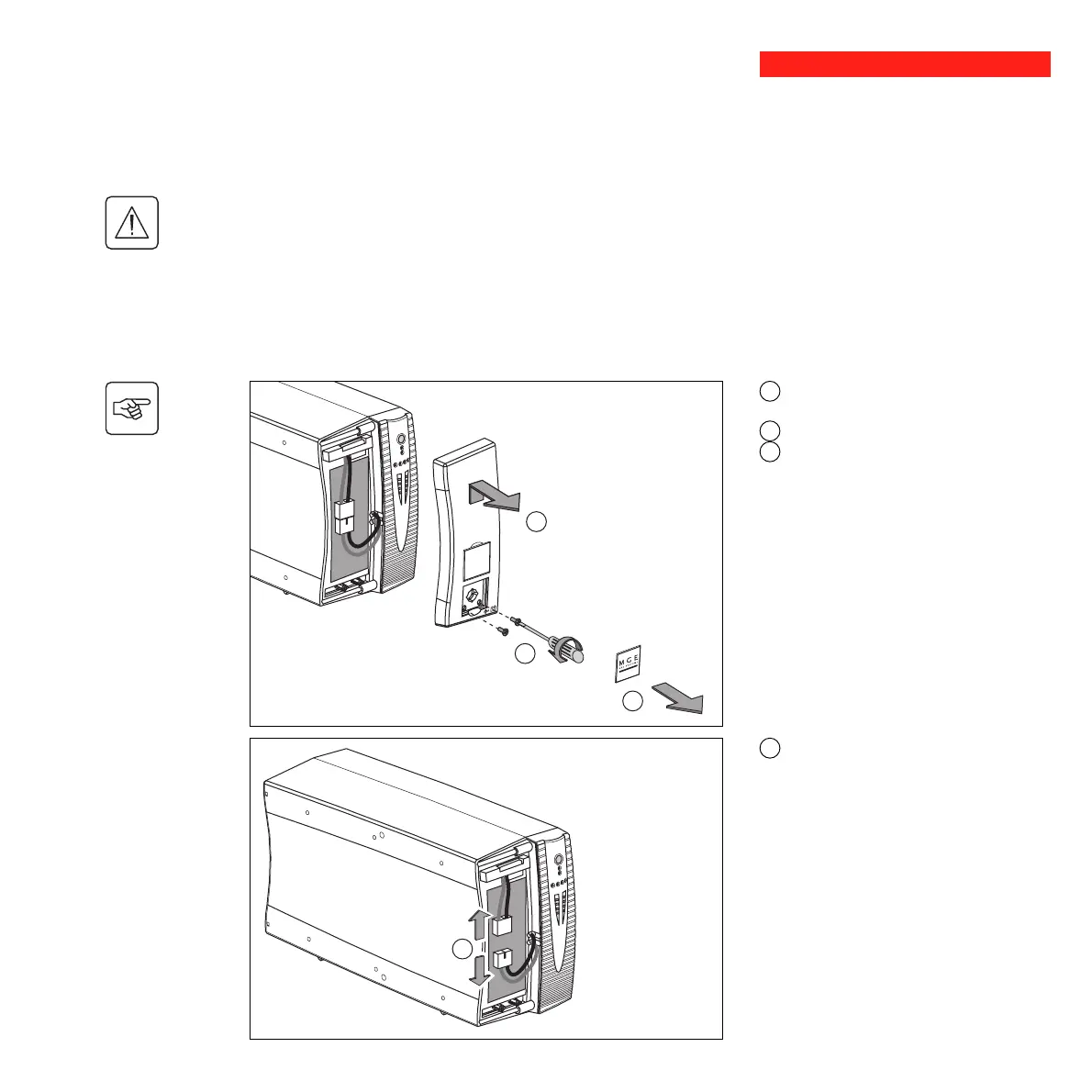
Removal of the battery module
This operation may be carried out with the UPS supplying power to the load.
Safety rules
Batteries constitute a danger (electrical shock, burns). The short-circuit current may be very high. Precautions
must be taken for all handling:
◗ remove all watches, rings, bracelets and any other metal objects;
◗ use tools with insulated handles.
A - Unclip the small plate with the MGE
logo on the front panel of the UPS.
B - Remove the two screws.
C - Remove the left-hand side of the front
panel by pulling it slightly up and then
forward.
Tower models
D
D - Disconnect the battery module by
pulling apart the connectors (never pull on
the cables).






 To Next Page