SW800 Installation Manual
17
Section 7.0 - Learning Cycle and Start Up
"TEST/LEARN" button is currently used for two functions.
a. TEST - if the "TEST/LEARN" button is pressed for less than 3 seconds and released, an activation will be
generated.
b. LEARN - if the button is pressed for at least 4 seconds and released, a door re-learn is selected.
Re-learn is confirmed by pushing the "ENTER" button.
Re-learn can be cancelled by pushing the "TEST" or "MENU" or "UP" or "DOWN" button.
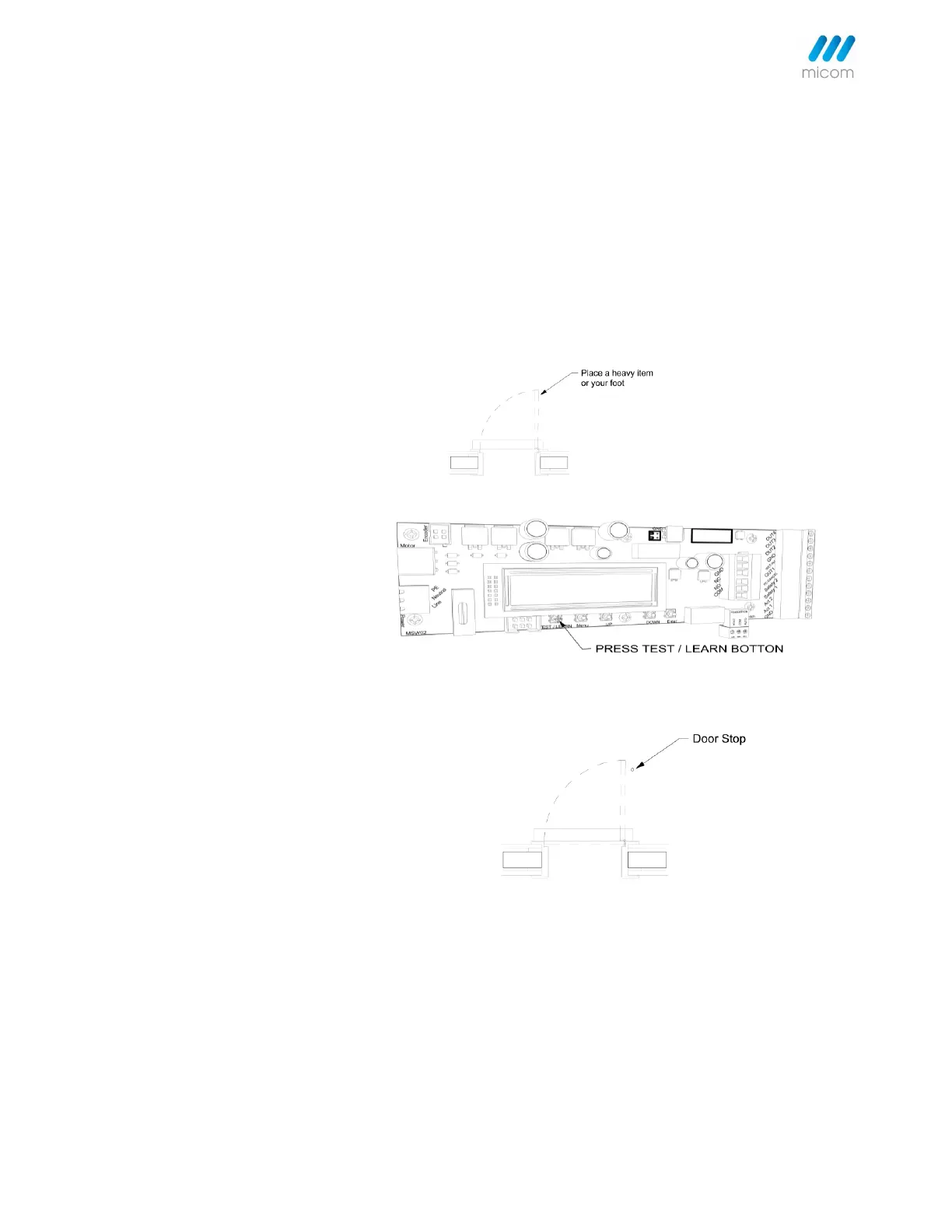
Step 1. Place a heavy item or your
foot at the desired full open position
at approx. 90 open position.
Step 2. Press Test/Learn button for 3
seconds and release to begin the
learning cycle.
Step 3. Incorporating a unique
electronic stop, the door will learn the
full open position during a one-time
open/door cycle.
The door will open until it touches the
object at the desired full open
position.
Back-check and latching position are
automatically calculated and do not
need setting (unless adjustment is
required).
On the next activation, the door will
open, slow at back check, then stop at
the learnt opened position.
The door will not hit the in-built fixed
doorstop.
Note: The built-in mechanical doorstop should only act as a limiting device should the door be pushed past its pre-
set electronically selected open position.



 To Next Page