Section 9.0 - Wiring Connections
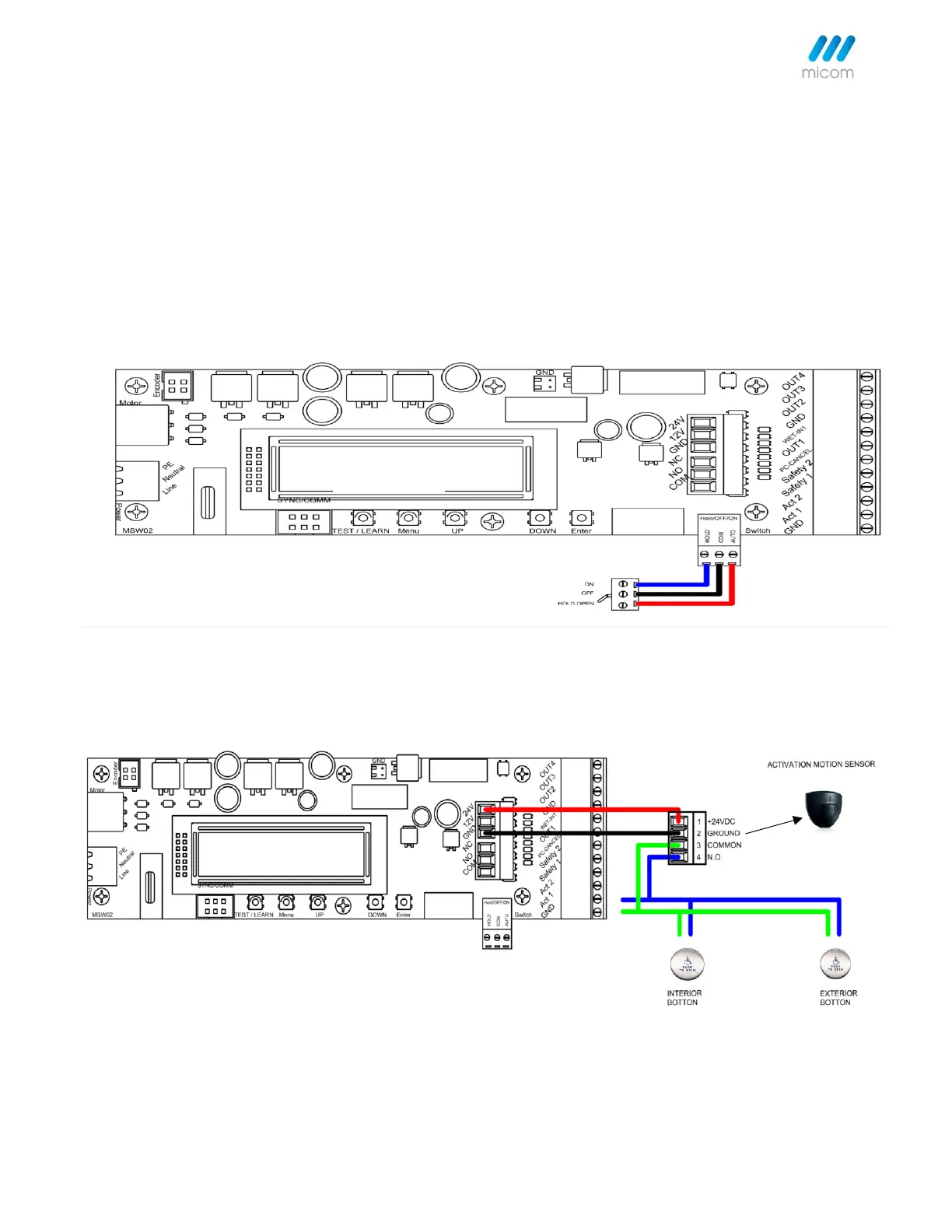
9.1 On/Off/Hold Open Selector Switch - 3 position switch offers easy selection
for 3 modes of operation:
1. Automatic - Motion sensors/push plates are active and will activate the operator to open the door automatically
should they be triggered.
2. Off/Manual - The door is free to open by hand and will fully close with spring power. This function does not switch
off the power; however, motion sensors/push plates are still active, but are ignored.
3. Hold Open - The operator will hold the door, in the fully open position, for an unlimited amount of time. The motor
will not overheat or fail causing the door to close.
9.1 "Act1" - Activation 1
9.2 "Act1" - Activation 1
Connected to activation switch such as motion sensor or push plate. When activated, this signal always opens the door.
9.3 "Act2" - Activation 2
Act2 serves only as a second activation device and requires an activation device be connected to the Act1 terminal.
Act2 only becomes active after Act1 is triggered or when the door is closing and before reaching the latch position.



 To Next Page