Page 15
midlandusa.com
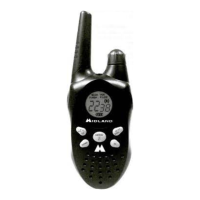
Model MXT115
To “lock” and “unlock” the keypad:
1. Be sure the radio is turned on (see Power On/Off)
2. Press and hold the Call/Lock / button for three seconds.
ƒ The Keypad Lock icon will show on the LCD display when the
keyp ad is “locked.”
3. Repeat steps 1 and 2 to “unlock” the keypad.
ƒ The Keypad Lock icon will turn off when the keypad is
“unlocked”.
Using Monitor Mode
Monitor mode lets yo u check for activity on the current active channel.
You can also use Monitor mode to adjust the vo lume of yo ur radio when
not receivi ng a signal.
To enter and exit Monitor mode:
1. Be sure the radio is turned on (see Power On/Off).
2. Be sure yo u have selected the desired channel (see Selecting the
Active Channel).
3. Press and hold the Monitor/Scan / button to enter
Monitor mode (the display will show the icon if the radio
channel is busy).
ƒ You will hear any activity on the current selected channel.
4. Turn the Volume Knob to increase or decrease the vo lume.
5. Once the vo lume has been adjusted to the desired leve l, press and hold
(3 seconds) the Monitor/Scan / button to exit Monitor mode.



 To Next Page