English-56
004-1055-00
TP210 Rev. A
© 2013 Midmark Corp. | 60 Vista Drive Versailles, OH 45380 USA | 1-800-643-6275 | 1-937-526-3662 |
[Revised: mo/dd/yr]
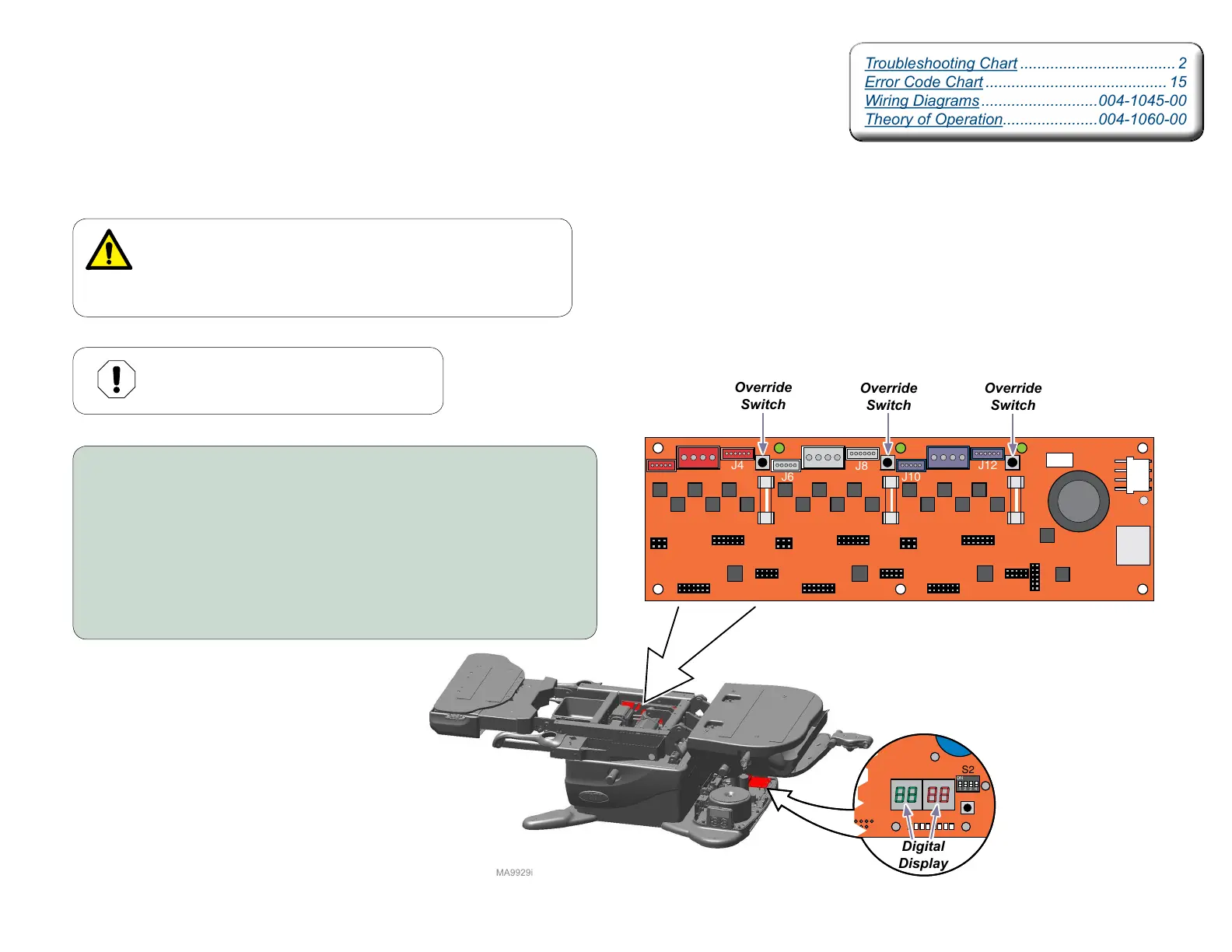
Foot, Tilt, and Back Function Override Switches
Isolating a Malfunction
In the event that an Overtravel limit switch is malfunctioning, the Foot, Tilt, or Back functions
can be operated by pressing the Override Switch on the Motor Control Hub PC Board
associated with the axis that has the malfunctioning Overtravel limit switch.
WARNING
The overriding of the Overtravel limit switches should only be
done after an inspection of the equipment determines the
product is acceptable to be moved. Failure to do so may result
in personal injury or damage to the table.
J14
J13
J12
J11
J10
J8
J7
J6
J4
J3
J2
F3
F2
F1
J9
J5
J1
TPD1
TPD2
TPD3
TPC1
TPC2
TPC3
TPB1
TPB2
TPB3
J15
TPA
Foot
Override
Switch
Tilt
Override
Switch
Back
Override
Switch
Digital
Display
Machine Control
Board
Motor Control Hub PC Board
To override...
A) Unplug table power cord.
B) When the digital display on the Machine Control Board darkens,
press and hold the Override switch associated with that axis.
C) While holding the Override switch, plug in table power cord.
D) Continue to hold the Override switch while pressing the associated
UP / DOWN button on the Hand Control and motion will be allowed.
E) When testing is complete, unplug table power cord.
F) When the digital display darkens, plug in table power cord.
Equipment Alert
Operating any function beyond the factory
pre set limits may cause damage to table.
Troubleshooting Chart .................................... 2
Error Code Chart .......................................... 15
Wiring Diagrams ...........................004-1045-00
Theory of Operation......................004-1060-00
Troubleshooting Chart .................................... 2
Error Code Chart .......................................... 15
Wiring Diagrams ...........................004-1045-00
Theory of Operation......................004-1060-00



 To Next Page