English-77
004-1055-00
TP210 Rev. A
© 2013 Midmark Corp. | 60 Vista Drive Versailles, OH 45380 USA | 1-800-643-6275 | 1-937-526-3662 |
[Revised: mo/dd/yr]
Foot Smart Sensor Switches
Switch Access
WARNING
Always disconnect table from power source before removing
any covers. Failure to do so may result in personal injury.
Troubleshooting Chart .................................... 2
Error Code Chart .......................................... 15
Troubleshooting Chart .................................... 2
Error Code Chart .......................................... 15
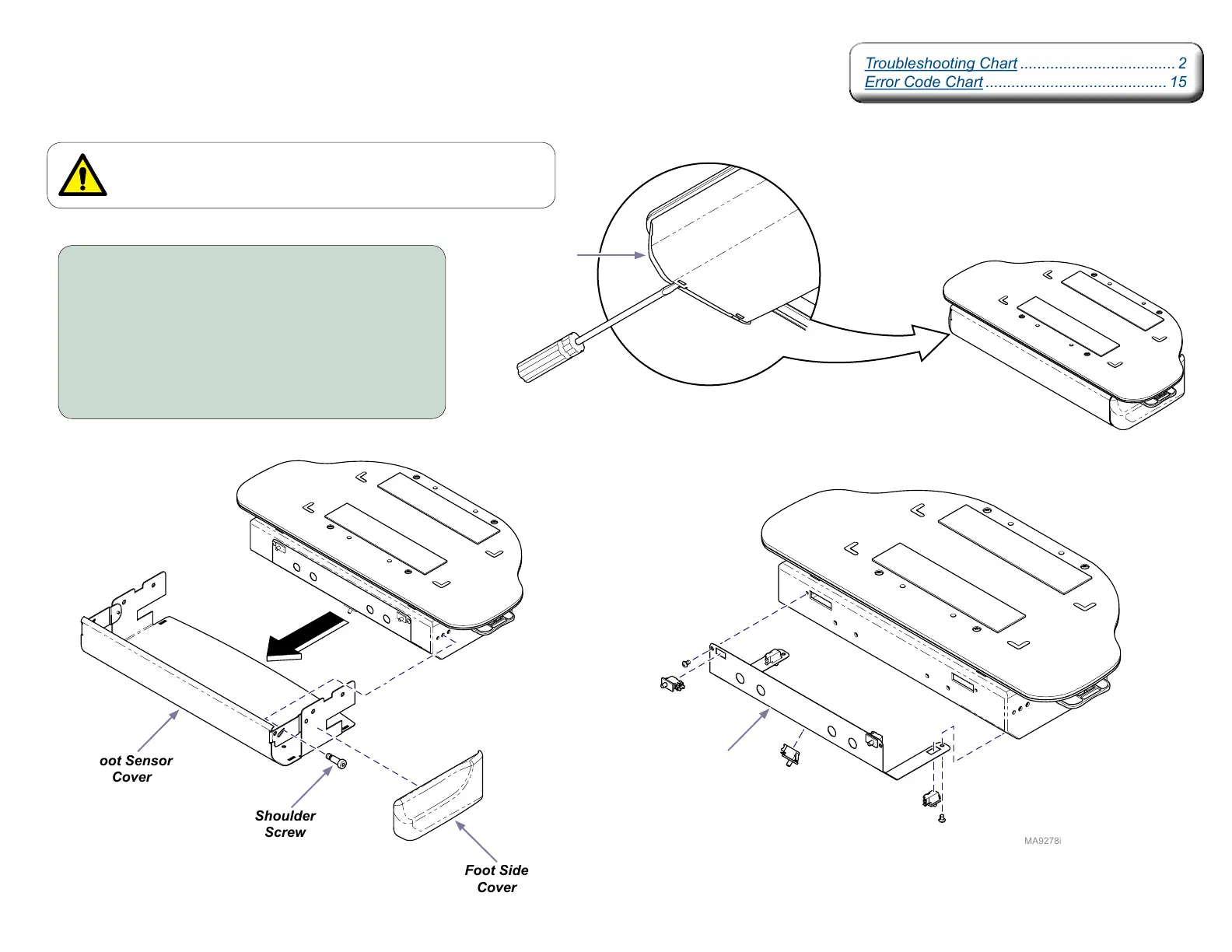
To access foot smart sensor switches...
A) Insert flat blade screwdriver into slots on bottom
of foot side covers to disengage and remove.
B) Remove two shoulder screws and pull foot
sensor cover forward.
C) Remove four screws to loosen switch bracket.
D) Depress tab on switch to remove switch from
switch bracket.
Foot Sensor
Cover
Shoulder
Screw
Foot Side
Cover
Foot Side
Cover
Switch
Bracket



 To Next Page