Cleaning and care
99
Cleaning the AutoDos
If the Clean AutoDos message is dis-
played, check that the AutoDos is
clean, and clean it if necessary, e.g.
powder residues. This helps keep the
AutoDos working properly.
In order to ensure that the AutoDos
function works at its best, check it
each time you replace the PowerDisk
and clean it if needed.
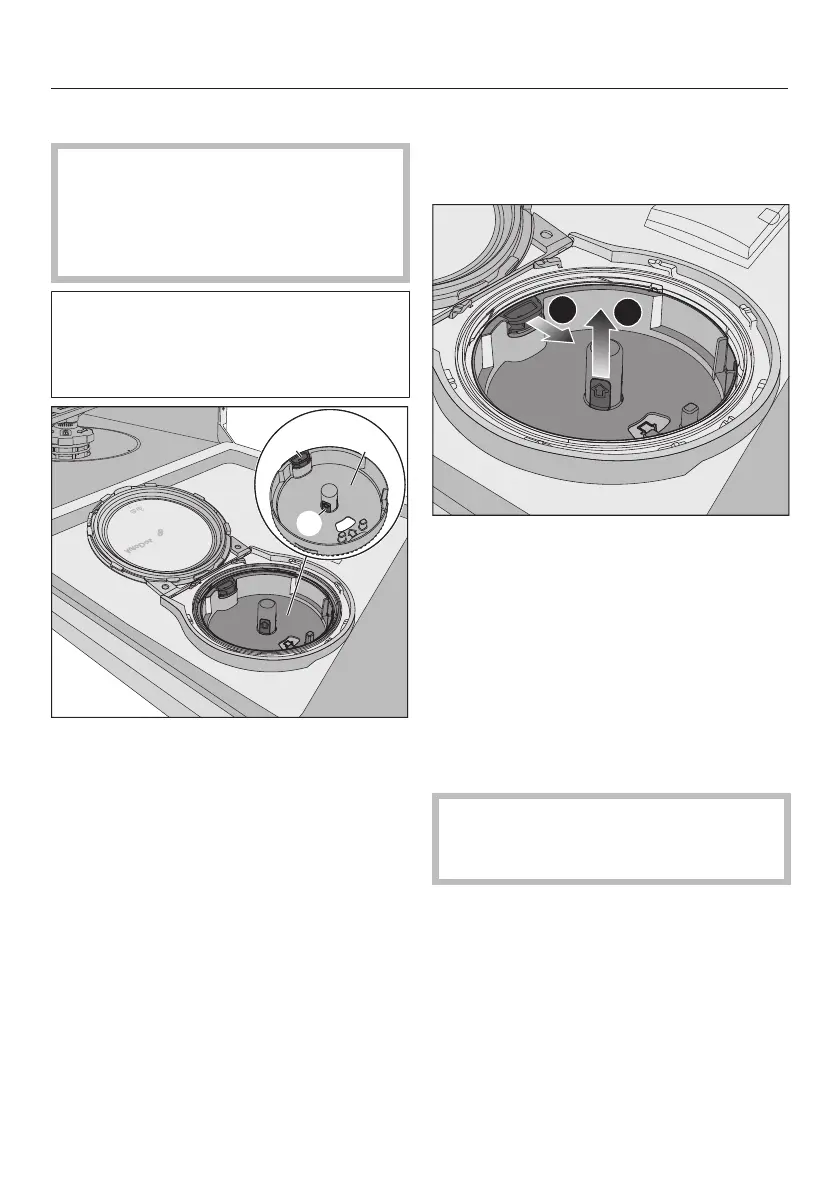
PowerDisk holder
yellow opening tag for unlocking the
PowerDisk holder
yellow tabs on the PowerDisk holder
Turn the AutoDos lid to and open
it.
Remove the PowerDisk if appropriate.
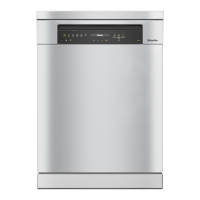
Unlock the PowerDisk holder by
pulling the yellow opening tag in the
direction of the arrow and simul-
taneously pull the PowerDisk holder
upwards using the yellow tabs.
Clean the AutoDos housing and the
PowerDisk holder with a damp cloth.
Dry all parts well so that the deter-
gent powder does not clump to-
gether.
It is very important that no moisture
stays inside the AutoDos system
during cleaning.



 To Next Page