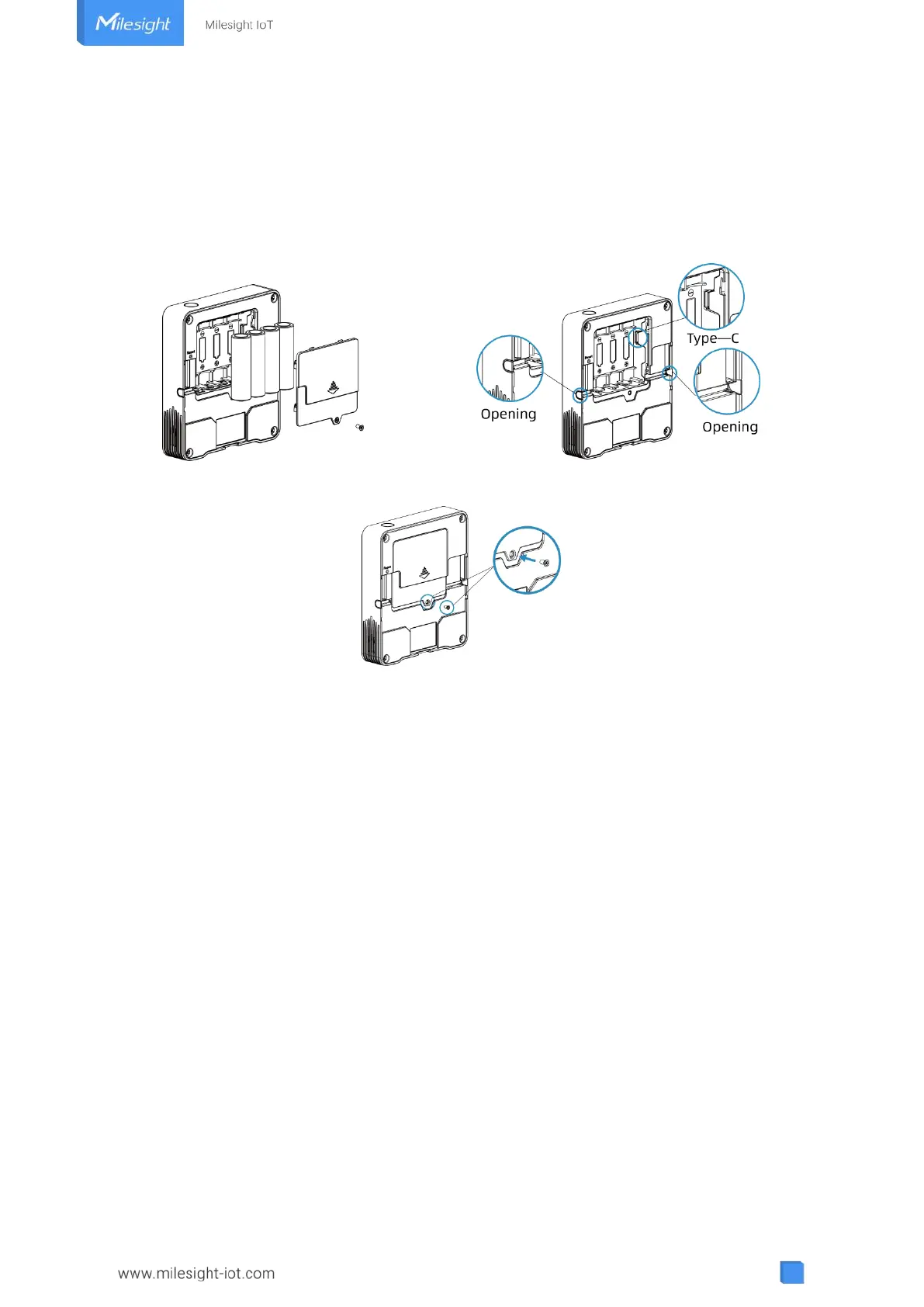
3. Power Supply
1. Release the screw at the back of device and remove the rear cover.
2. Install the batteries or type-C cable to the device. If the device is powered via type-C port, then
left or right side should make an opening to pass through the type-C cable.
3. Fix the rear cover back to device with the fixing screw.
Note:
AM307 and AM308 can be powered via USB type-C port or by ER14505 Li-SOCl
2
batteries.
When batteries and external power are both used, external power will be the preferred power
supply option.
AM319 supports powered via USB type-C port only.
Type-C port can't be used to charge battery.
4. Operation Guide
4.1 Log in the ToolBox
AM300 series can be monitored and configured via ToolBox App or ToolBox software. Please
select one of them to complete configuration.
4.1.1 NFC Configuration
1. Download and install “Milesight ToolBox” App from Google Play or Apple App Store.
2. Enable NFC on the smartphone and launch Milesight ToolBox.
3. Attach the smartphone with NFC area to the device to read device information. Basic



 To Next Page