OM-289711 Page 15
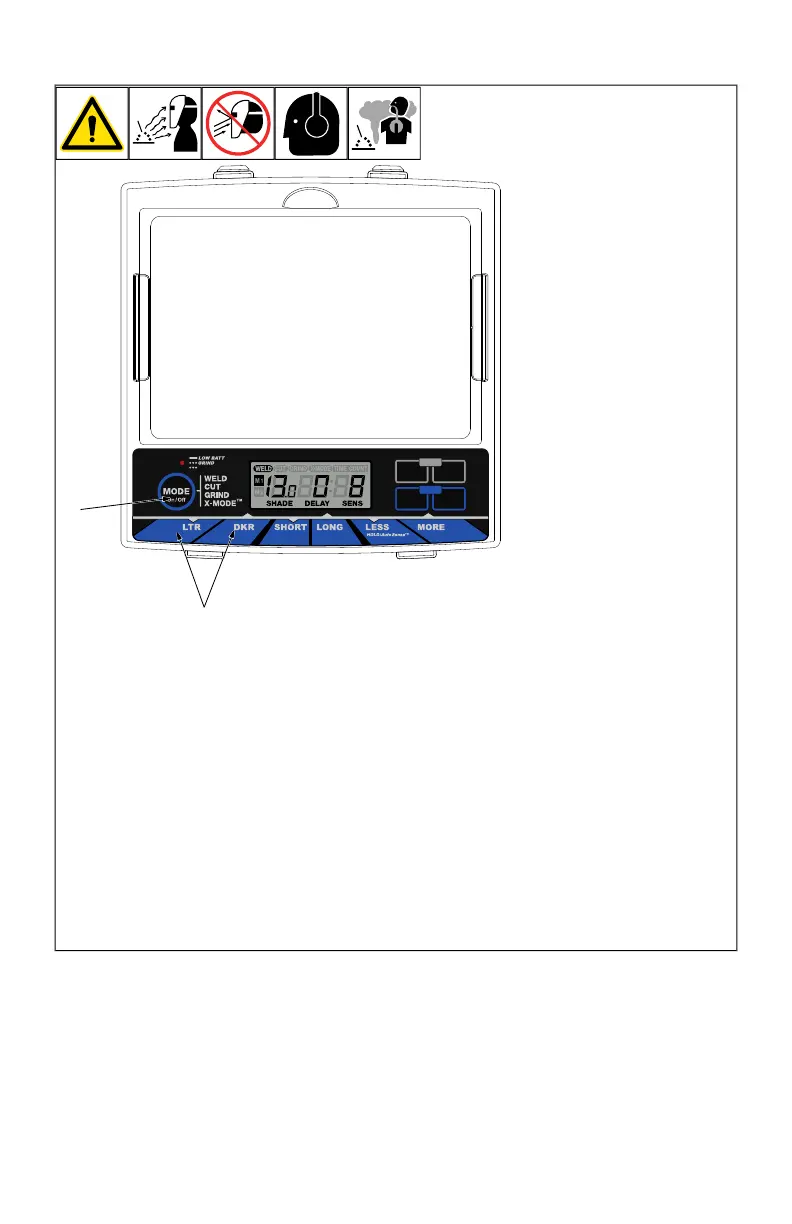
5-4. Variable Shade Control
(R)
MEMO
(
B
)
ARC
MEMO
TIME COUNT
1 2
2
1
1 Variable Shade Adjust-
ment Buttons
2 Mode Control Button
Use the LTR and DKR adjust-
ment buttons to adjust the
lens shade in the darkened
state. Use the table in Section
1-4 to select proper shade
control setting based on your
welding process. The shade
ranges for each mode are as
follows:
Weld - No. 8–No. 13
Cut - No. 5–No. 8
Grind - No. 3 only
X-Mode - No. 8–No. 13
Start at the highest setting
and adjust lighter to suit the
application and your personal
preference.
Variable Shade Adjustment
Procedure
l Press Mode button to turn
lens On.
l Press Mode button to se-
lect desired function:
Weld, Cut, or X-Mode.
l Use LTR and DKR adjust-
ment buttons to select de-
sired shade.
l Begin welding or continue
with other lens
adjustments.








 To Next Page