User Manual minCam360compact
®
®minCam GmbH, Bundesstraße 9, 87538 Fischen, Germany info@mincam.de
Version: March 2020, according to the technical state of the art at the time of publication, subject to alterations
If the battery has a significantly shorter operating time than after purchase,
it can be assumed that it has reached the end of its life.
•
ATTENTION, Risk of injury: Never open the system without authorisation,
never carry out repairs yourself.
•
Handle the system with care. It can be damaged by shocks, blows or falling
from an already low height. Keep all parts of the operation unit away from
moisture and extreme heat. Protect the storage unit from dirt and rain.
To ensure smooth storage, format the SD card from time to time. Keep the
memory card away from magnetic exciters.
•
Do not use contaminated cameras for fresh water operations.
In case of damage caused by improper operation, the warranty claim becomes void.
No liability is assumed for consequential damages. Technical changes and errors
excepted.
1.2.2
Intended use
This camera system is designed for optical inspections of pipes and cavities, not for
medical inspections. Please use the camera system only for the predetermined range
of applications.
1.2.3
Commissioning with monitor case
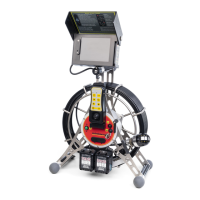
If the minCam360compact
®
is used with the TFT5R, proceed as follows during
commissioning:
1.
Move the monitor case (display and control unit) into position. Align the case
by releasing the lever on the ball joint. When the monitor is in the ideal working
position, close the lever again.


 To Next Page