Home
Mingda
3D Printers
MD-600 Pro
Page 14 (MD-600 Pro Software Configuration)
Mingda MD-600 Pro - MD-600 Pro Software Configuration; MD-600 Pro Machine & Extruder Settings
24 pages
Manual
Save Page as PDF
To Next Page
To Next Page
To Previous Page
To Previous Page
Loading...
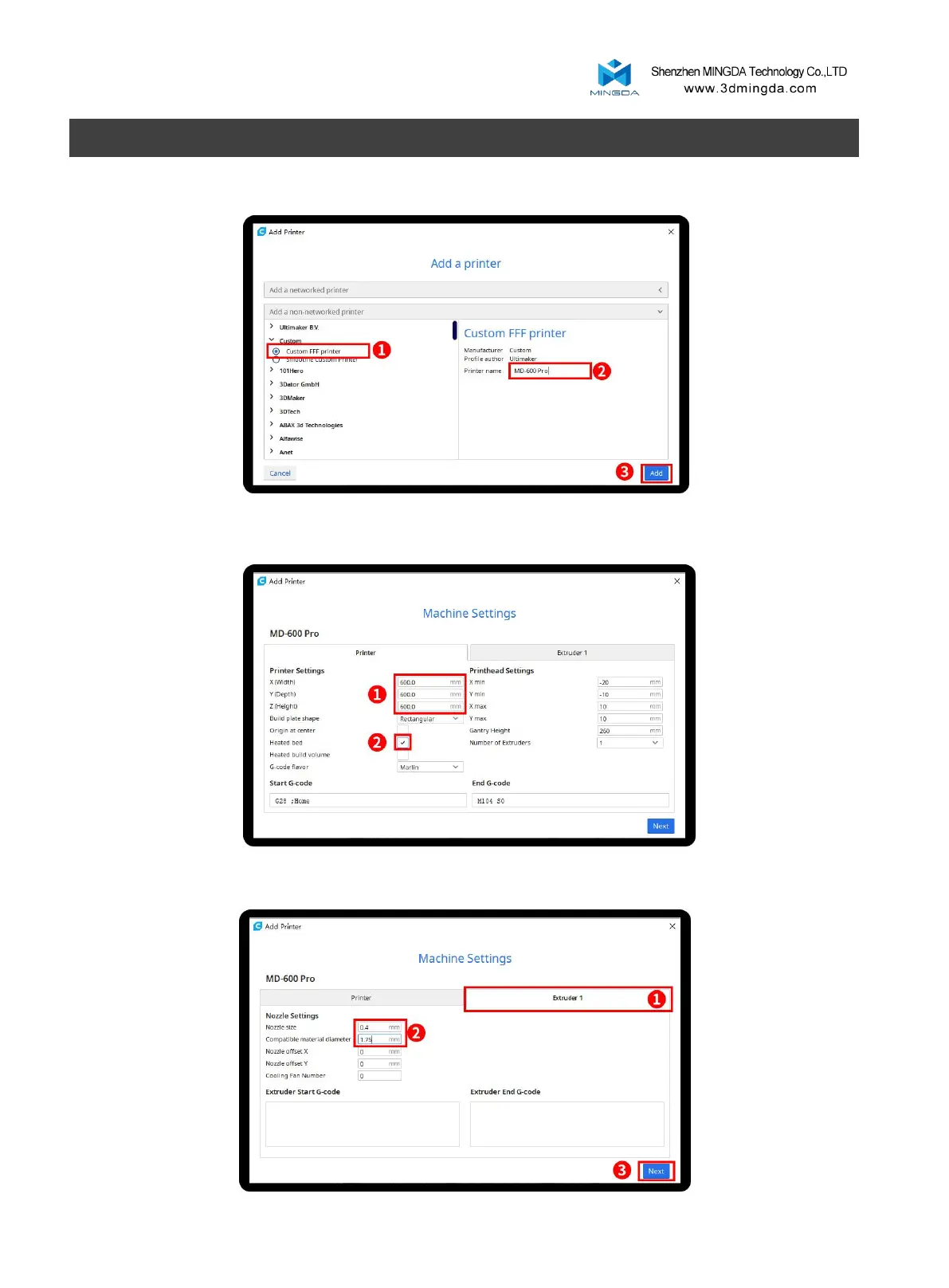
Choose Cust
om[Custom F
FF printe
r ], insert P
rinter na
me for ex
ample MD
-600 Pro, and C
lick Add
Insert prin
t size, X600 Y6
00 Z600, sele
ct Heat
ed Bed
Click Ex
truder 1, n
ozzle size 0.4
mm, Comp
atible fila
ment dia
meter 1.7
5mm, Clic
k next
12
MD-600 Pr
o
13
15
Table of Contents
Main Page
Table of Contents
2
Notice
3
Brief Introduction
5
User-Guide Instructions
5
Learn more Information
5
Safety Precautions
5
Overview
6
View of 3D Printer
7
Tool Box Accessories
8
Installation
9
Take out the Tool Box
9
Plugged in
9
Turn on the Power Switch
9
Install the Filament (Take PLA Filament as an Example )
9
Auto Bed Leveling
11
Printing the Test Files
12
Software
13
Install CURA
13
Add Printer
13
Import Configuration File
16
Slicing
18
Printing Process
19
Pause and Continue to Print
19
Dismantle the Model
20
General Maintenance
20
Daily Preventive Maintenance
20
500 Hours Maintenance
20
Switch between High Temperature and Ordinary Hot End
21
Trouble Removal
21
Support
22
Customer Support
22
Working Computer Specifications
22
MINGDA Limited Warranty Statement
22
Quality Assurance
23
Related product manuals
Mingda MD-600D
32 pages
Mingda MD-6H
20 pages
Mingda MD-4H
20 pages
Mingda MD-400D
40 pages
Mingda MD-A128
16 pages
Mingda MD-1000D
32 pages
Mingda MD Series
20 pages
Mingda Magician X
20 pages
Mingda Magician X2
42 pages
Mingda Magician Pro
24 pages
Mingda Glitar 4
10 pages



 To Next Page