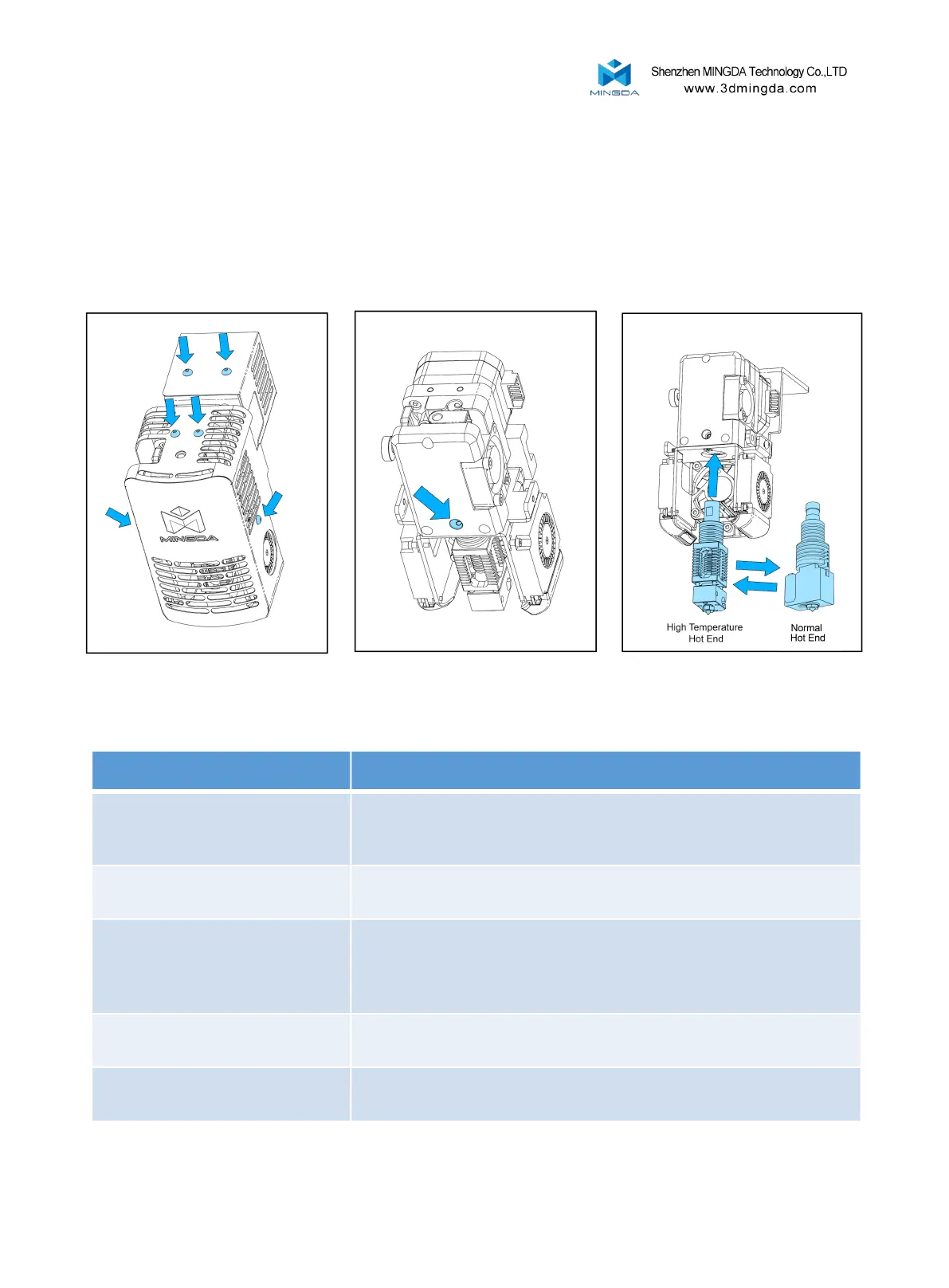
Switch Between High-Temperature and Normal Hot End
1. Remove the six screws as shown.
2. Remove the cable terminal on the hot end and loose the screw that secures the hot end.
3. replace a new hot end.
4. Insert the new hot end, tight the fixing screw, and connect the cable terminal.
5. Reinstall the two covers.
7. Trouble Removal
1. Check whether the power cord is inserted firmly
2. Check if the power switch is turned on
3. Confirm whether the socket has power
Filament may be stuck in the nozzle, please refer to
<1000 hours maintenance>
Please check the lubricating condition, wipe oil on the optical axis and
evenly lubricate again.
Another possibly reason is rack affected by external force during transport
( At the moment you need to contact MINGDA after sales service)
SD card damaged; SD card slot damaged; SD card inserted deep
insufficient; the slots line is loose.
Can't show temperature or heat
The temperature sensor the heater is in poor contact or damaged; the
main board is faulty.
19



 To Next Page