minnkotamotors.com | 33
©2022 Johnson Outdoors Marine Electronics, Inc.
REPLACING THE BATTERY
Alignment Alignment
PegPeg
BatteryBattery
Retaining Retaining
FingersFingers
Retaining Retaining
FingersFingers
BatteryBattery
Remote Remote
Case FrontCase Front
Remote Remote
Case BackCase Back
Remote Remote
Case FrontCase Front
Remote Remote
Case Case
BackBack
3f
3g
Circuit Circuit
BoardBoard
KeypadKeypad
Alignment Alignment
PegPeg
ScrewsScrews
3
4
5
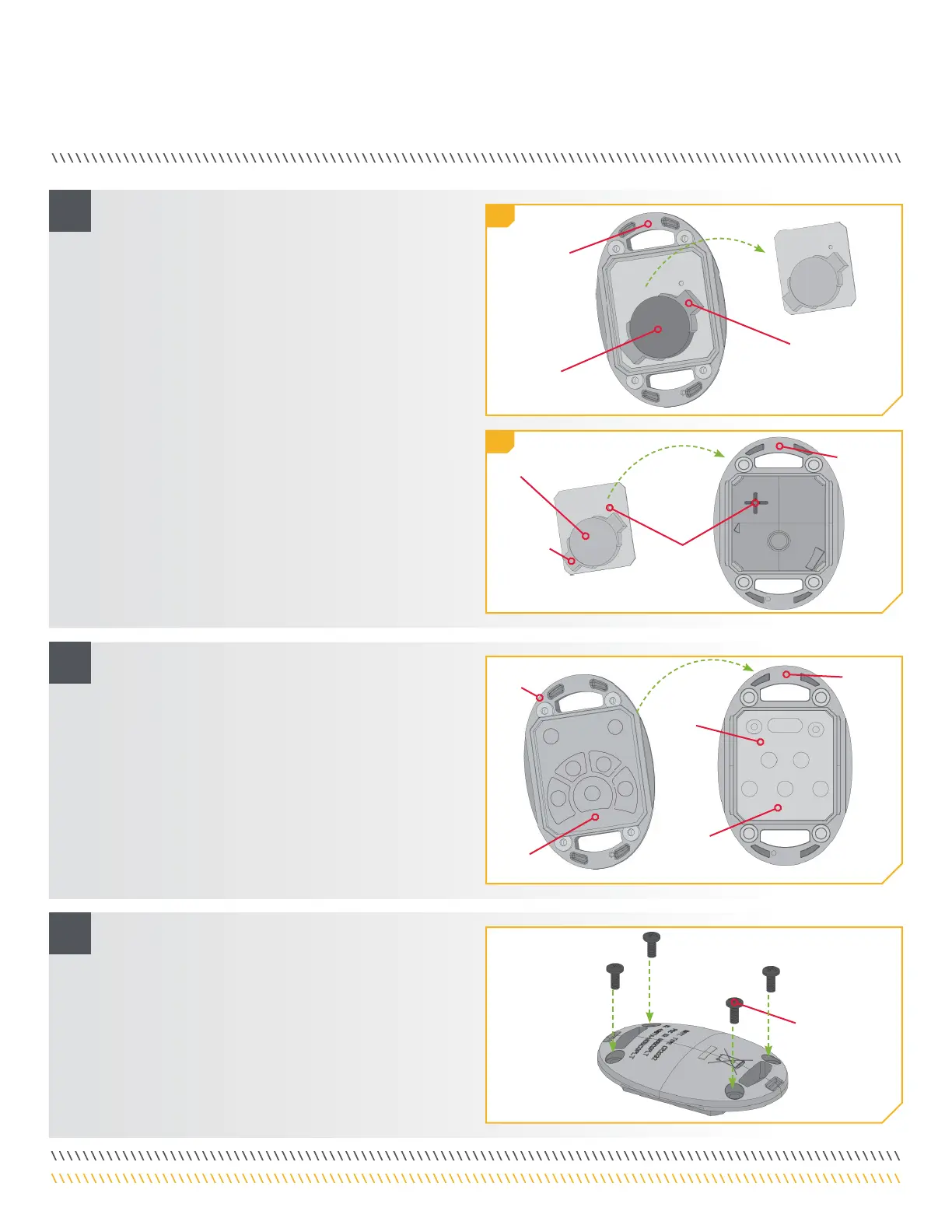
f. Reassemble the remote. Begin by removing the
board from the front of the remote case. This is the
same board that holds the battery. Leave the Keypad
in place on the front of the remote.
g. Note that the alignment peg in the back of remote
case must line up with the corresponding alignment
hole in the circuit board. Place the board with the
battery facing down on the back of the remote case.
h. Position the back of the remote case so that the
Alignment peg is towards the top when the remote
is laying on a flat surface. Position the front of the
remote case so the keypad and the curved buttons
are towards the bottom when the remote is laying on
a flat surface.
i. Keep the back of the Remote Case flat. Place the
front of the Remote Case, with the Keypad is place,
on the back of the Remote Case. Make sure the Case
is seated.
j. Reinstall the four case screws and tighten them
as required.


 To Next Page