2726
SETTING DATE/TIME STANDARD LENS POSITION
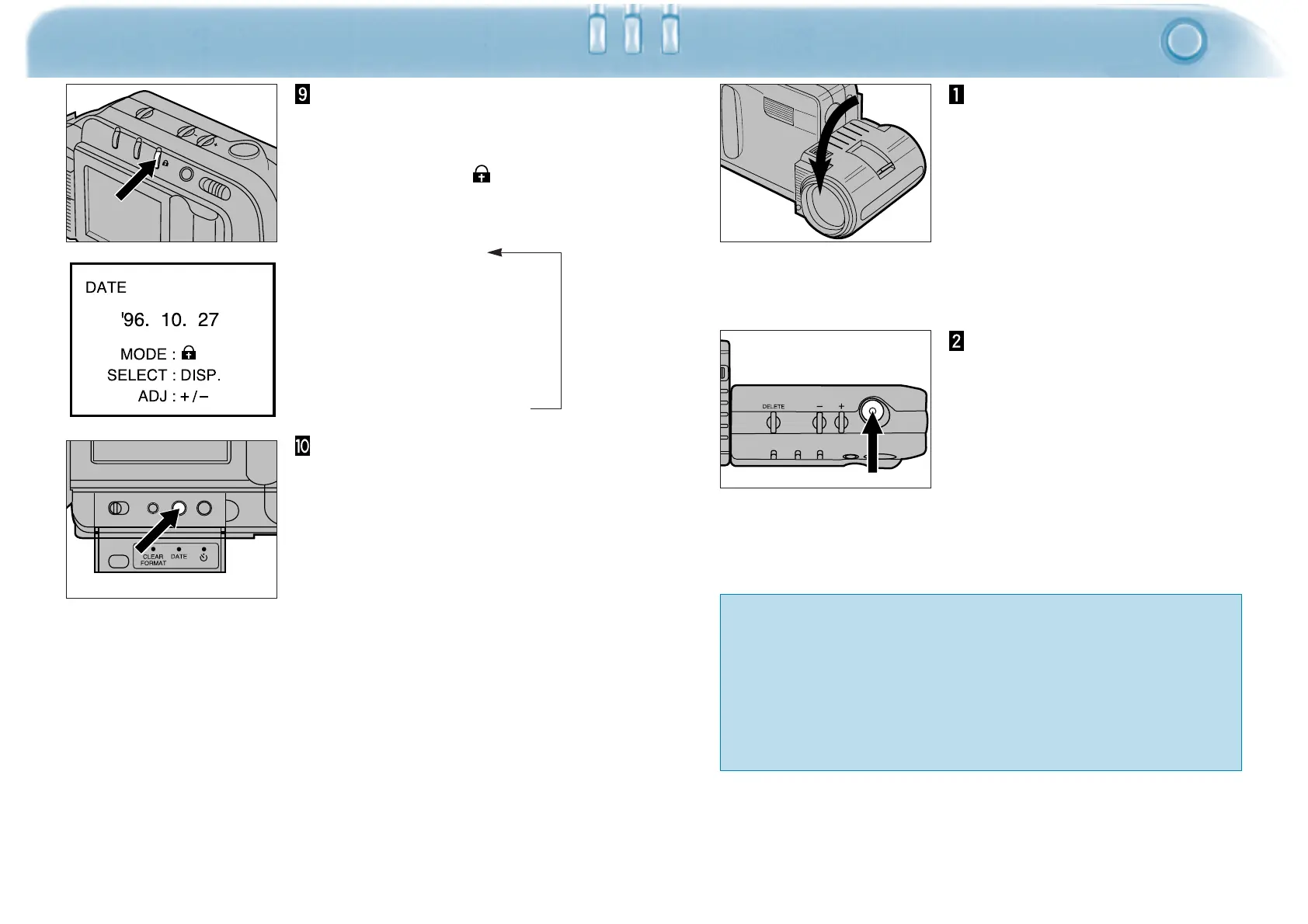
Once all the settings are
correct, reselect the date
format by pressing the
protect button ( )
• The formats will appear in the
following sequence:
YY MM DD
↓
MM DD YY
↓
DD MM YY
↓
AM/PM (12 hour clock)
↓
Military (24 hour clock)
Press the date button to
exit the Set Date/Time
menu.
Turn the lens unit forward
by 90° as shown. This
position will be referred to
as the "standard lens
position" throughout this
manual.
• Rotate the unit as far as it will go.
• The flash will not fire unless the
lens is in the standard position.
Frame the image in the
LCD monitor, then press
the shutter-release button.
• To prevent blurring, hold the
camera firmly with both hands and
keep your arms at your sides.
• Keep your fingers and hair from
blocking the lens and flash.
The Dimâge V lens unit rotates forward and backward, making it
possible to photograph yourself (see page 42).
With the Lens Extension Cable LS-V100 the lens unit can be
detached from the camera and used to photograph from a variety
of angles (see pages 43-46).





 To Next Page