EasyManua.ls Logo

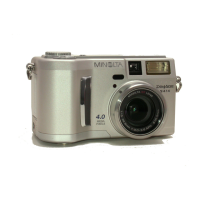
Minolta DiMAGE S404 - User Manual

Minolta DiMAGE S404
116 pages
Print Icon
To Next Page IconTo Next Page
Loading...
INSTRUCTION MANUAL
E
9224-2781-11 H-A201

Table of Contents

Questions and Answers

  • B
    Benjamin NguyenJul 30, 2025
    Why Minolta DiMAGE S404 pictures are too dark while using flash?
    • J
      Jillian StricklandJul 30, 2025
      If your Minolta Digital Camera pictures are too dark when using the flash, the subject may be too far away. Try moving closer to the subject or increasing the camera's sensitivity setting.
  • K
    Katherine BaileyAug 5, 2025
    Why are my Minolta DiMAGE S404 Digital Camera pictures not sharp?
    • D
      Dr. Chris Brown MDAug 5, 2025
      If your Minolta Digital Camera pictures are not sharp, here's what you can do. Ensure your subject is within the autofocus range, or try using macro mode if appropriate. If you're already in macro mode, try canceling it. For tricky focusing situations, use the focus-lock function on an object at the same distance as your subject, or switch to manual focus. If you're using slow shutter speeds while hand-holding the camera, try using a tripod, increasing the camera's sensitivity, or using the flash.
  • C
    carlosmaxwellAug 11, 2025
    What to do if the shutter will not release on Minolta DiMAGE S404?
    • K
      Kevin JarvisAug 11, 2025
      If the shutter on your Minolta Digital Camera won't release, it could be due to a full CompactFlash card. Try inserting a new card, deleting some images to free up space, or reducing the image quality or size settings. Also, make sure there's a CompactFlash card actually inserted in the camera.
  • R
    Roy PetersAug 17, 2025
    Why continuous drive does not work on Minolta DiMAGE S404 Digital Camera?
    • G
      Gabriel FlemingAug 17, 2025
      If the continuous drive function isn't working on your Minolta Digital Camera, check your image quality setting. If it's set to super fine, try changing it to a different setting.
  • E
    ericwilliamsAug 22, 2025
    What to do if Minolta DiMAGE S404 live image is black or white?
    • S
      Steven AlexanderAug 22, 2025
      If your Minolta Digital Camera displays shooting data but the live image is entirely black or white, it might be set to manual-exposure mode (M). Try adjusting the shutter speed or aperture value until an image appears on the monitor.

Summary

Before You Begin

Packing List

Lists all items included with the Minolta DiMAGE S404 digital camera.

Battery Recommendation

Advises on using Ni-MH batteries for better camera performance and longevity.

For Proper and Safe Use

Battery Safety Warnings

Details precautions for handling and using camera batteries to prevent damage or injury.

General Safety Precautions

Covers essential safety guidelines for using the camera, AC adapter, and flash.

Names of Parts

Camera Body Overview

Identifies key components and controls on the camera body.

Viewfinder and Mode Dial

Explains the viewfinder's function and the camera's mode dial settings.

Data Panel and LCD Monitor Display

Details the indicators and information shown on the data panel and LCD monitor.

Getting Up and Running

Attaching Neck Strap and Lens Cap

Instructions on how to attach the camera strap and lens cap securely.

Changing Batteries

Step-by-step guide for inserting and replacing AA batteries in the camera.

Battery Condition and Auto Power Save

Explains battery indicators and the camera's power-saving features.

CompactFlash Card Installation

Details how to insert and manage the CompactFlash memory card.

Auto-Recording Mode

Handling the Camera

Provides guidance on how to hold the camera steady for optimal shooting.

Setting Automatic Recording

Explains how to set the camera for fully automatic image capture.

Zoom Lens and Digital Zoom

Details the camera's optical and digital zoom capabilities and usage.

Basic Recording Operation

Step-by-step guide to taking a photograph using auto-recording mode.

Flash Modes

Describes the different flash modes available and their uses.

Drive Modes

Details options like self-timer, continuous advance, and bracketing.

Navigating the Auto-Recording Menu

Guides users through accessing and changing auto-recording settings.

Image Size Settings

Explains image size options and their impact on file size and quality.

Image Quality Settings

Details image quality options affecting compression and file size.

Exposure Compensation

Explains how to adjust exposure for lighter or darker images.

Multi-Function Recording Mode

Autofocus Areas and Control

Explains how to select and control autofocus areas for better composition.

Exposure Modes

Covers Program, Aperture Priority, and Manual exposure settings.

White Balance Settings

Details automatic, preset, and custom white balance adjustments for correct colors.

Playback Mode

Single-Frame Playback Display

Explains the information shown during single-image playback.

Deleting Images and Movies

Provides instructions on how to safely delete still images and movie clips.

Enlarged Playback

Explains how to zoom in on images for closer examination.

Copying Images

Details the process for copying image files between storage media.

Setup Mode

Controlling Camera Operation

Introduction to the setup mode for camera functions and settings.

Navigating the Setup Menu

Guides users through accessing and changing camera settings via the menu.

Formatting CompactFlash Cards

Explains how to format the CompactFlash card, erasing all data.

Resetting the Camera

Details how to restore camera settings to their factory defaults.

Data-Transfer Mode

Connecting to a Computer Overview

Introduction to connecting the camera to a computer and OS compatibility.

Connecting the Camera to a Computer

Step-by-step instructions for establishing a connection between the camera and a computer.

Automatic Driver Installation (Windows 98;98 SE)

Steps for automatic driver installation on Windows 98/98SE.

Disconnecting Camera from Computer

Safe procedures for disconnecting the camera to prevent data loss or damage.

Troubleshooting

Camera Will Not Work Troubleshooting

Solutions for common problems preventing the camera from powering on or operating.

Shutter Will Not Release Troubleshooting

Addresses issues where the shutter button does not trigger an image capture.

Pictures Not Sharp Troubleshooting

Tips for resolving issues with out-of-focus or blurry images.

Care and Storage

Camera Care and Cleaning

Guidelines for cleaning and maintaining the camera body and lens.

CompactFlash Card Care and Handling

Proper handling and storage advice for CompactFlash cards to prevent damage.

Technical Specifications

Camera Technical Specifications

Provides detailed technical data about the camera's features and capabilities.

Minolta DiMAGE S404 Specifications

General IconGeneral
BrandMinolta
ModelDiMAGE S404
CategoryDigital Camera
LanguageEnglish

Related product manuals