5.
Highlight your selection and press the OK button to confirm.
6.
Press the MENU button to exit the settings menu and return to shooting.
3.8 AE-L & AF-L
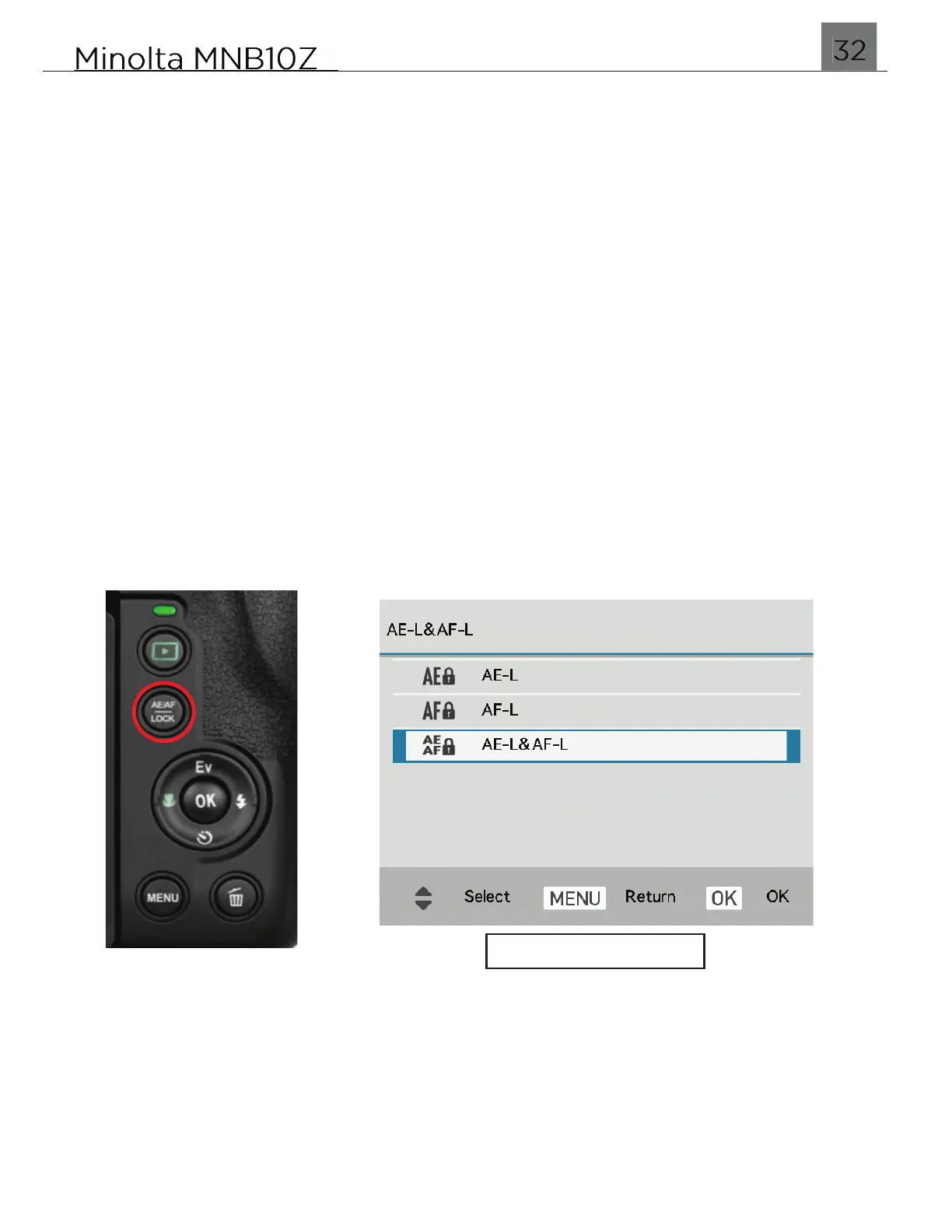
This setting allows you set the default setting for the AE/AF LOCK hotkey. When
pressing this button, it allows to quickly lock the Exposure and/or Focus.
AE-L (Auto Exposure Lock)
This function allows you to lock the auto exposure during shooting. It is useful for
when you want to reframe the scene, but keep the current exposure from changing.
It allows the camera to maintain the same brightness between captures.
AF-L (Auto Focus Lock)
This function allows you to lock the lens focus during shooting. It is useful for when
you want to focus on an object, and then recompose your shot freely while still
focused on the desired subject. It allows the camera to maintain the same focus
between captures.
AE-L & AF-L (Auto Focus Lock)
This function allows you to lock both the auto exposure and lens focus during
shooting.
1.
To access this setting, press the MENU button.
2.
Once in the menu, press the UP and DOWN buttons to navigate. Pressing the LEFT
and RIGHT buttons will switch the menu from Photo settings to Video or System
settings.
3.
Select ‘AE-L & AF-L and press the OK button to enter the submenu.
4.
You may select from AE-L, AF-L and AE-L & AF-L.
5.
Highlight your selection and press the OK button to confirm.
6.
Press the MENU button to exit the settings menu and return to shooting.


 To Next Page