5.2 Auto Off
This menu sets the duration of time in which the camera will wait with no user input
before automatically powering off.
1.
To access this setting, press the MENU button.
2.
Once in the menu, press the RIGHT button twice to switch from Camera settings to
System settings.
3.
Press the UP and DOWN buttons to navigate.
4.
Select ‘Auto Off’ and press the OK button to enter the submenu.
5.
You may select from None, 3 Minutes, 5 Minutes, and 10 Minutes.
6.
Highlight your selection and press the OK button to confirm.
7.
Press the MENU button to exit the settings menu and return to shooting.
5.3 Language
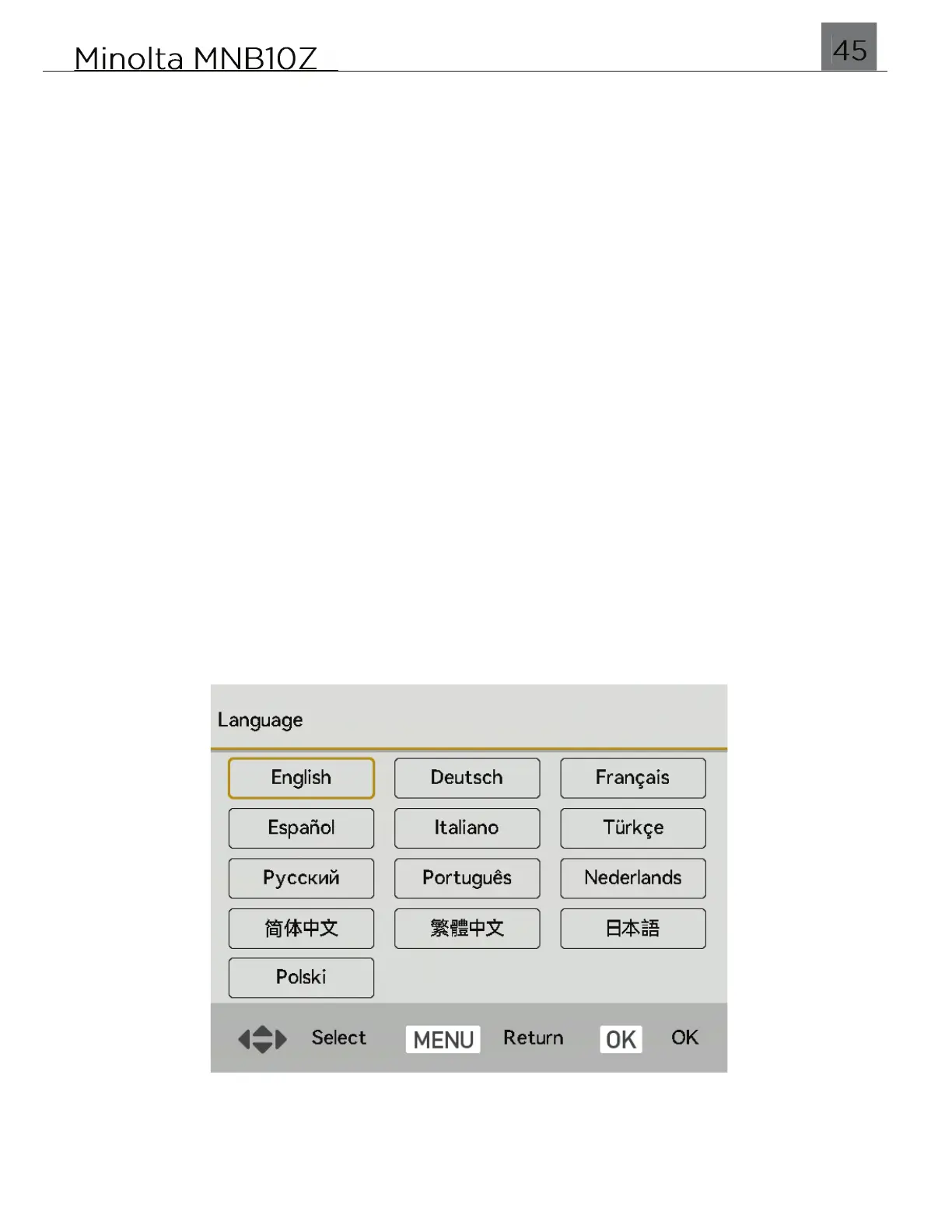
This menu sets the display language for all menus.
1.
To access this setting, press the MENU button.
2.
Once in the menu, press the RIGHT button twice to switch from Camera settings to
System settings.
3.
Press the UP and DOWN buttons to navigate.
4.
Select ‘Language’ and press the OK button to enter the submenu.
5.
You may select from any of the display languages. Below is screenshot of all
languages for reference.
6.
Highlight your selection and press the OK button to confirm.
7.
Press the MENU button to exit the settings menu and return to shooting.


 To Next Page