Instructions For Use – neXus Ultrasonic Surgical Aspirator
Doc #: 100-10-1000 rev A p 44
8.2 Mechanical Faults
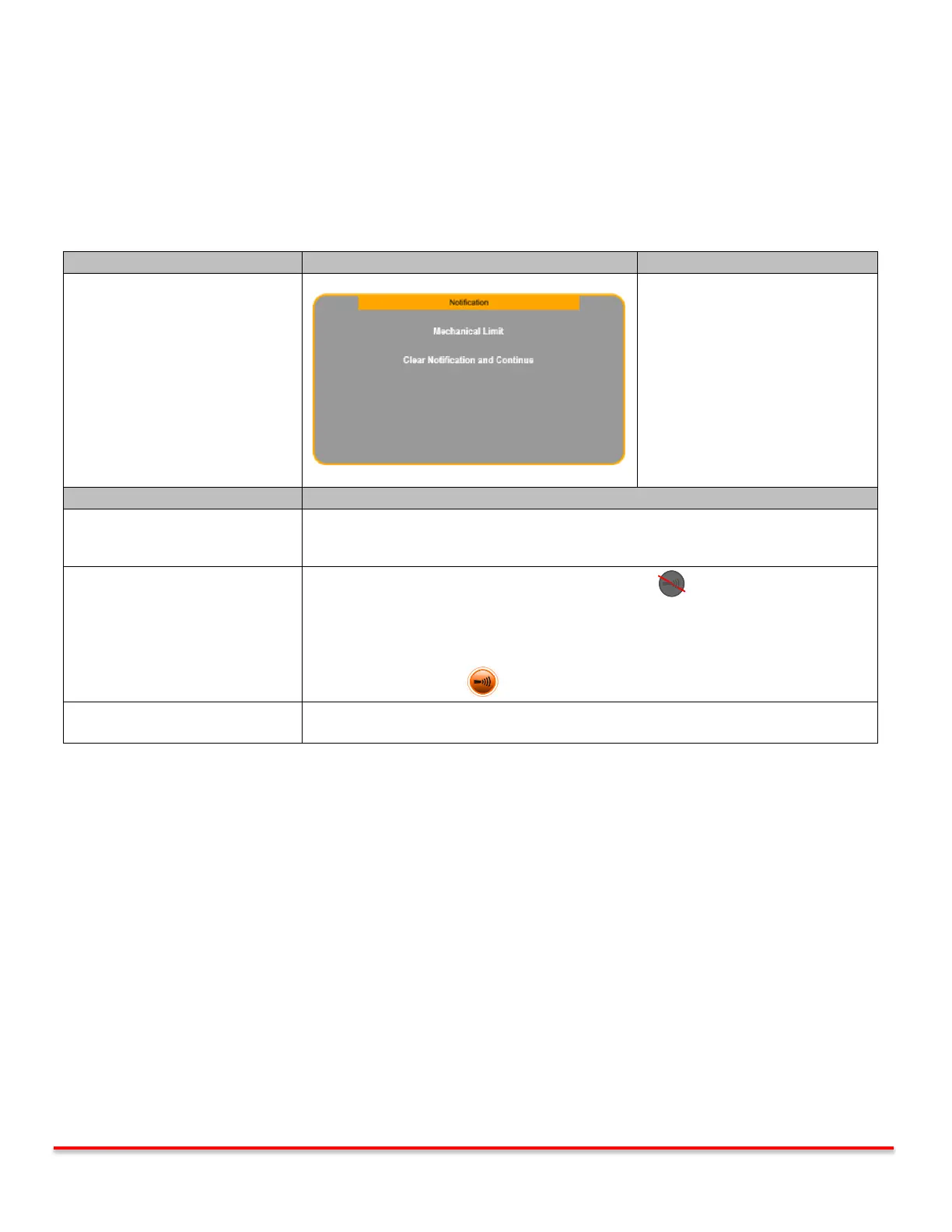
The console monitors the ultrasonic output at all times and alerts in cases of overload or malfunction of the vibrating elements
(handpiece, extension and ultrasonic tip). A Notification is displayed together with an audible indicator as long as the footswitch
is depressed. Ultrasound and Irrigation are deactivated temporarily.
Tip overload can occur during hard tissue removal when
applying excessive tip pressure or facing strong tissue resistance,
e.g. from thick cortical bone. This can lead to stalling of the
ultrasonic tip. Follow the corrective action below.
Notification
Frequency Fault
System functions remain enabled
while Notification is displayed.
Reducing tip pressure will automatically clear the Notification without releasing the
footpedal or release footpedal and try again.
If problem persists, use higher amplitude setting as required.
Release footswitch and Set ultrasound to STANDBY .
Remove silicone sleeve (if applicable) and probe cover.
Inspect extension probe and ultrasonic tip for damage. Replace if necessary.
Otherwise re-tighten extension probe and tip using the correct wrenches. Set
ultrasound to ENABLE and continue procedure.
If corrective action steps above are followed and fault continues, the handpiece may
need to be replaced.
Table 8.2: Frequency Fault Notification



 To Next Page