Instructions For Use – neXus Ultrasonic Surgical Aspirator
Doc #: 100-10-1000 rev A p 46
8.5 Temperature Faults
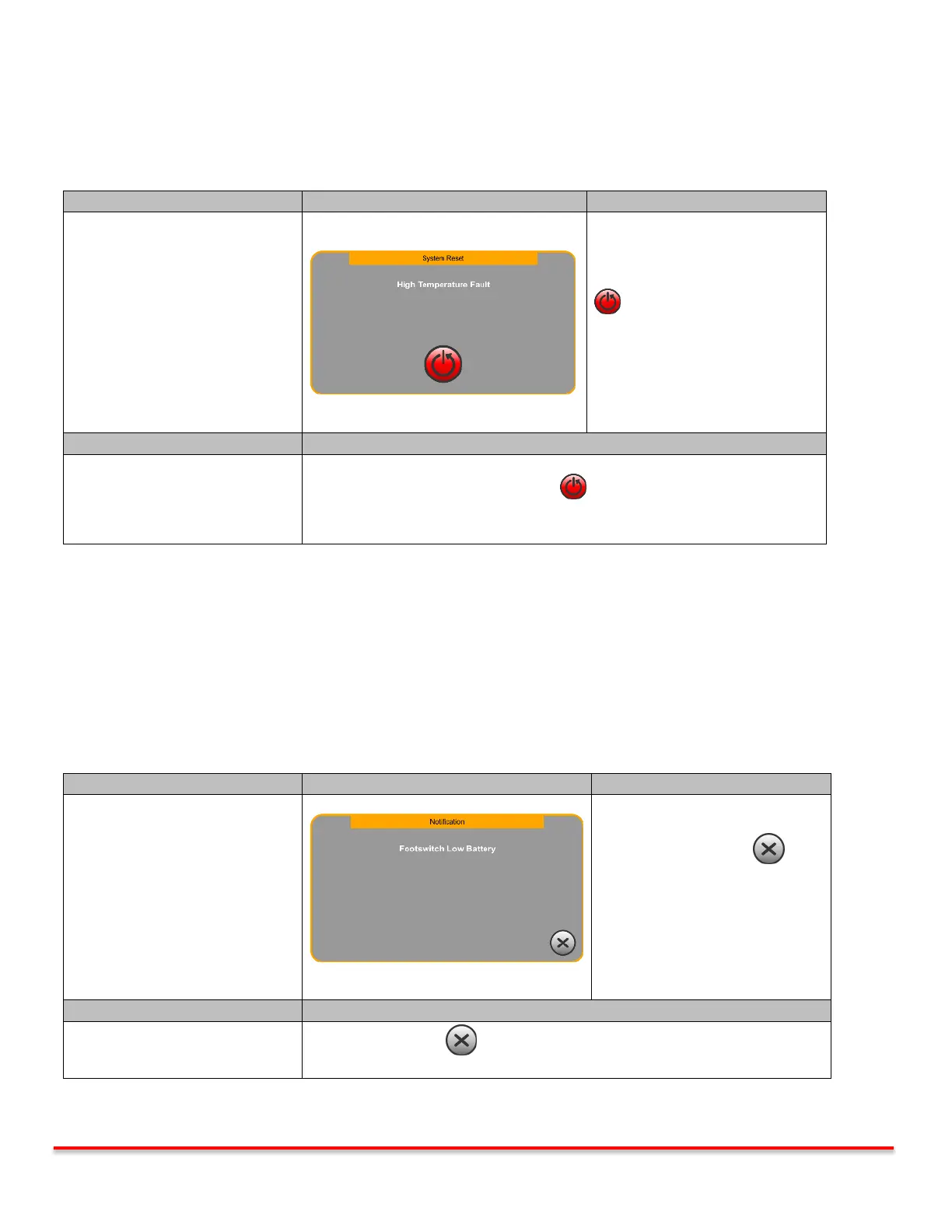
The console monitors the internal temperature at all times and faults in cases where the temperature is too high. A System
Reset screen is displayed together with an audible indicator. Ultrasound and Irrigation are deactivated.
System functions automatically
disabled.
Pressing the System Reset Button
reboots the system.
“neXus” splash screen appears
followed by the Priming screen.
Priming screen may be skipped.
*Skipping priming screen returns
user to the Main screen.
Blowers failed or are blocked
Inspect that the vents under the display and in the rear of the console are not
blocked. Press the System Reset Button and try again.
If corrective action steps above are followed and fault continues, let the unit
cool down and try again.
Table 8.5: Temperature Faults
8.6 Footswitch Faults
8.6.1 Footswitch Low Battery Notification
The footswitch is powered with an “AA” alkaline battery. If the battery voltage is too low the console will issue a low battery
notification. The system remains active and the procedure is uninterrupted. Thee batteries should be replaced immediately
following the procedure.
System functions remain enabled.
Pressing the Exit button
returns to the Main screen.
Press the Exit Button and continue procedure. Replace battery immediately
following the procedure.
Table 8.6.1: Low Battery Notification



 To Next Page