Instructions For Use – neXus Ultrasonic Surgical Aspirator
Doc #: 100-10-1000 rev A p 47
8.6.2 Footswitch Connection Lost Notification
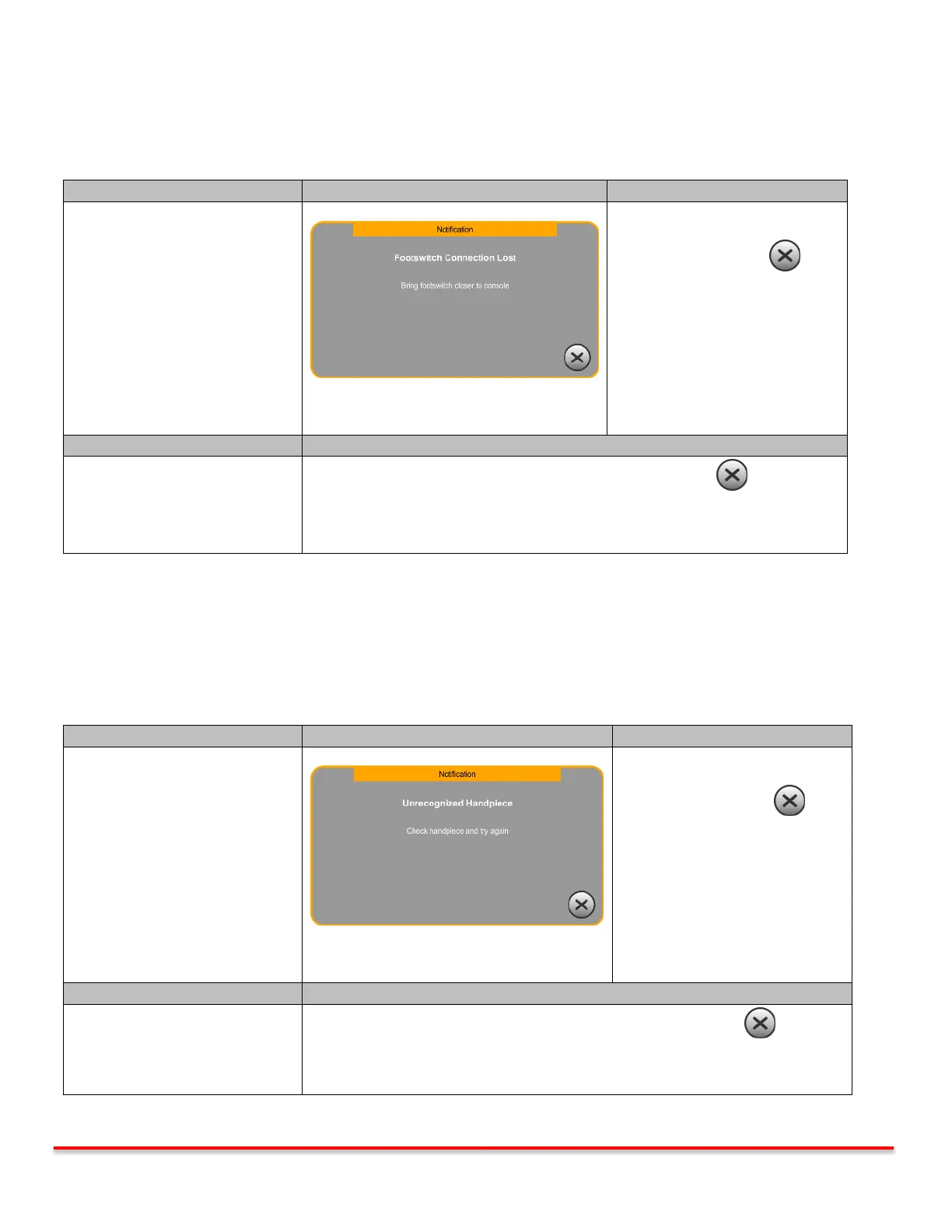
The footswitch for the neXus console uses wireless RF technology. If the wireless connectivity is lost, the console will display
a fault notification. As a result, the console functionality will be disabled.
Notification
Footswitch Connection Lost
System functions remain enabled.
Pressing the Exit button
returns to the Main screen.
Footswitch out of range or
footswitch failure.
Bring the footswitch closer to the console, press the Exit Button and continue
procedure.
If corrective action steps above are followed and fault continues, the footswitch
may need to be replaced. Contact Misonix Service Center.
Table 8.6.2: Footswitch Connection Lost Notification
8.7 Handpiece Faults
The console has the ability to recognize the handpiece that is connected to the console. If the handpiece cannot be
recognized, the console will display a fault notification. As a result, the console functionality will be disabled.
Notification
Unrecognized Handpiece
System functions remain enabled.
Pressing the Exit button
returns to the Main screen.
Unplug the handpiece. Plug handpiece back in, press the Exit Button .
If corrective action steps above are followed and fault continues, the handpiece
may need to be replaced.
Table 8.7: Unrecognized Handpiece Notification



 To Next Page