Instructions For Use – neXus Ultrasonic Surgical Aspirator
Doc #: 100-10-1000 rev A
p 53
10.2 Filter Replacement
10.2.1 Periodic Maintenance
CAUTION:
All periodic maintenance is to be performed by the hospital’s technical staff, trained OR staff member or by a Misonix Inc
authorized technical personnel. Under normal conditions, the filter should be changed at 6-month intervals.
10.2.2 Replacing the External Filter
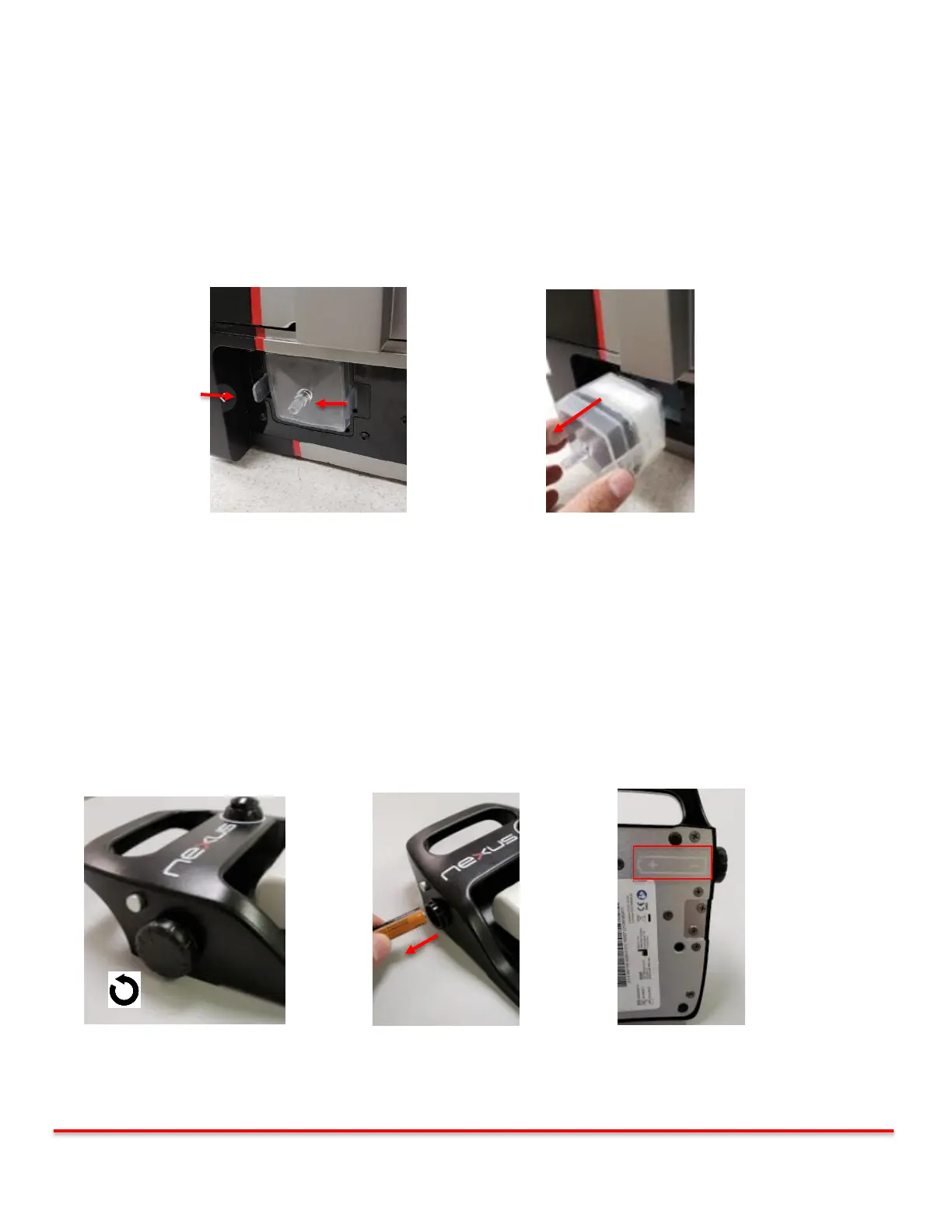
Disconnect the aspiration line from the filter. Push in both tabs inward toward the filter as shown and pull out from the console.
Reverse procedure to reinstall.
Figure 10-1: Push Tabs inward Figure 10-2: Pull out filter
10.3 Footswitch Battery Replacement
The Wireless footswitch is powered by one “AA” alkaline battery. Replace with only NEW battery.
CAUTION:
The neXus device will alert the user if the batteries in the footswitch are low. Replace batteries immediately following the
procedure.
Open the battery compartment by turning the cap counter clockwise. Remove the battery and reinstall new “AA” battery.
CAUTION: The polarity is indicated on the rear of the footswitch. Assure the battery is installed in proper polarity.
Re-tighten cap to footswitch housing by rotating clockwise. Turn until the cap is tight to the housing.
Figure 10-3: Remove Battery Cap Figure 10-4: Remove Battery Figure 10-5: Battery polarity



 To Next Page