20/1531-ASP11301 Uen B5 2017-03-23 12
I
NSTALLING CABINET
5. Anchor the cabinet to the floor according to the type of floor. For a concrete floor,
see 2.2.6.1 Installing the Tip Protection on a Concrete Floor on page 11 . For a
raised floor, see 2.2.6.2 Installing the Tip Protection on a Raised Floor on page
12 .
2.2.6.1 Installing the Tip Protection on a Concrete Floor
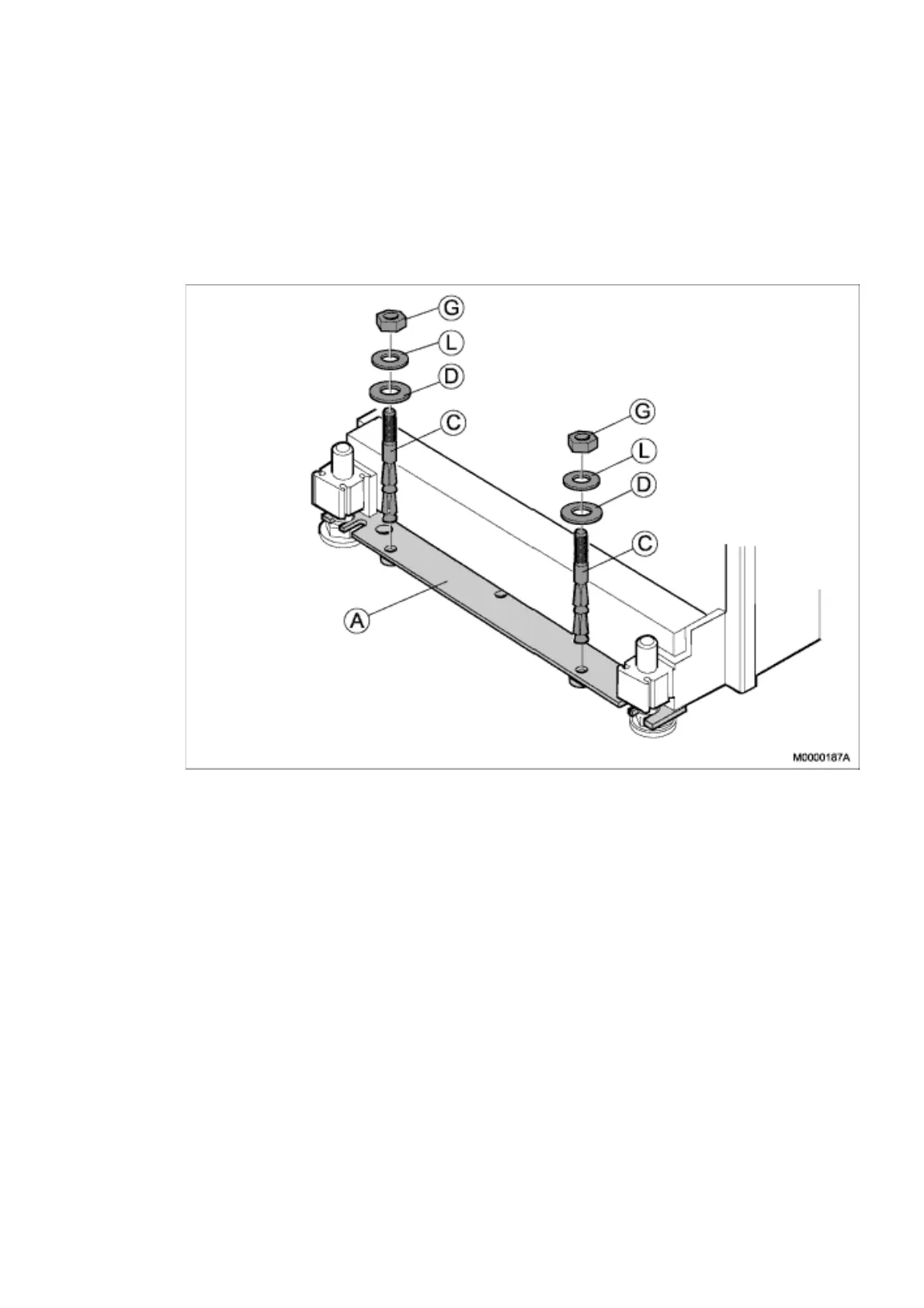
Figure 5: Installing the Expander Screw
Note: The following procedure must be performed for the feet at the front and for the
feet at the back:
1. Insert two expander screws (C) through the yoke (A) and into the concrete, see
Figure 4 Installing the Expander Screw on page 11
2. Hammer the two expander screws into position. Be careful to the threads.
3. Install two insulating washers (D), two washers (L), and two nuts (G) on the two
expander screws, see Figure 4 Installing the Expander Screw on page 11
4. Tighten the two expander screws.
5. Proceed to the next installation stage, see 2.2.8 Fastening the Cabinets on page
16.



 To Next Page