20/1531-ASP11301 Uen B5 2017-03-23 30
I
NSTALLING CABINET
2.6.4 MOUNTING REAR AIR PLATE IN SUBRACK A
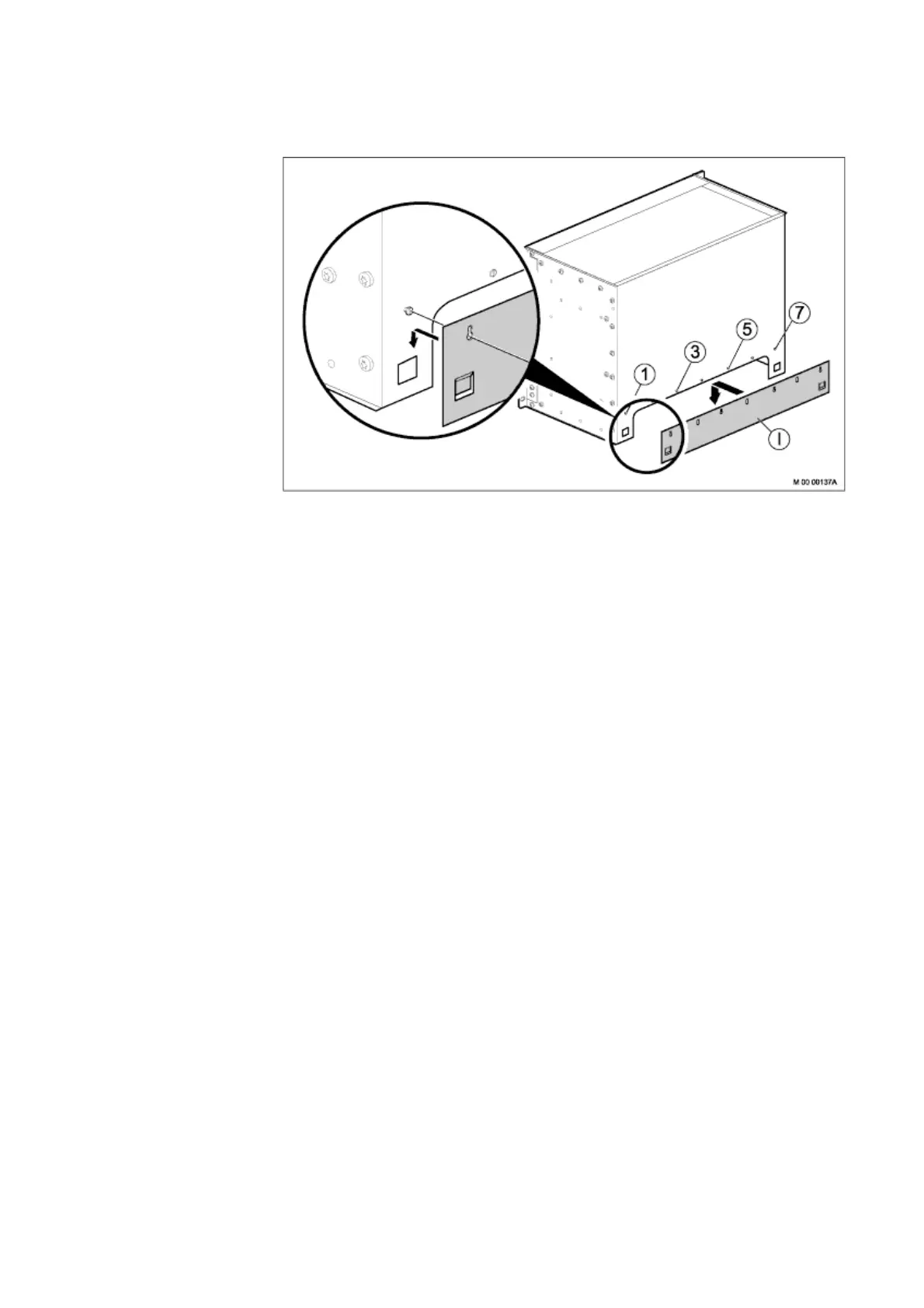
Figure 23: Mounting Rear Air Plate in Subrack A
1. Turn subrack A back to an upright position.
2. Loosen, but do not remove the screws (1, 3, 5, and 7) on the back panel of the
subrack, so they stick out a few millimeters. Note that only these four screws
should be loosened.
3. Position the four key holes of the rear air plate on the half-released subrack
screws and slide down the air plate. Make sure that the squared plates hook into
position.
4. Fasten the screws 1, 3, 5, and 7.
Parts from this mounting set are used at a later installation stage, leave the remaining
parts at hand.
2.6.5 INSTALLING SUBRACK A
Note: Make sure that the front and rear air plates are mounted.
For more information see 2.6.3Mounting the Front Air Plate in Subrack A on page 29
and 2.6.4Mounting Rear Air Plate in Subrack A on page 30.
To install subrack A, perform the following steps:



 To Next Page