INSTALLING CHASSIS IN A CABINET
39 20/1531-ASP11301 Uen B5 2017-03-23
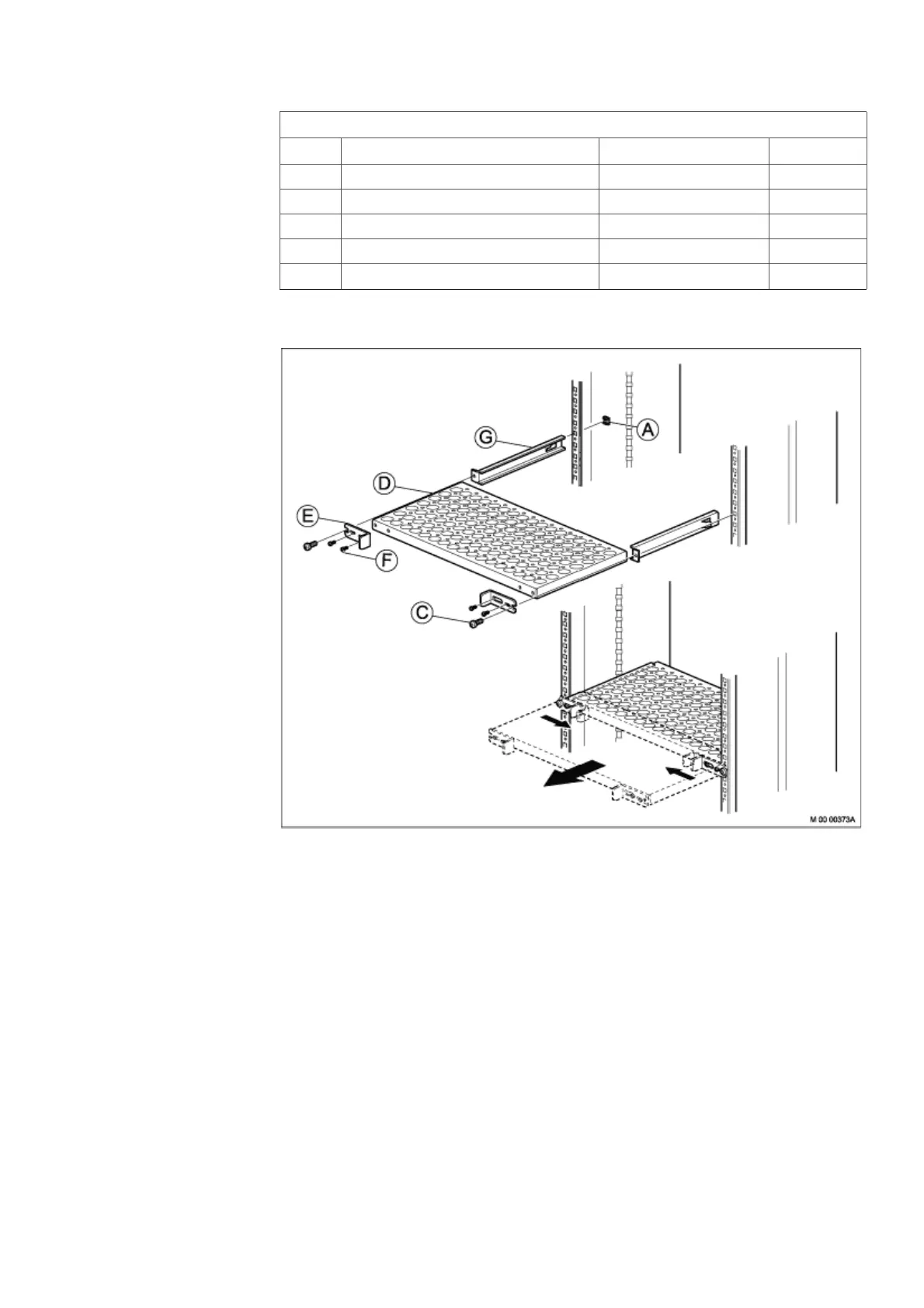
To install the cabinet shelf, see on page 39, and perform the following steps:
Figure 32: Installing Cabinet Shelf
1. Mount two captive nuts (A) ( 2.4 Installing Supporting Captive Nuts on page 22 )
at the chosen position for the shelf.
2. Fasten the two slides (G) to the two captive nuts in the cabinet using the two
screws (C) and then loosen the screws.
3. Loosen the four screws (F) slide the two fixing brackets (E) against each other
on the shelf and push the shelf (D) into the two slides (G).
4. Slide the two fixing brackets (E) outwards behind the two screws (C), then tighten
the four screws (F).
5. Finally fasten the shelf (D) by tighten the two screws (C).
E FIXING BRACKET (factory mounted) SXA 123 0417/1 2
F SCREW M 4X8 (factory mounted) 24/SBF 228 040/0080 4
G SLIDE SXA 123 0320/2 2
A CAPTIVE NUT M 6 SBM 173 060/03 2
C SCREW M 6X16 03/SBA 121 060/0160 2
86/BYB 501/2 Cabinet Shelf
Pos Title/Function Product Number Quantity



 To Next Page