20/1531-ASP11301 Uen B5 2017-03-23 38
I
NSTALLING CABINET
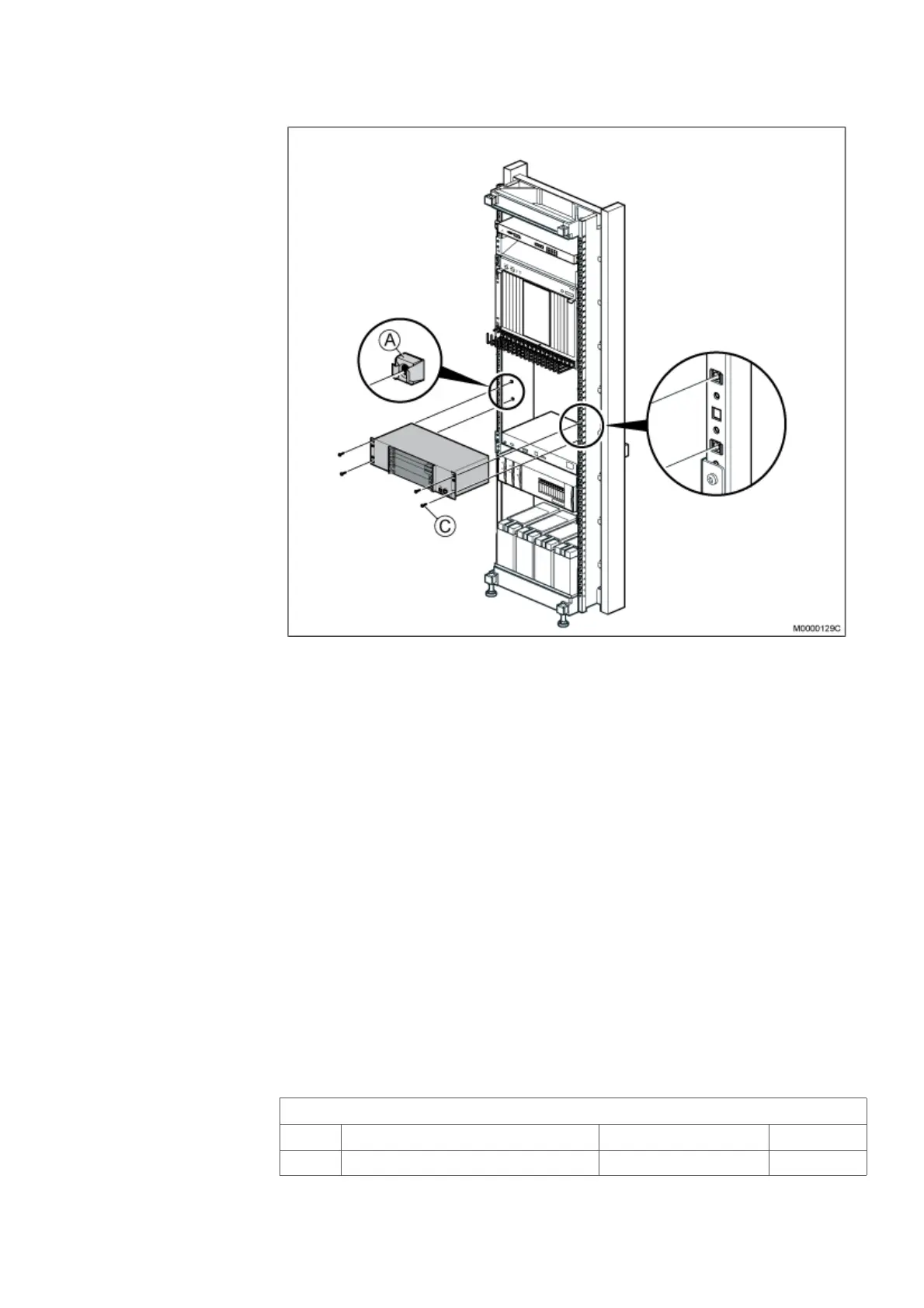
Figure 31: Installing MX-ONE Lite subrack
1. Mount four captive nuts (A) (2.3 Installing Supporting Captive Nuts on page 18)
at a chosen position. The MX-ONE Lite has mounting holes to fit both metric and
inch measured cabinets.
2. Fasten the MX-ONE Lite to the four captive nuts in the cabinet, using the four
screws (C), see on page 38.
3. Additional MX-ONE Lite units can be mounted directly above or below the first
one. No gap is needed between the units as they have their own cooling
systems.
Note: Do not obstruct the cooling air flow, which goes from right to left in the MX-ONE
Lite and Slim subrack.
2.10 INSTALLING A CABINET SHELF
This section describes the installation of a cabinet shelf in the cabinet.
Note: The cabinet shelf is optional, and could be used for a portable computer or a
heavy unit i.e the 2U Power unit.
Table 16 Cabinet Shelf
86/BYB 501/2 Cabinet Shelf
Pos Title/Function Product Number Quantity
D SHELF SXA 210 44/2 1



 To Next Page