26
Load the Workpiece
Prepare a workpiece of the necessary size and load it on MODELA.
A block having a margin of a few millimeters larger than the minimum required size is optimal. Cutting time is long if too large, and the
solid object cannot be made if too small.
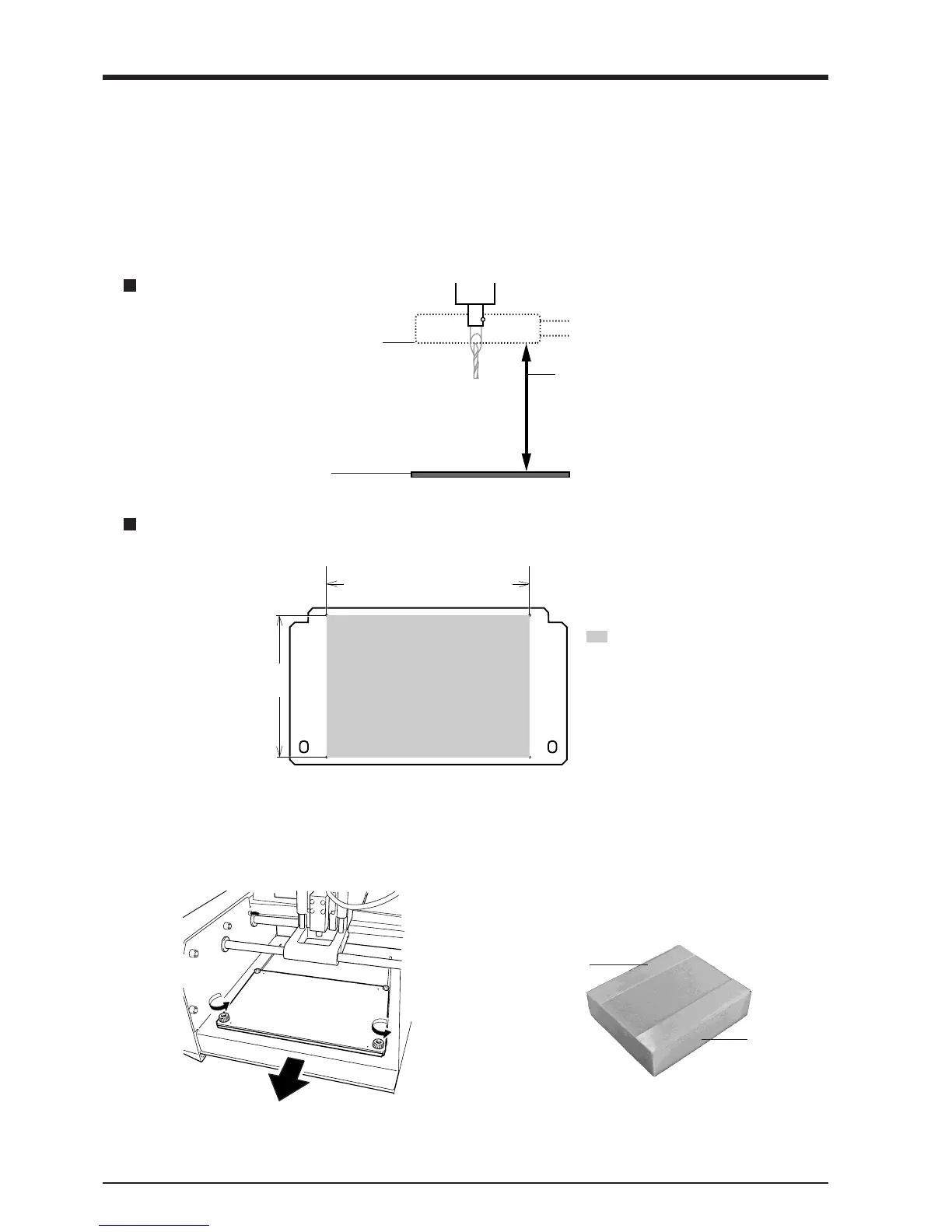
Bottom surface of the carriage
Work plate surface
62.4 mm (2-7/16 in.)
Workpiece thicker than this value cannot be
loaded.
In actual use, the thickness of the loadable
workpiece varies according to the length of the
mounted tool and the thickness of the base.
Maximum cutting area of the MODELA
Z-direction
X- and Y-direction
: Maximum cutting area
The area demarcated by
lines passing through the
centers of the four holes as
shown in the figure is the
suggested maximum cutting
area.
1
Remove the screws shown in the figure and detach
the work plate.
2
Apply double-sided tape to the workpiece.
Make the adhesive surface broad so that the
workpiece does not come loose during cutting.
With a block like that in the figure, for example,
apply the tape so there are no gaps on any side.
Double-sided
tape
Workpiece
MDX-20 : 152.4 mm (6 in.)
MDX-15 : 101.6 mm (4 in.)
MDX-20 : 203.2 mm (8 in.)
MDX-15 : 152.4 mm (6 in.)



 To Next Page