RS03/06-S/Q Hardware Manual RS03/06-S/Q Hardware Manual
7
9 / 28 / 2015
+86-400-820-9661
2. Getting Started
The following items are needed:
• A 24-70 Volt DC power supply, see the section below entitled
“
Choose a Power Supply
”
for
help in choosing the right one.
• A compatible RS motor, please see the section below entitled
“
Recommended Motor
”
• A small flat blade screwdriver for tightening the connectors screw (included)
• A PC running Microsoft Windows XP/Vista/Windows 7/Windows 8 32-bit or 64-bit (Using serial
communication port. Need a USB to Serial converter if the PC doesn
’t have)
• A RS-232 communication cable (included)
2.1 Installing Software
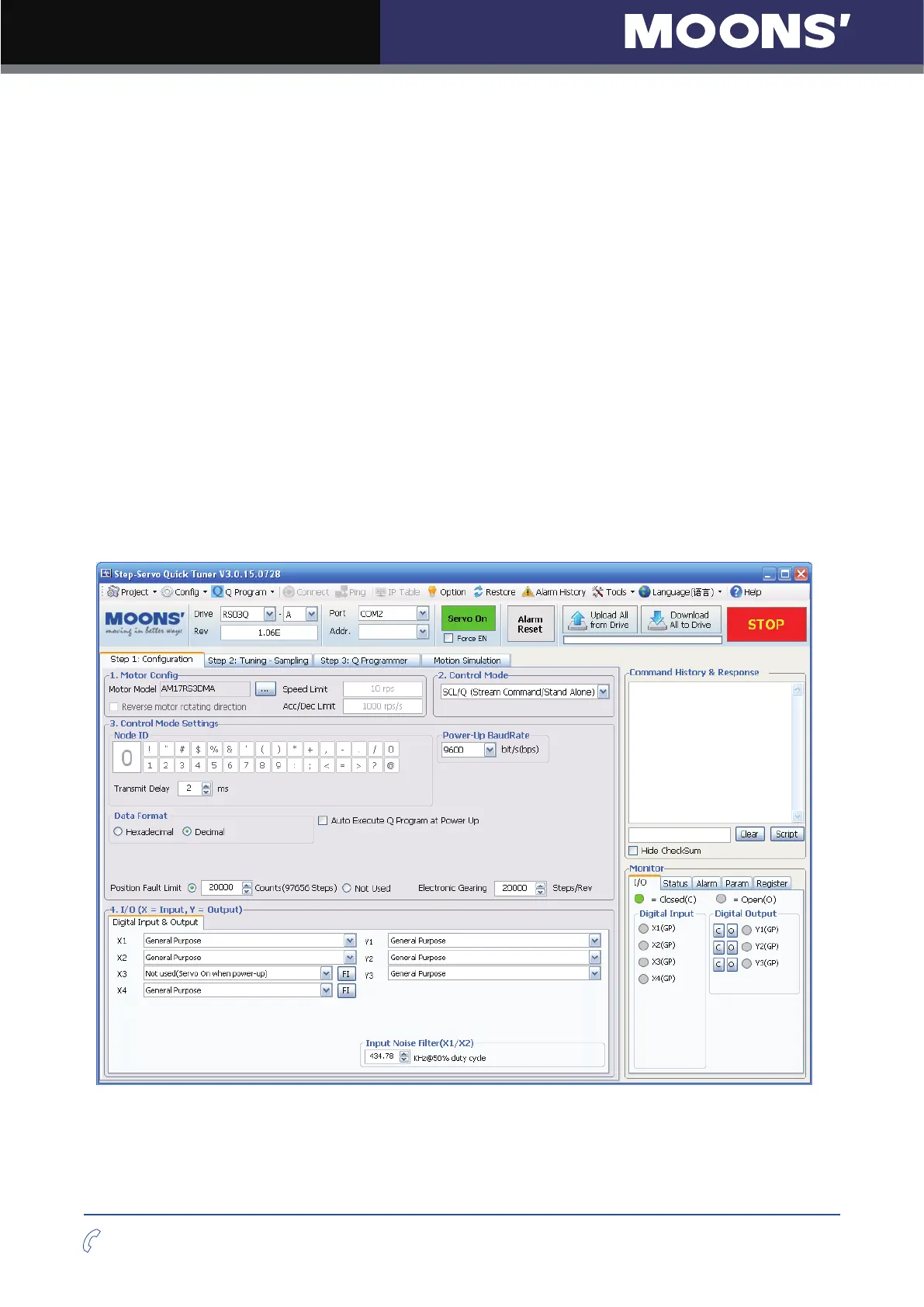
Step-Servo Quick Tuner is the PC based software application used to configure, and perform
servo tuning, drive testing and evaluation of the step-servo products. System servo control gains,
drive functionality and I/O configuration are set with Step-Servo Quick Tuner
. It also contains an
oscilloscope function to help set the servo control gains. For Q type driver, this software can be
used to edit and download Q program to your drive. Motion simulation and status monitor are also
included.












 To Next Page