www.miinet.comMoore Industries-International, Inc.
- 17 -
User’s Manual
224-790-00K
May 2018
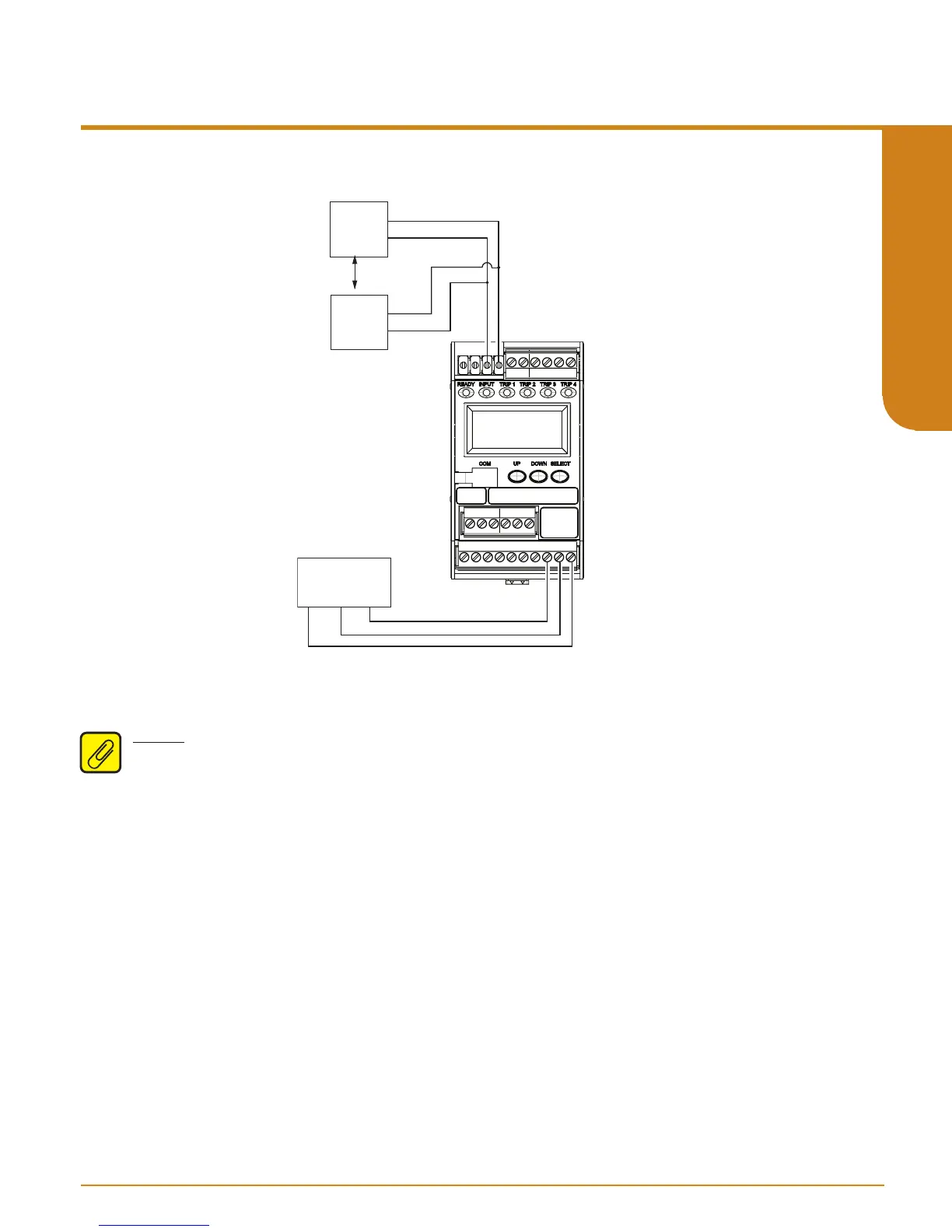
Figure 2.3. SPA
2
(TPRG) Bench Check
Units with the Analog Output Option (-AO)
Note: Even though 0-20mA is the range of the analog output it can be scaled by the user for a
narrower range (such as 4-20mA).
1. Connect the analog output.
2. When testing the milliamp output it is best to use a 250 ohm precision resistor across the
output terminals. Then you can use your multimeter (set to voltage) to read the voltage drop
across the resistor. Hence a reading of 1V means that the analog output is putting out 4mA,
and a reading of 5V equates to a 20mA output.
3. Set your input simulator to the low end of your configured input span. Verify that the analog
output is correct. By example – a 1V reading across your 250 ohm resistor equates to a 4mA
output.
4. Set your input simulator to the high end of your configured input span. Verify that the analog
output is correct. By example – a 5V reading across your 250 ohm resistor equates to a 20mA
output.
You have now conrmed that your SPA
2
is operating correctly and can now be condently installed
into your application.
MILLIVOLT
SOURCE
OR T/C
SIMULATOR
_
+
OHMS
OR RTD
SIMULATOR
AC/DCGND
AC/DC
Universal Power
Supply
Programmable Limit Alarm Trips
SPA
2
SECTION 2


 To Next Page