www.miinet.comMoore Industries-International, Inc.
- 29 -
User’s Manual
224-790-00K
May 2018
Programmable Limit Alarm Trips
SPA
2
SECTION 4
Configuring the HLPRG Input
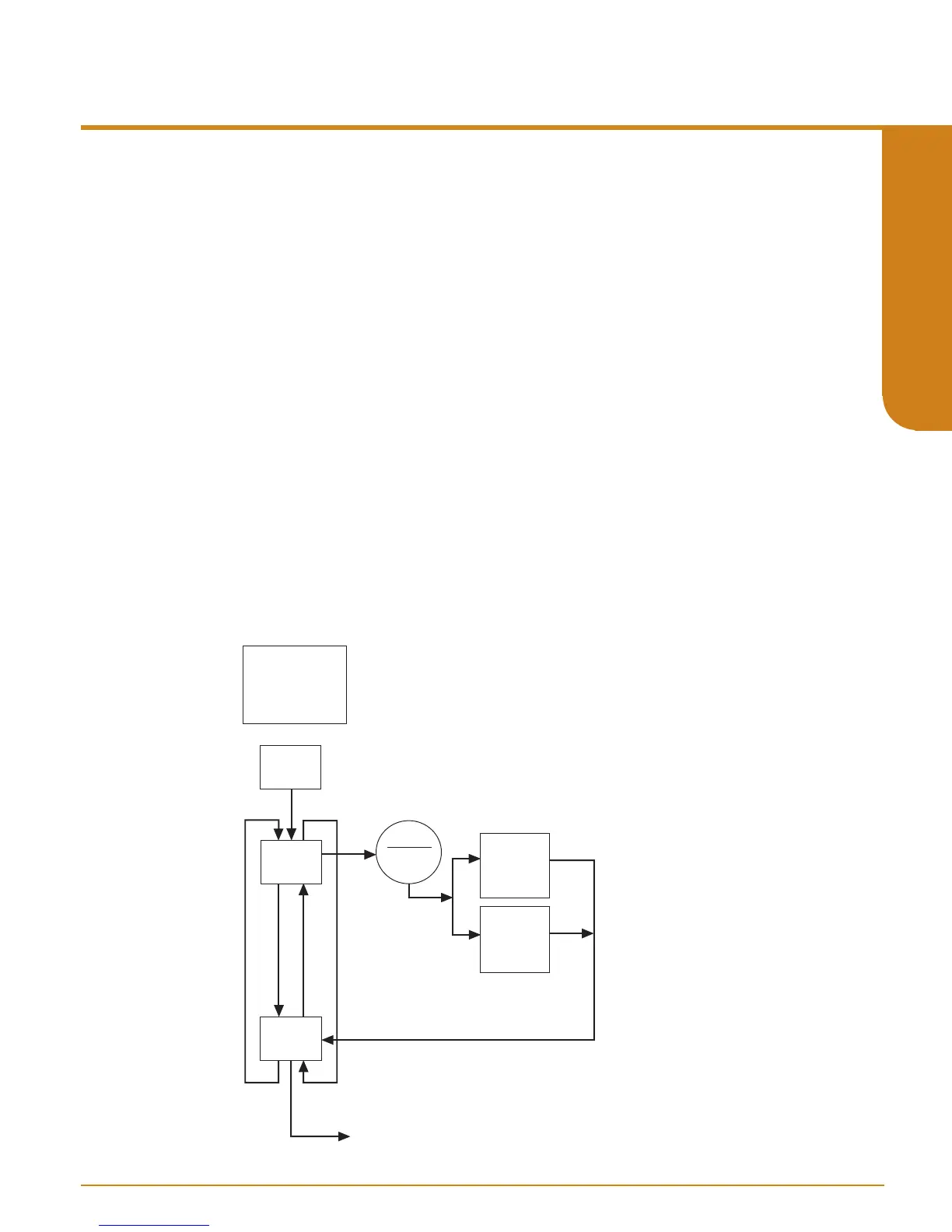
Figure 4.4. gives an overview of the Input Configuration menu.
If the Password Jumper is not installed, the password sub-menu is bypassed, and the “CONFG
INPUT” menu is accessed by pressing SELECT from the process variable display.
1. From the “CONFG INPUT” display, press SELECT.
2. At “INPUT TYPE” press SELECT. The display shows, “CURNT” or “VOLT” (current or voltage
parameter). Use the UP or DOWN arrow buttons to scroll through the two options for input
type. The default display for this menu is always the last setting.
3. When the display shows the type of input, current or voltage, that you choose to use, press
SELECT.
4. Next, the available input values are displayed. Use the UP or DOWN buttons to scroll through
the selections, choose a value that is greater than or equal to the maximum value for the input
you will be monitoring and press SELECT when the value has been displayed.
5. “EXIT INPUT” appears. If all values in this parameter have been set, press SELECT. If not,
return to the menu and set your values.
6. The next display is the menu for the selection of functional options, ”CONFG OPTNS”. To skip
the rest of the configuration menus and return to the process variable display, press the UP
button twice (to “CONFG EXIT”), and press SELECT.
Figure 4.4. CONFG INPUT Menu
SEL
SEL
SEL
TOGGLE
CURRENT/
VOLT
CONFG
INPUT
INPUT
TYPE
D
U
EXIT
INPUT
U
D
Volt List:
10V
5V
2.5V
1.25V
Current List:
50mA
25mA
12.5mA
6.25mA
CONFG OPTNS menu
SEL
SEL
SEL
Use the UP and
Down buttons
to cycle through
the lists


 To Next Page