www.miinet.com Moore Industries-International, Inc.
- 62 -
User’s Manual
224-790-00K
May 2018
Programmable Limit Alarm Trips
SPA
2
SECTION 5
PC Configuration Software Summary
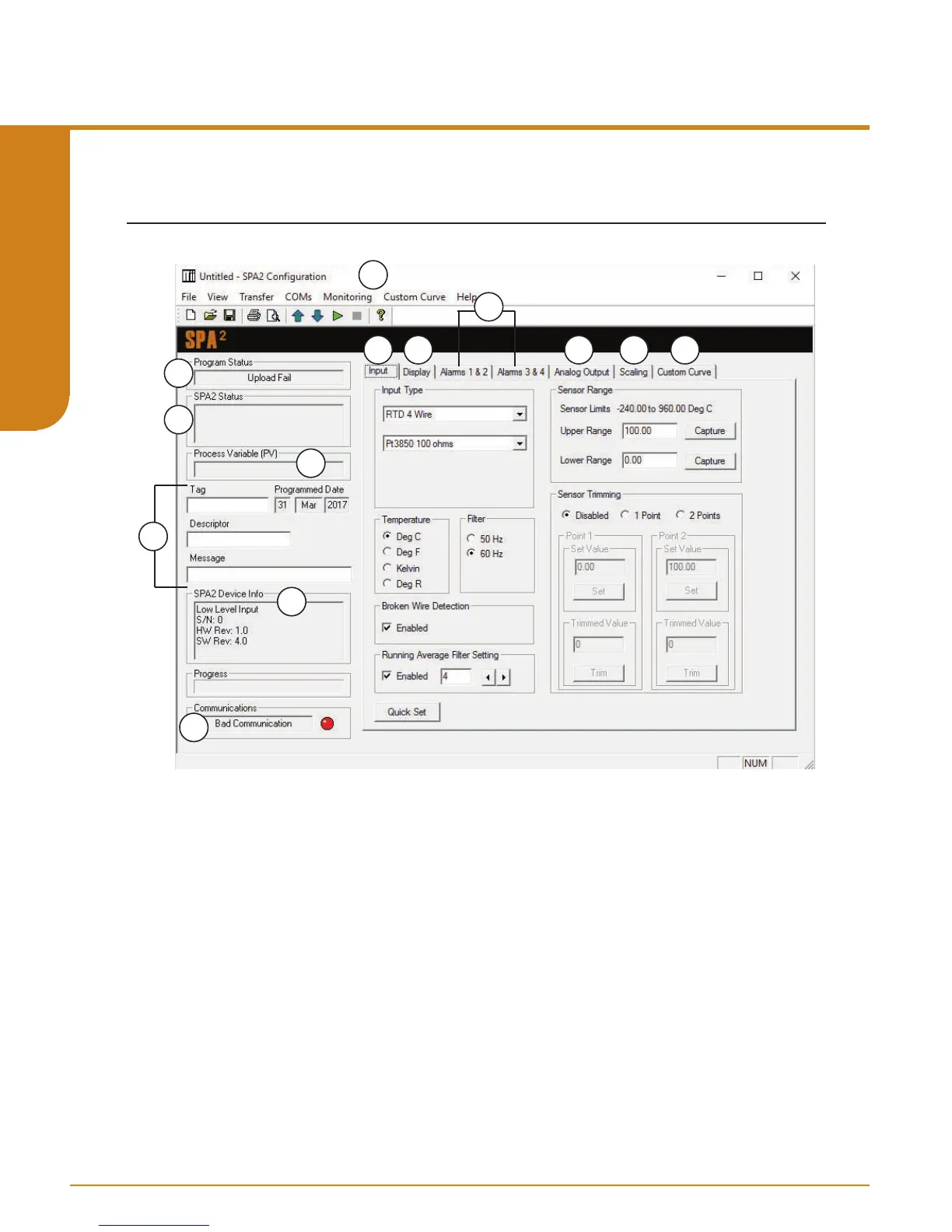
Figure 5.3. SPA
2
Main PC Screen (TPRG version shown)
Once the default configuration has been saved to disk, it is safe to program other parameters. The
PC Software is made up of these sections:
1. Tool Bar/Status Bar– Dropdown menus and corresponding icons allow you to perform various
functions throughout the PC Configuration Program. Refer to the Status and Tool Bar Legend for a
complete description.
2. Program Status– This portion of the program displays the activity of the connected unit. It will
display such messages as: Reading SPA Info, Idle, Monitoring Variables and Monitor Fail.
3. SPA
2
Status– Indicates if there are problems or faults with the instrument.
4. Process Variable (PV)– Displays the selected Process Variable.
5. Identification Parameters– Use this parameter to place an identifying “Tag” (12 alphanumeric
characters max.), “Descriptor” (16 alphanumeric characters max.) or “Message” (32 alphanumeric
characters max.).
6. SPA
2
Device Info– This “read-only” display indicates instrument configuration, device
identification, hardware revision and software revision.
1
2
3
5
4
6
7
8
9
10
11
12
13


 To Next Page